Cirklon Sequencer User Manual
Change View / Scene Select View
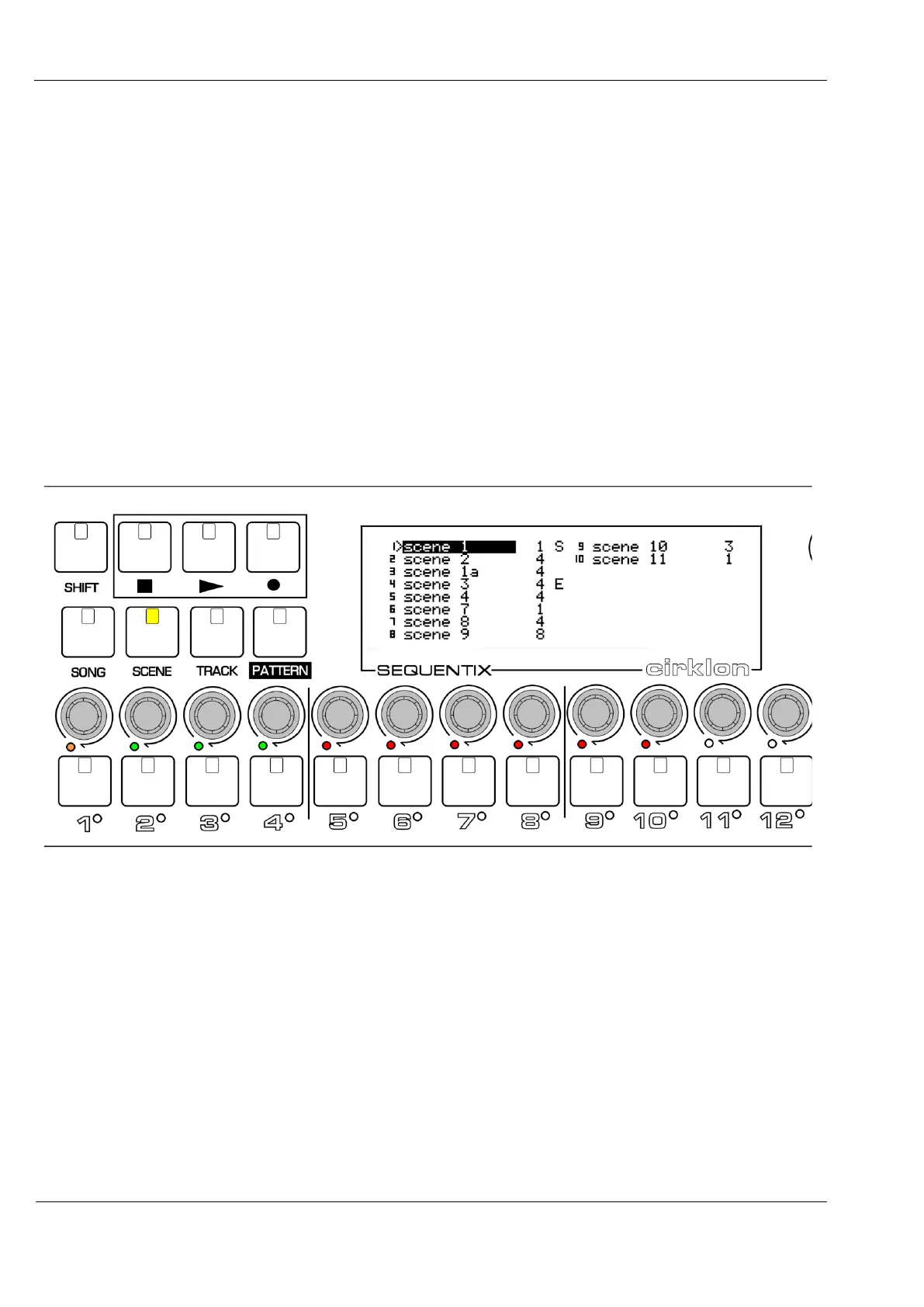
For rapid access to a larger number of scenes, the scene list has an alternative view, where
scene names are shown in two columns of up to eight scenes.
This is the scene select view.
Scene selections can still be made using the VALUE encoder as before, but the step encoders
can be used to select scenes directly, and to quickly set scene loop start and end points at the
same time.
The “change view” menu option is used to switch between the two views.
Your choice of view is stored permanently.
An example of how Cirklon might look in scene select is shown below:
This example song has a total of 10 scenes, not numbered contiguously as some scenes have
been edited and saved-as, while others have been deleted.
In the scene select view, each scene is mapped to one of the step encoders.
The current scene is shown by a flashing amber LED.
All other scenes are shown with a red LED, unless they are within a scene loop, in which
cases they have a green LED.
On the display, the scene names are shown in two columns (if required), with the number of
the step encoder the scene is mapped to just before the name.



 To Next Page