Cirklon Sequencer User Manual
The frame size will only need to be changed if additional modules are connected, in which
case you will also need to change at least one setting on the extra modules.
This is described in more detail in the Board Level Config section.
Drum Trigger Map
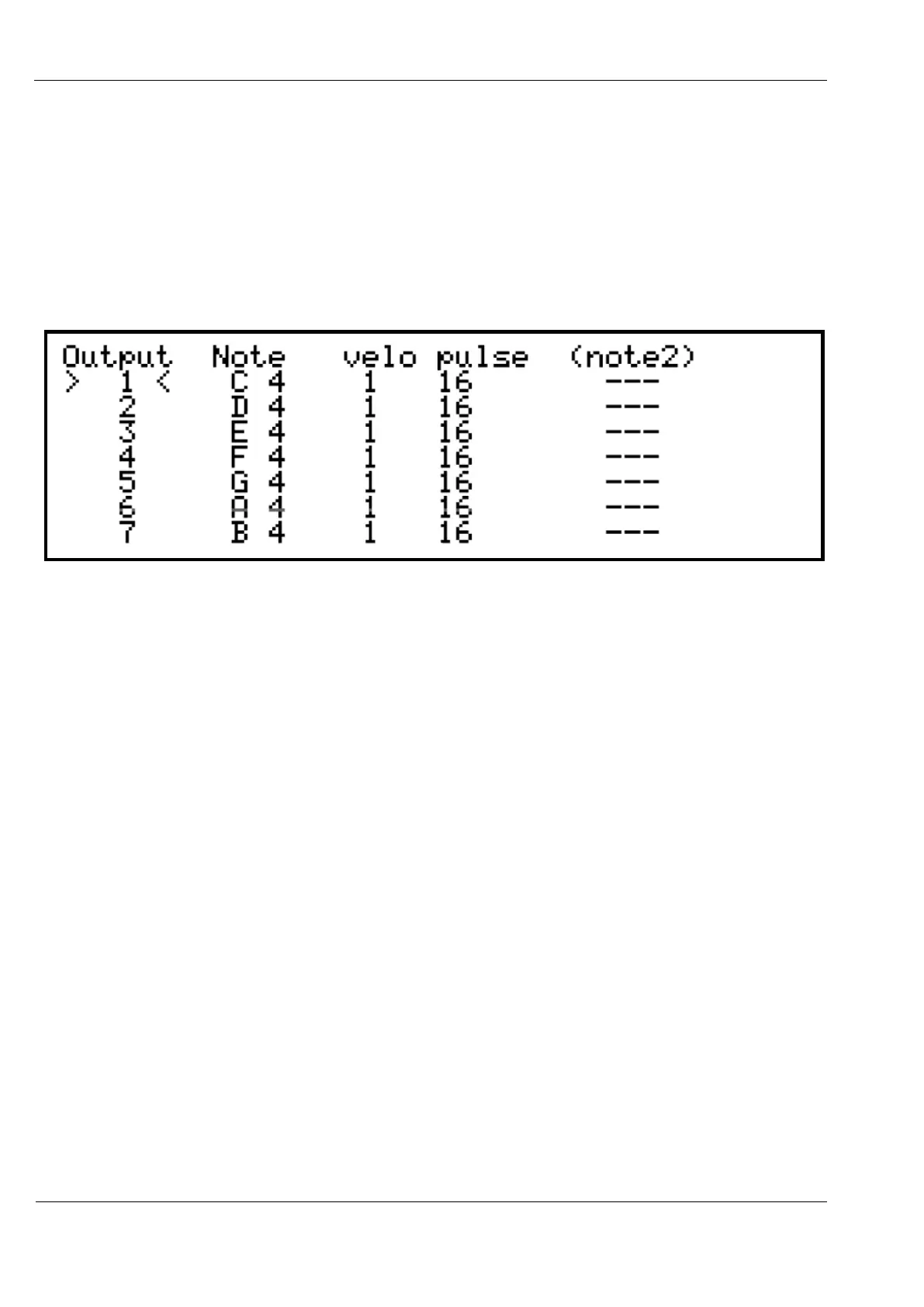
The trigger map… option takes you to a sub-page like this:
For each trigger and accent output pair, you can select which note will trigger it, choose a
velocity response curve, adjust the trigger pulse length, and set an optional second trigger
note.
Select the output to configure using encoder 6, then edit the values with the encoders below
each column.
Any changes made on the trigger map page apply immediately.
To return to the main drum trig config page, press the MENU key.
There are two velocity curve options.
Curve 1 has a higher minimum voltage, rising linearly to the maximum voltage output.
Curve 2 has a lower minimum voltage rising to a lower maximum.
These curves were designed with two typical applications in mind, others may be added in
future if required.
Select the curve which best suits the attached drum sound when triggered over the full range
of velocity.
The pulse length is specified in eighths of a millisecond (0.125ms steps).
The default pulse length of 16 is therefore equal to 2ms.
The maximum length is 240, equivalent to 30ms.
Turning the length value as if to select zero will select “gate” mode, where the trigger output



 To Next Page