SMARTRG INC. PROPRIETARY AND CONFIDENTIAL. ALL RIGHTS RESERVED. COPYRIGHT © 2018 118
MAC Filter
On this page, you can configure whether wireless clients are allowed to access the wireless network of the wireless gateway.
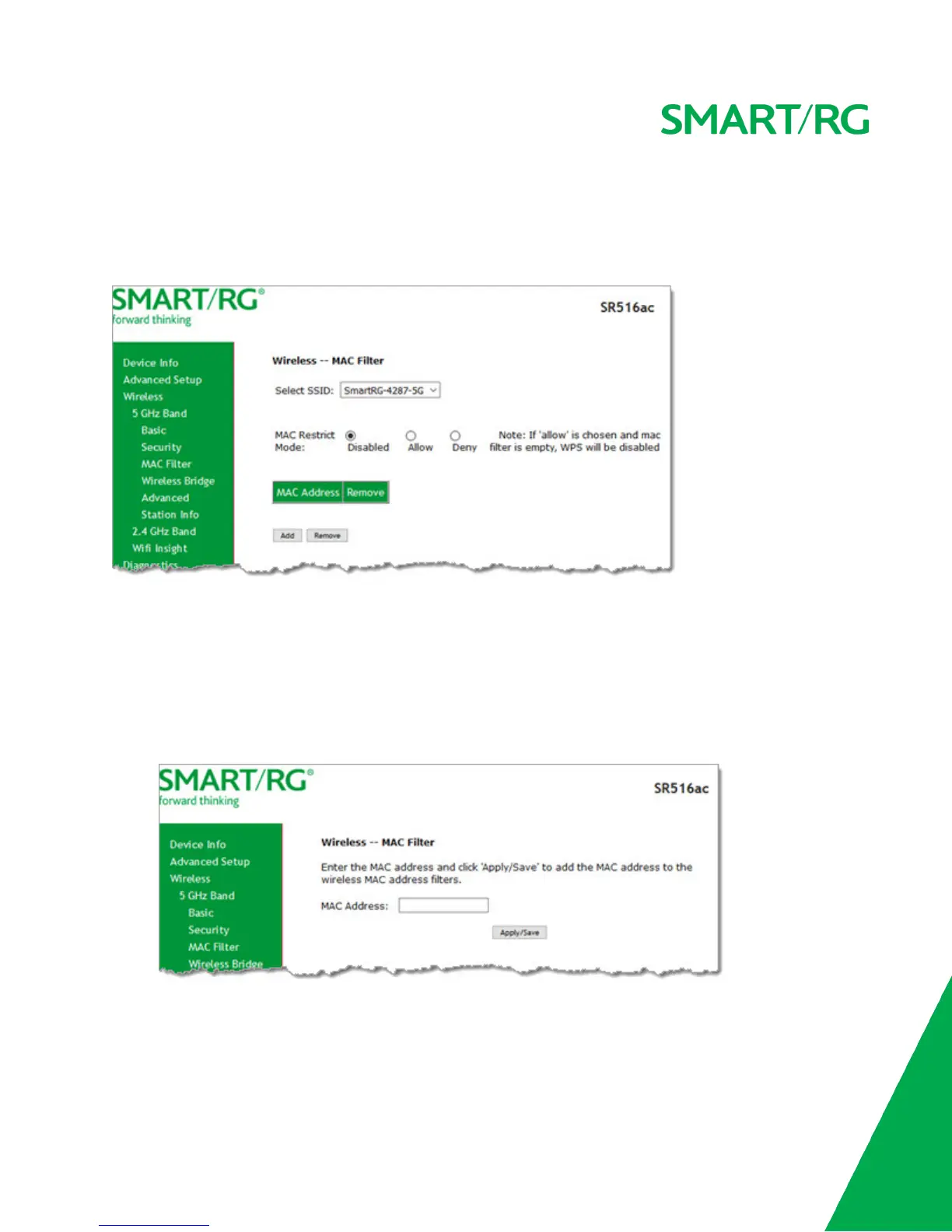
1. In the left navigation bar, click Wireless > MAC Filter. The following page appears.
2. In the Select SSID field, select the access point that you want to configure.
3. Select the MAC Restrict Mode. Options are:
n Disabled: Disable wireless MAC address filtering. This is the default.
n Allow: Allow the wireless clients in the MAC Address list to access the wireless network.
Note: For this option to work, you must add at least one MAC address to this page.
n Deny: Reject requests from the wireless clients in the MAC Address list to access the wireless network.
4. To add a MAC Address to the filter list:
a. Click Add. The following page appears.
b. Enter the MAC address of the wireless client.
c. Click Apply/Save to save the address to the list. You are returned to the Wireless - MAC Filter landing page.



 To Next Page