SMARTRG INC. PROPRIETARY AND CONFIDENTIAL. ALL RIGHTS RESERVED. COPYRIGHT © 2018 11
Statistics
In this section, you can view network interface information for LAN, WAN Service, xTM and DSL. Data is updated at 15-minute
intervals.
LAN
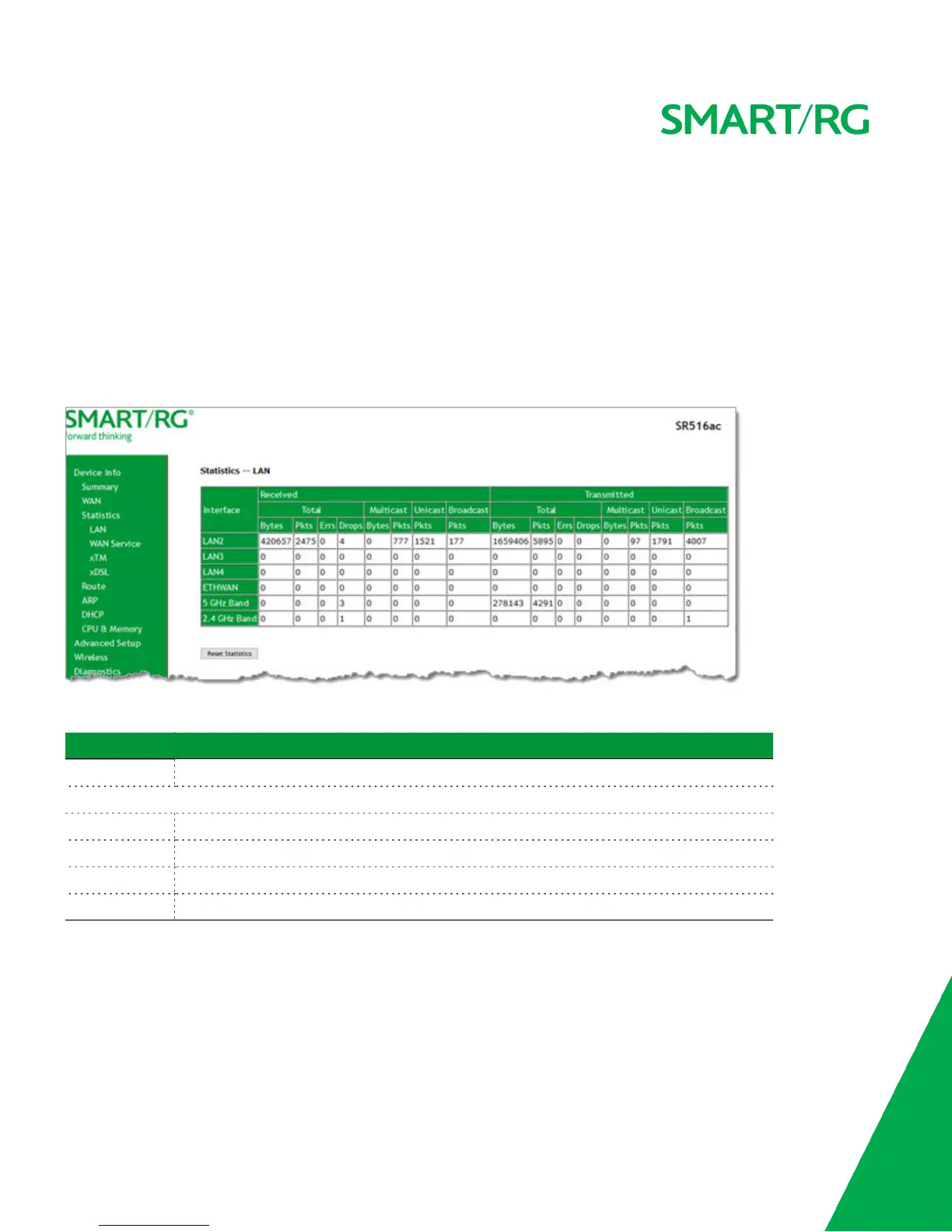
On this page, you can view the received and transmitted bytes, packets, errors and drops for each LAN interface configured on
your gateway. All local LAN Ethernet ports, Ethernet WAN ports and wireless interfaces are included.
In the left navigation bar, click Device Info > Statistics. The Statistics - LAN page appears.
To reset these counters, click Reset Statistics near the bottom of the page.
The fields on this page are defined below.
Field Name Description
Interface Available LAN interfaces. Options are LAN1 - LAN4, ETHWAN, 5GHz Band, and 2.4 GHz Band.
Received & Transmitted columns
Bytes The total number of packets in bytes.
Pkts The total quantity of packets.
Errs The total quantity of error packets.
Drops The total quantity of dropped packets.
WAN Service
On this page, you can view the received and transmitted bytes, packets, errors and drops for each WAN interface for your gate-
way. All WAN interfaces configured for your gateway are included.
In the left menu, click Device Info > Statistics > WAN Service. The Statistics - WAN page appears where you can view detailed
information about the status of your WAN.



 To Next Page