SMARTRG INC. PROPRIETARY AND CONFIDENTIAL. ALL RIGHTS RESERVED. COPYRIGHT © 2018 90
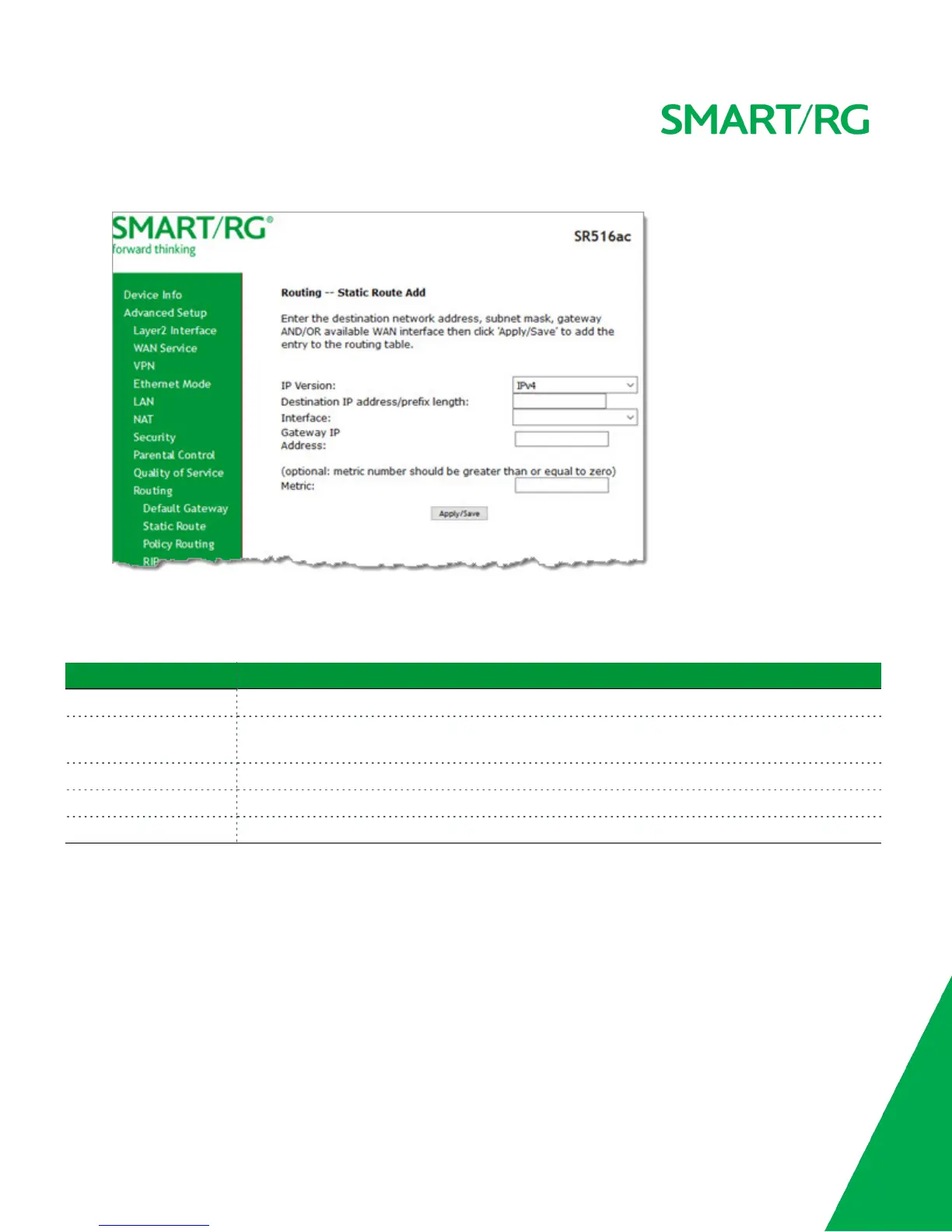
1. In the left navigation bar, click Advanced Setup > Routing > Static Route and then click Add. The following page appears.
2. Fill in the fields, using the information in the table below.
3. Click Apply/Save to commit your changes.
The fields on this page are defined below.
Field Name Description
IP Version Select the IP version associated with the static route you wish to create. Options are IPv4 and IPv6.
Destination IP address/-
prefix length
Enter the destination network address / subnet mask for this route.
Interface Select the WAN Interface for this route. This list is filtered by the selected IP version.
Gateway IP Address Enter the next-hop IP address. If needed, include the /prefix length.
Metric (Optional) Enter a number that is zero or higher.
Policy Routing
Policy routing makes somewhat automated routing choices based on policies defined by a network administrator. For example, a
network administrator might want to deviate from standard routing based on destination markers in the packet and, instead, for-
ward a packet based on the source address. Use this feature to establish similar policies.
1. In the left navigation bar, click Advanced Setup > Routing > Policy Routing and then click Add. The following page
appears.



 To Next Page