SMARTRG INC. PROPRIETARY AND CONFIDENTIAL. ALL RIGHTS RESERVED. COPYRIGHT © 2018 25
Field Name Description
more packets per second than the others since it became active) will only affect itself and not
other sessions.
Default Queue
Weight
Enter the default weight of the specified queue. Options are 1-63. The default is 1.
Default Queue Pre-
cedence
Enter the precedence of the specified group. The lower the value, the higher the priority. Options are 1-
8. The default is 8.
PTM Interface
SmartRG gateway follow VDSL2 standards to support Packet Transfer Mode (PTM). An alternative to ATM mode, PTM transports
packets (IP, PPP, Ethernet, MPLS, and others) over DSL links. For more information, refer to the IEEE802.3ah standard for Eth-
ernet in the First Mile (EFM).
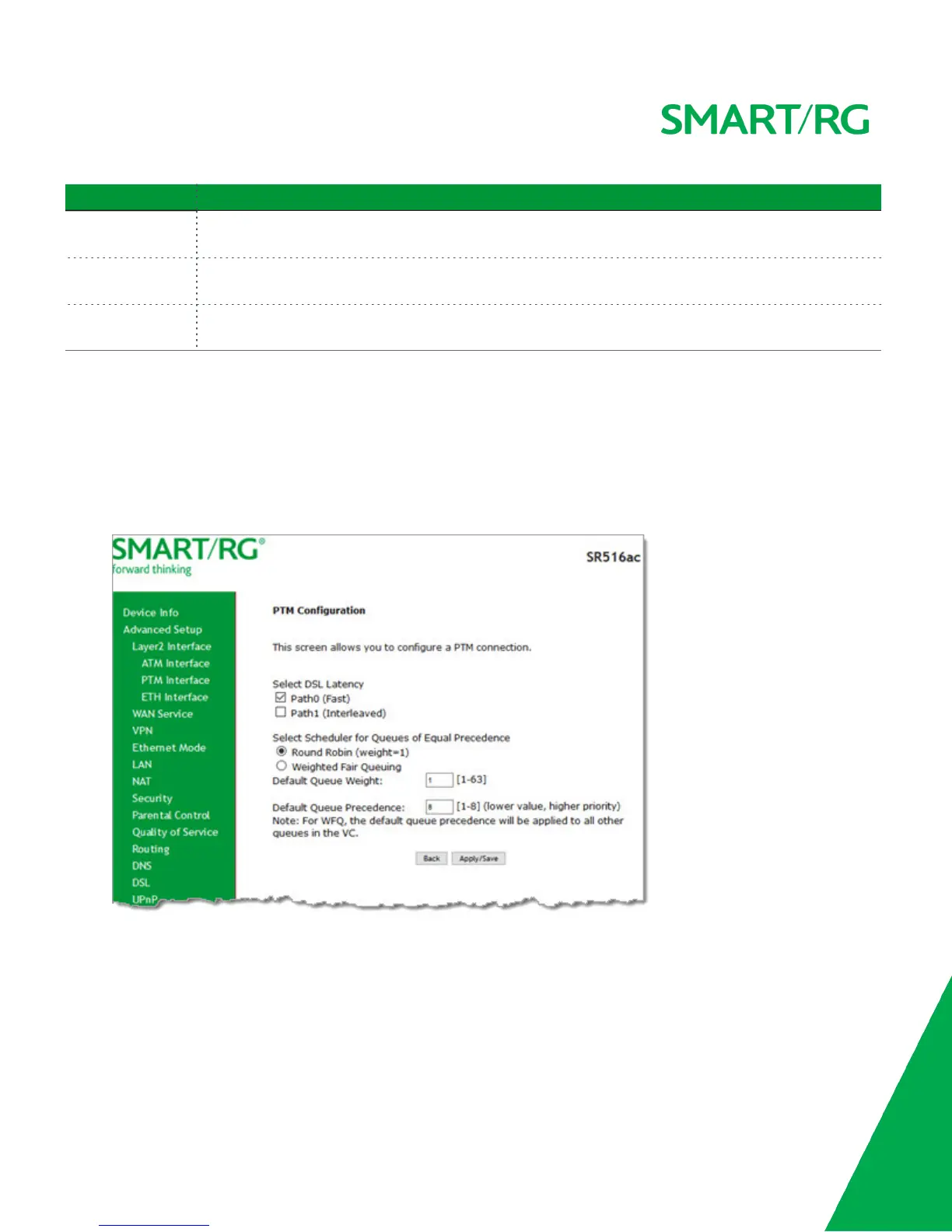
On this page, you can configure PTM WAN interfaces.
1. In the left navigation bar, click Advanced Setup > Layer2 Interface > PTM Interface, and then click Add. The following
page appears.
2. Modify the settings as desired, using the information in the table below.
3. Click Apply/Save to commit your changes. The new interface appears on the PTM Configuration page.
4. To remove an interface, click the Remove checkbox next to it and then click the Remove button.
The fields on this page are defined below.



 To Next Page