SMARTRG INC. PROPRIETARY AND CONFIDENTIAL. ALL RIGHTS RESERVED. COPYRIGHT © 2018 73
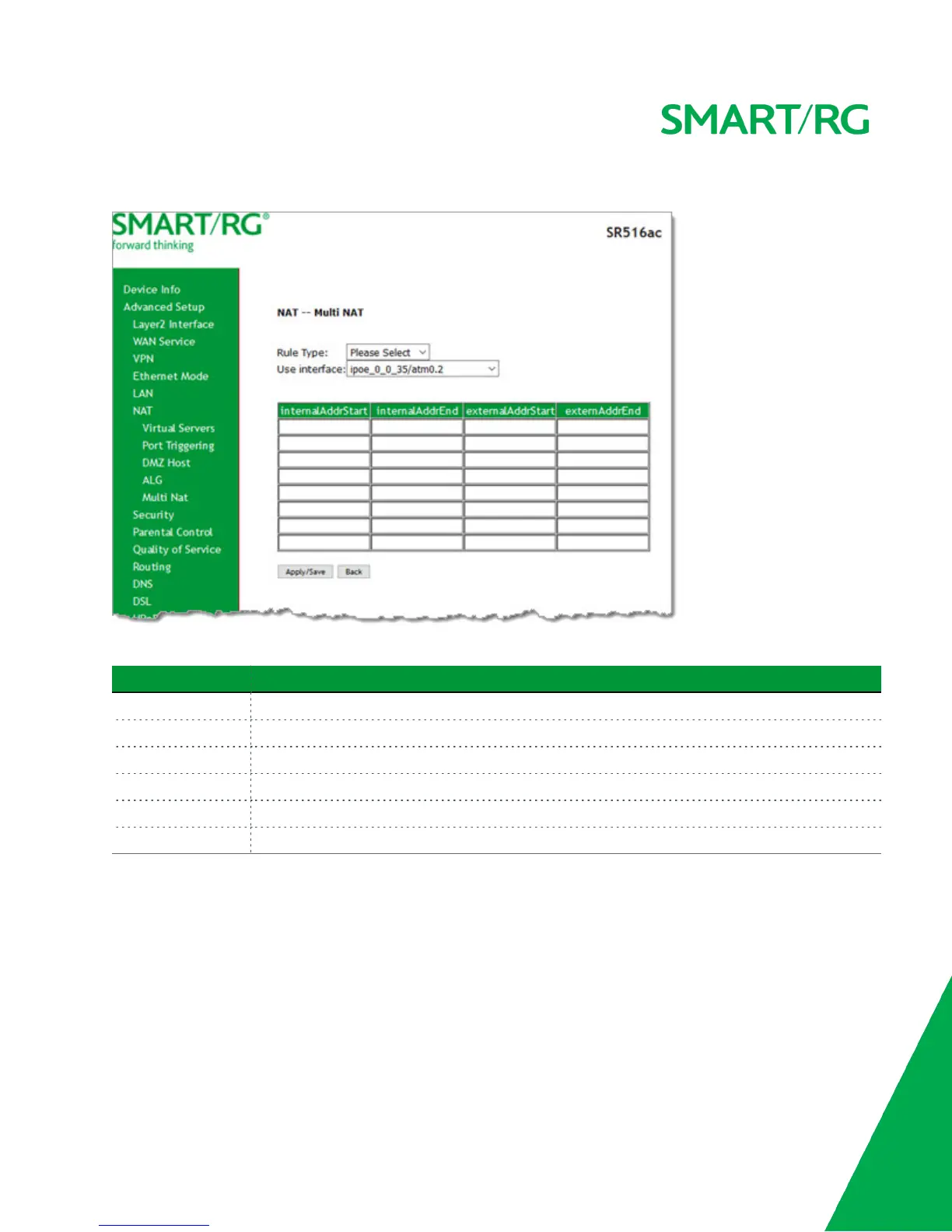
1. In the left navigation bar, click Advanced Setup > NAT > Multi NAT and then click Add. The following page appears.
2. Modify the fields as needed, using the information in the table below.
Field Description
Rule Type Select the type of rule. Options are One to One, One to Many, Many to One, and Many to Many.
Use Interface Select the interface to which this rule will apply.
internalAddrStart Enter the starting address for the internal server.
internalAddrEnd Enter the ending address for the internal server.
externalAddrStart Enter the starting address for the external server.
externalAddrEnd Enter the ending address for the external server.
3. Click Apply/Save to save and apply the settings. The server or servers for the selected service appear on the MultiNat
table page.
Security
In this section, you can configure the incoming and outgoing IP filtering and MAC filtering.
IP Filtering - Outgoing
On this page, you can add an outgoing filter and prevent certain data being transferred from the LAN to the WAN.
You can define up to 32 outgoing IP filters.



 To Next Page