SMARTRG INC. PROPRIETARY AND CONFIDENTIAL. ALL RIGHTS RESERVED. COPYRIGHT © 2018 102
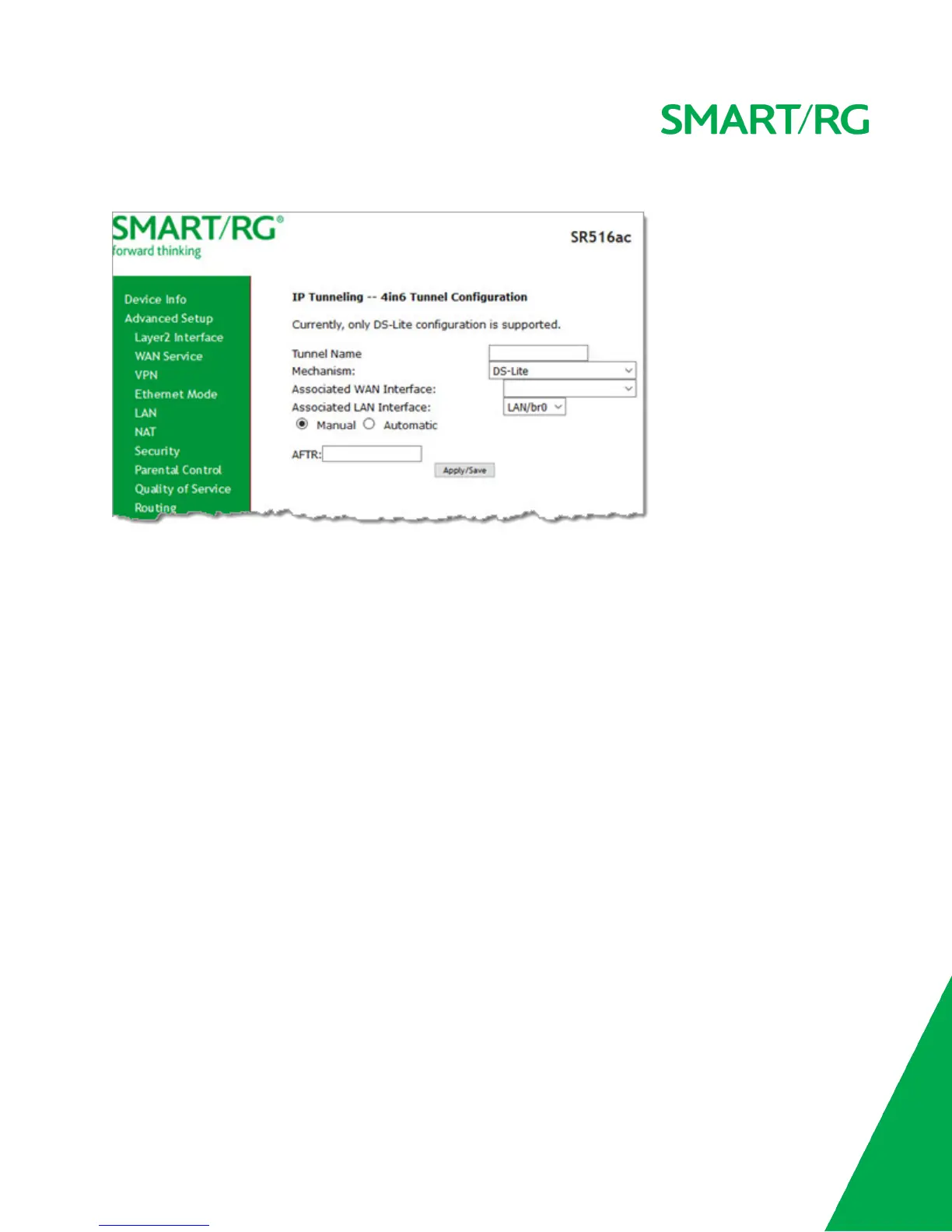
1. In the left navigation bar, click Advanced Setup > IP Tunnel > IPv4inIPv6 and then click Add. The following page appears.
2. Enter a Tunnel Name. In the Mechanism field, the only option is DS-Lite.
3. Select the LAN and WAN interfaces associated with the tunnel you wish to establish.
4. In the AFTR (Address Family Transition Router) field, do either of the following:
l To configure manually, enter the remote address in the AFTR field.
l To configure automatically, select Automatic above the AFTR field.
5. Click Apply/Save to commit your changes.
Certificate
In this section, you can configure certificates (local and Trusted CA) for the gateway. For more information about certificates,
refer to the ITU X.509 standard.
Local
On this page, you can manage local certificates used to identify the gateway to other users. You can create a new certificate
request locally and have it signed by a certificate authority, or you can import an existing certificate. For additional info regard-
ing Public Key Infrastructure (PKI), refer to ITU-T X.509.
Creating certificate requests



 To Next Page