SMARTRG INC. PROPRIETARY AND CONFIDENTIAL. ALL RIGHTS RESERVED. COPYRIGHT © 2018 91
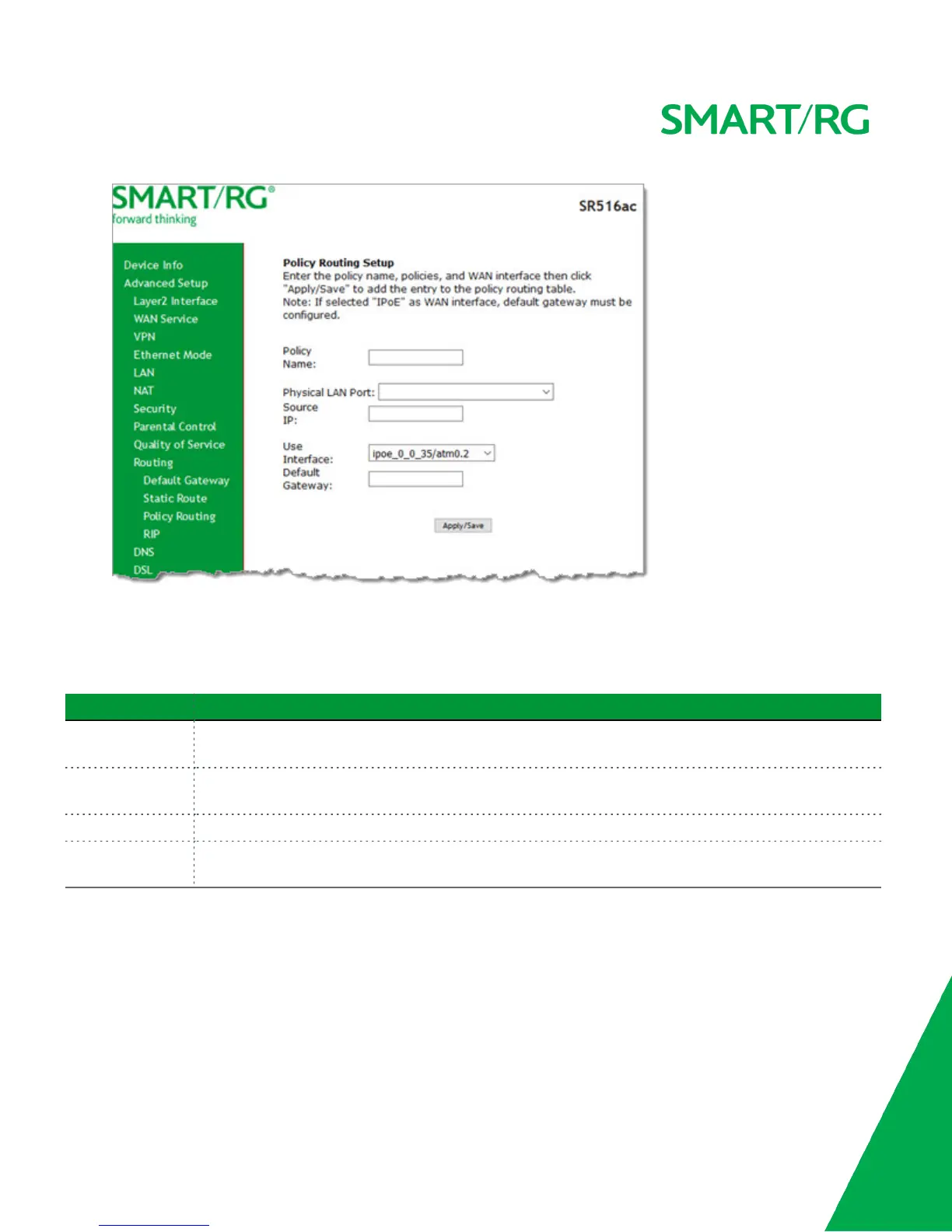
2. Fill in the fields, using the information in the table below.
3. Click Apply/Save to commit your changes. You are returned to the Policy Routing Setting page.
4. To remove a route, click the Remove check box next to it and then click the Remove button. The list is refreshed.
The fields on this page are defined below.
Field Name Description
Policy Name Enter a descriptive name for this entry to the policy routing table. The maximum is 8 characters. Special
characters are not allowed.
Physical LAN Port Select a physical LAN interface for the policy route. Options include Ethernet (LAN) ports 1-4 and both wire-
less bands.
Source IP Enter the IP address for the source of the policy route.
Use Interface Select the WAN Interface for this policy route. If you select an IPoE interface, you must enter the IP
address for the Default Gateway.
RIP
RIP (Routing Information Protocol) is a type of distance-vector routing protocol, which leverages hop count as a metric for routing.
RIP puts a limit on the number of hops (maximum of 15) allowed in order to prevent routing loops. This can sometimes limit the
size of networks where RIP can be successfully employed.



 To Next Page