SMARTRG INC. PROPRIETARY AND CONFIDENTIAL. ALL RIGHTS RESERVED. COPYRIGHT © 2018 75
Field Name Description
or port:port) for which egress traffic will be blocked from reaching the specified destination(s).
Destination IP
address [/prefix
length]
Enter the destination IP address of a LAN side host for which you wish to filter (block) outgoing traffic using
the specified protocol(s).
Note: The address specified here can be a particular address or a block of IP address on a given network
subnet. This is done through appending the address with the associated routing "/prefix" length decimal
value (preceded with the slash).
Destination Port
(port or port:port)
Set the destination host port (or range of ports) for the above host (or range of hosts) to define the des-
tination port profile for which egress traffic will be blocked, e.g., for a computer external to the local net-
work.
IP Filtering - Incoming
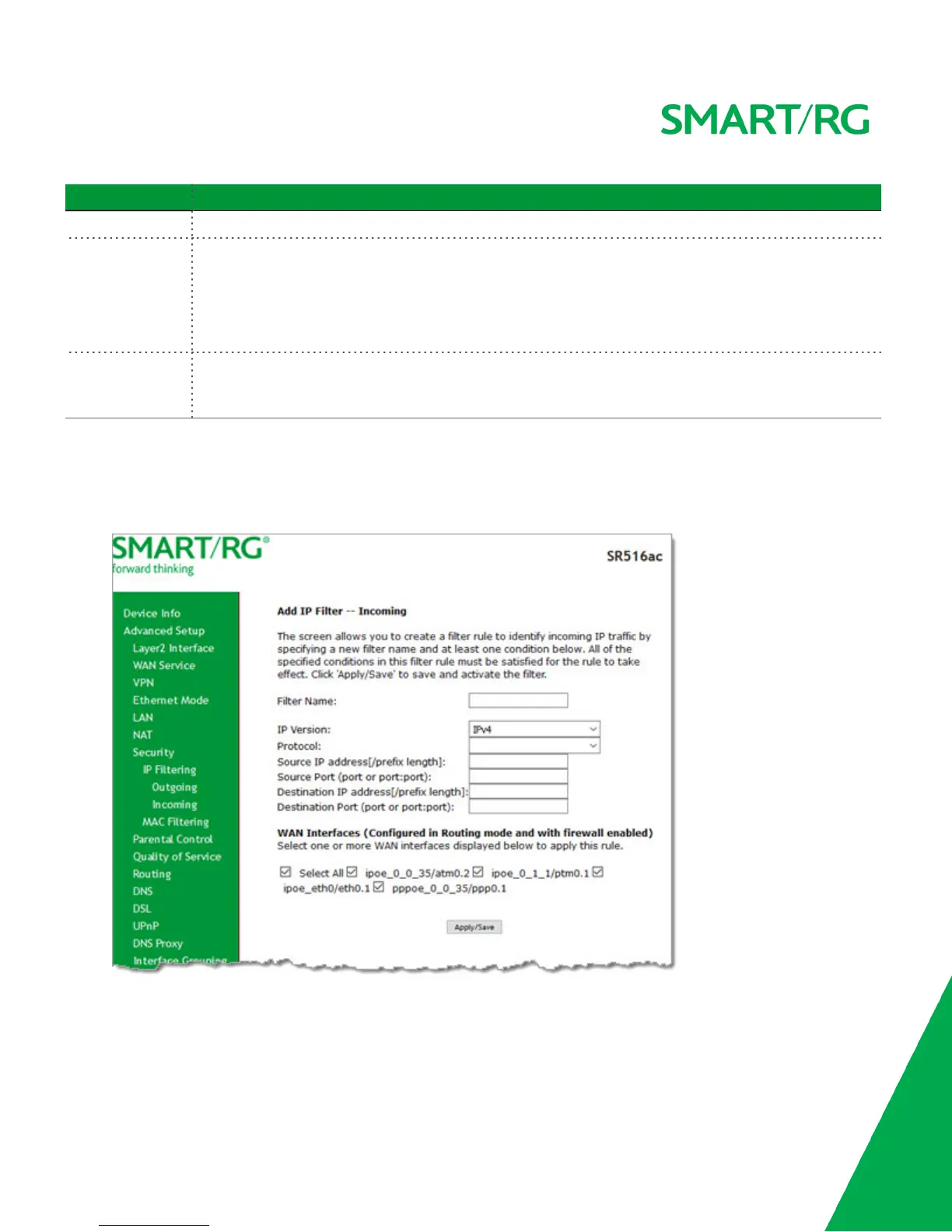
On this page, you can add an incoming filter and prevent certain data being transferred from the WAN to the LAN.
1. In the left navigation bar, click Advanced Setup > Security > IP Filtering > Incoming and then click Add. The following
page appears.
2. Fill in the fields, using the information in the table below. The Filter Name and Protocol fields are required.
3. Click Apply/Save to commit your changes.
The fields on this page are defined below.



 To Next Page