SMARTRG INC. PROPRIETARY AND CONFIDENTIAL. ALL RIGHTS RESERVED. COPYRIGHT © 2018 149
Field Description
Domain (Optional) Enter the domain for this connection.
Resource (Optional) Enter a descriptive name for this connection.
XMPP Server Address Enter the IP address for the server.
XMPP Server Port Enter the port for the IP address entered above.
5. Click Apply/Save to save and apply the settings.
6. To remove a connection, click the Remove checkbox to the right of the entry and then click the Remove button.
Internet Time
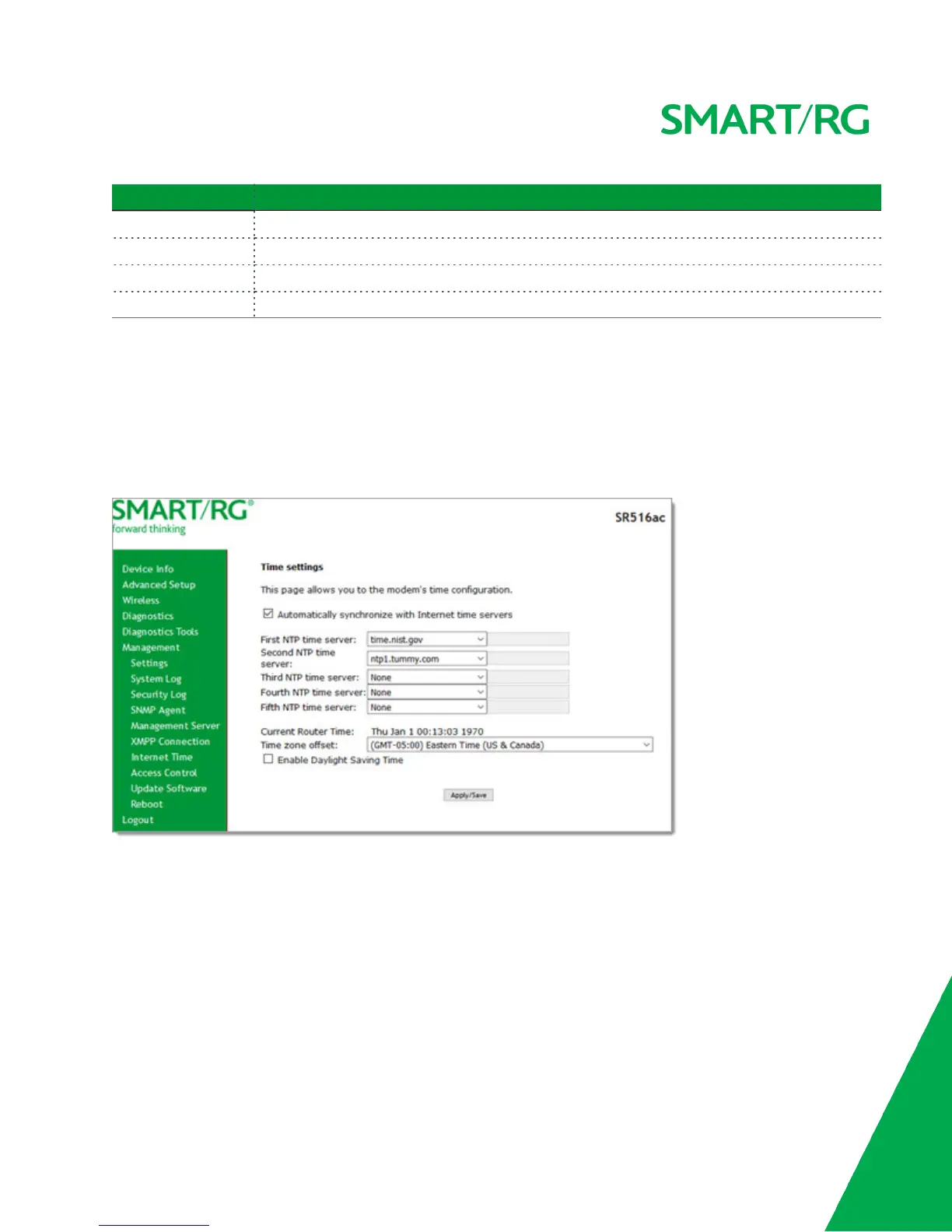
On this page, you can configure the gateway to synchronize its time with the Internet time servers. This feature is enabled by
default.
1. In the left navigation bar, click Management > Internet Time. The following page appears.
2. Select the desired time servers.
3. Select the Time zone offset.
4. (Optional) Click Enable Daylight Savings Time.
5. Click Apply/Save to save and apply the settings.
6. To disable this feature, click the Automatically synchronize with Internet time servers check box to clear it and then
click Apply/Save to save your changes.
Access Control
In this section, you can manage user passwords and the services that are available for users.
The following user names are assigned specific rights:



 To Next Page