SMARTRG INC. PROPRIETARY AND CONFIDENTIAL. ALL RIGHTS RESERVED. COPYRIGHT © 2018 71
Field Name Description
Trigger Protocol Select the protocol required by the application that will be using the ports in the specified range.
Options are TCP, UDP, and TCP/UDP. The default is TCP.
Open Port Start
Open Port End
Enter the starting and ending numbers of the range of available incoming ports. Options are 1 - 65535.
Open Protocol Select the protocol for the open port. Options are TCP, UDP, and TCP/UDP.
DMZ Host
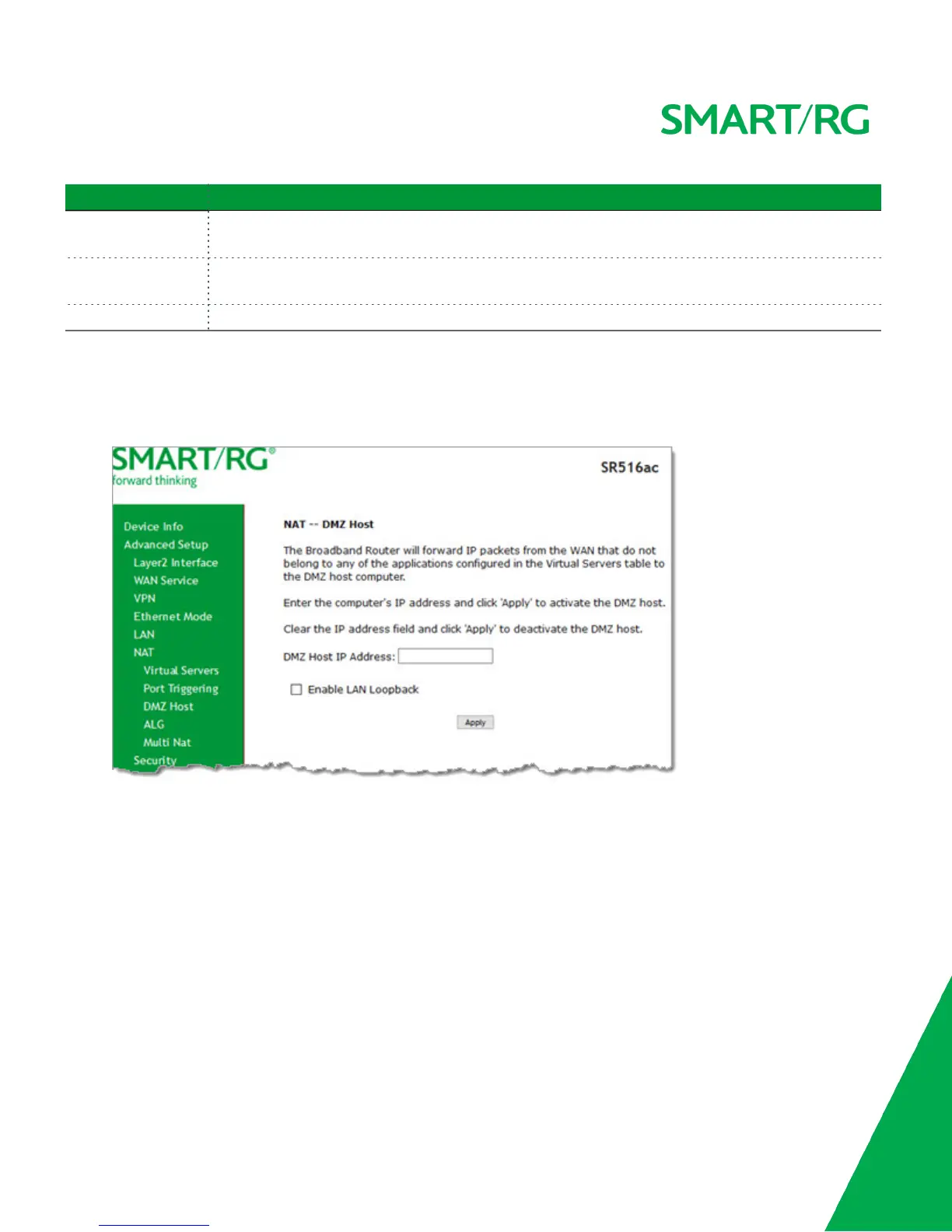
DMZ allows all the ports of a PC on your LAN to be exposed to the Internet. On this page, you can set the IP address of a PC to be
the DMZ host, so that the DMZ host will not be blocked by your firewall.
1. In the left navigation bar, click Advanced Setup > NAT > DMZ Host. The following page appears.
2. Enter the DMZ Host IP Address.
3. (Optional) To enable on-demand link diagnostics, click Enable LAN Loopback.
4. To deactivate a DMZ host, delete the IP address from the DMZ Host IP Address field, and then click Apply.
5. Click Apply to commit the new or changed address.
ALG
On this page, you can enable Session Initiation Protocol (SIP) for your NAT. SIP is a communications protocol for signaling and con-
trolling multimedia communication sessions.



 To Next Page