SMARTRG INC. PROPRIETARY AND CONFIDENTIAL. ALL RIGHTS RESERVED. COPYRIGHT © 2018 144
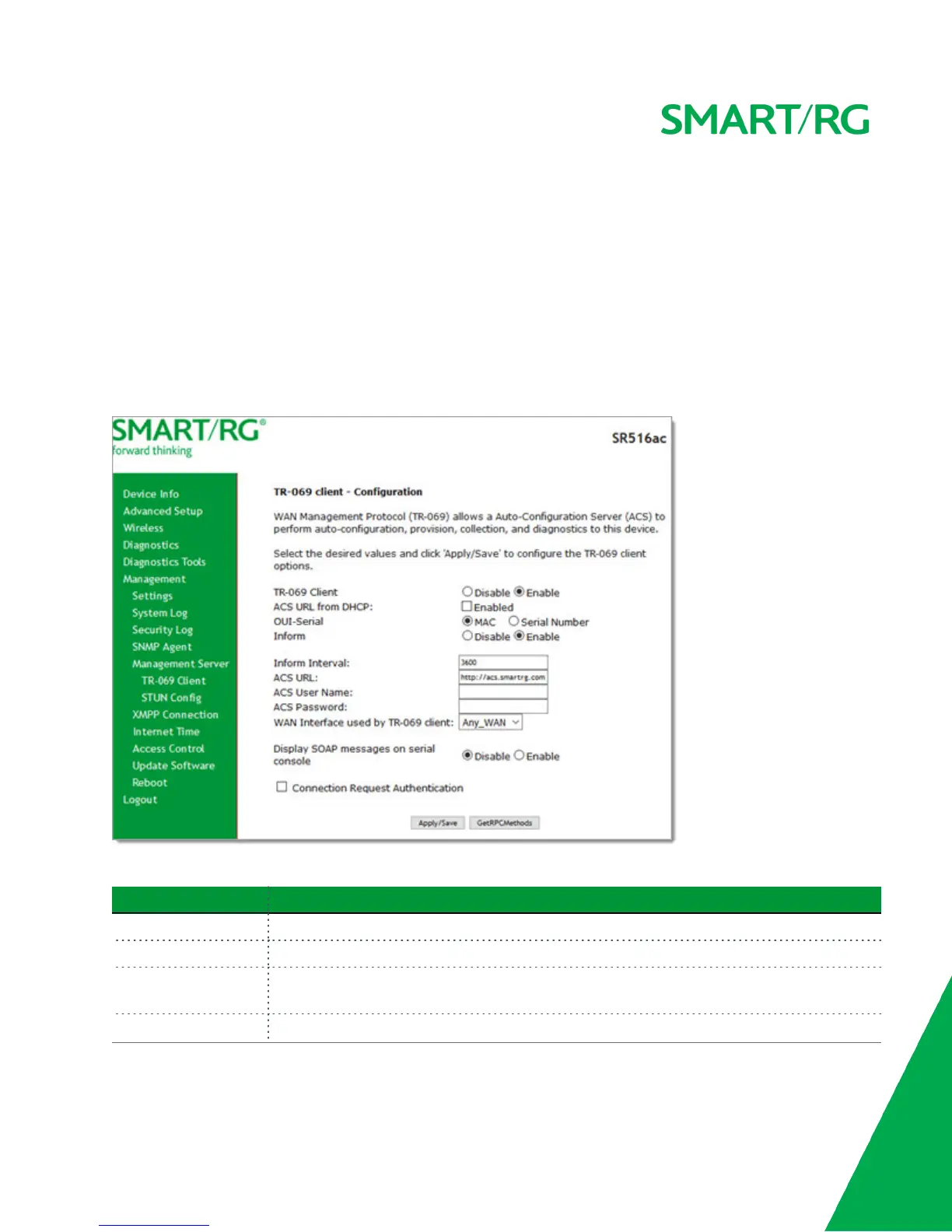
The TR-069 client screen contains default connection parameters and generally only needs to be enabled, pointed to the ACS
URL, and any required ACS Username and ACS Password entered. This manual does not cover the setup of your ACS. If you need
to modify the default settings, consult the materials provided by your ACS vendor to determine the appropriate parameters and
server settings.
SmartRG products can accommodate several ACS products, including:
l Calix Consumer ACS
l Cisco Prime Home
l ClearVision
l Device Manager by SmartRG
1. In the left navigation bar, click Management > Management Server. The following page appears.
2. Complete the necessary fields per the instructions from your ACS platform vendor.
Field Name Description
TR-069 Client This option is enabled by default. To disable this feature, click the Disable button.
ACS URL from DHCP Click to enable the gateway to obtain the ACS URL from the DHCP server.
OUI-Serial Select whether to use the MAC address or the device serial number as the identifier. The
default is MAC.
Inform Select whether the gateway will synchronize with the ACS. This option is enabled by default.



 To Next Page