SMARTRG INC. PROPRIETARY AND CONFIDENTIAL. ALL RIGHTS RESERVED. COPYRIGHT © 2018 55
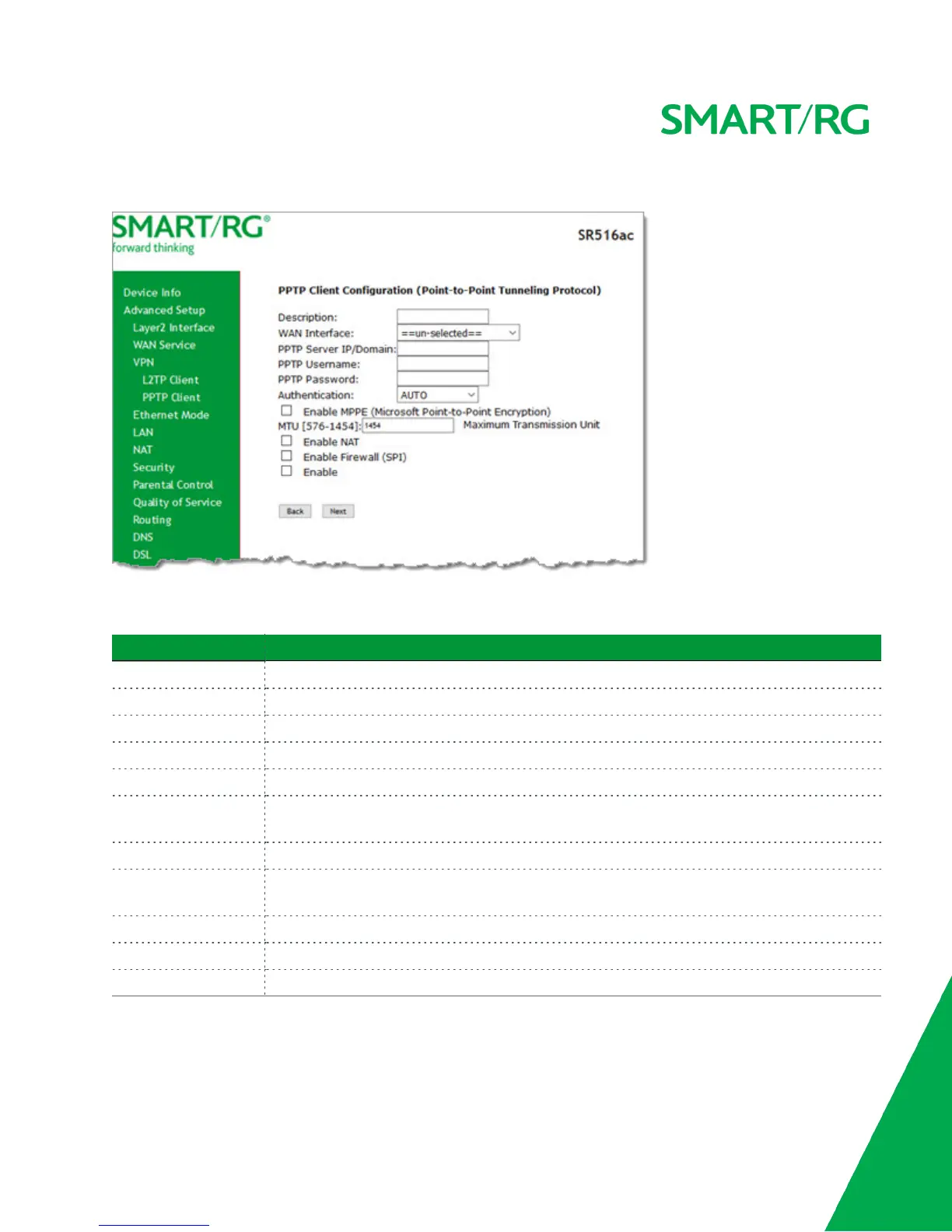
1. In the left navigation menu, click Advanced Setup > VPN > PPTP Client and then click Add. The following page appears.
2. Fill in the fields, using the information in the table below. The Description, WAN Interface, and PPTP Server IP/Domain
fields are required.
Field Name Description
Description Enter a useful description of this configuration.
WAN Interface Select the WAN interface for this client.
PPTP Server IP/Domain Enter the IP address of the PPTP server.
PPTP Username If not using the default of "admin", enter the user name for the server.
PPTP Password If not using the default of "admin", enter the password for the server.
Authentication Select the authentication method. Options are NOAUTH, AUTO, PAP, CHAP, MS-CHAP_V1, and
MS-CHAP_V2.
Enable MPPE (Optional) Select to enable Microsoft Point-to-Point Encryption.
MTU (Optional) Enter the maximum number of transmission units allowed for this client. Options are
576-1454. The default is 1454.
Enable NAT (Optional) Select to enable Network Address Translation features.
Enable Firewall (SPI) (Optional) Select to enable the firewall.
Enable Click to enable this PPTP client configuration.



 To Next Page