S2 User Handbook
145
METERBRIDGE MODULES
20
METERBRIDGE MODULES
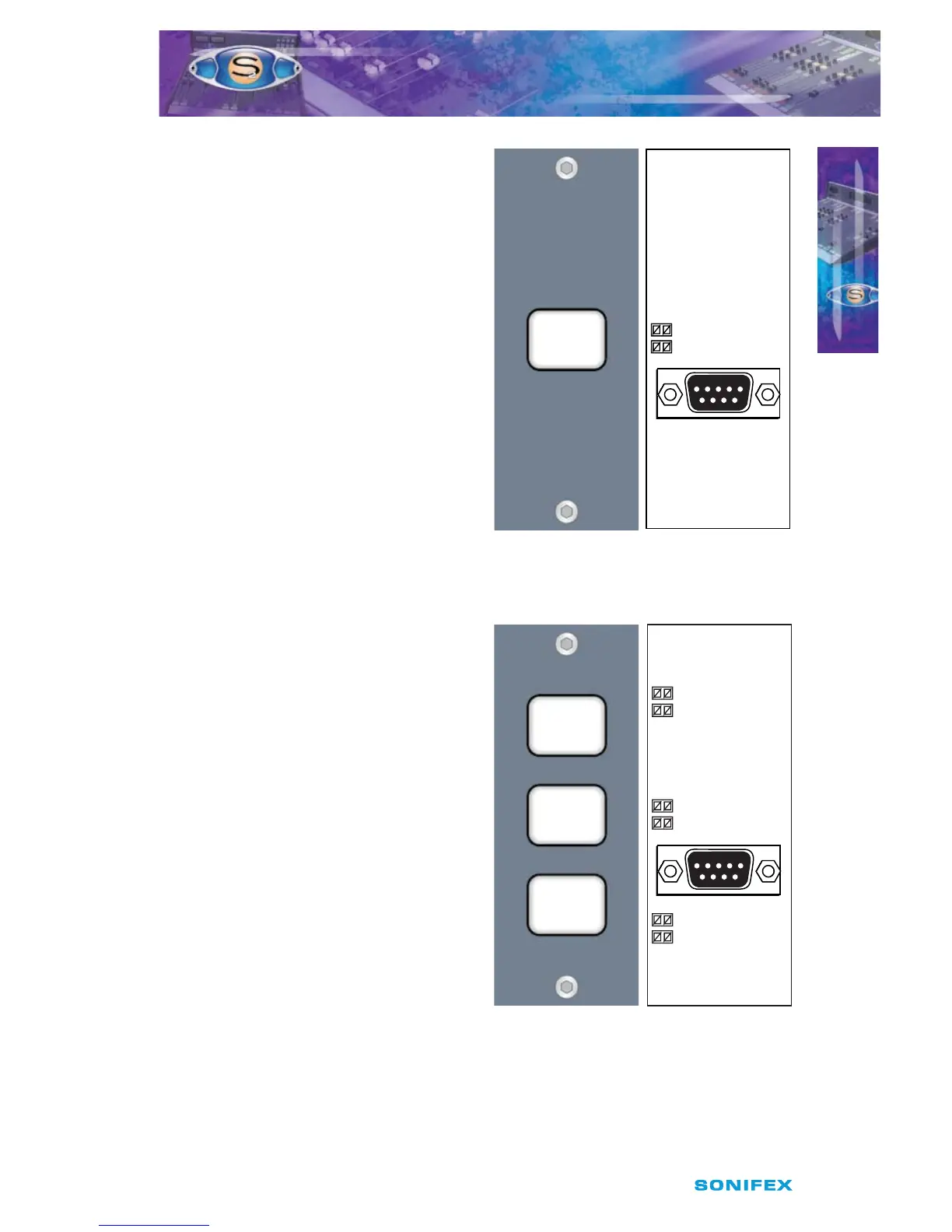
S2-MSB1 Meterbridge Switch
Panel With 1 Button
This is a meterbridge panel, 1 channel wide,
with 1 button which can be used for bespoke
control of the S2, or for your own purposes,
e.g. equipment control. Contact Sonifex with
your particular mixer control requirements.
To make the switch illuminate either green, red
or orange, set the jumper(s) next to the button
to either GRN, RED or GRN & RED (for orange).
S2-MSB3 Meterbridge Switch
Panel With 3 Buttons
This is a meterbridge panel, 1 channel wide,
with 3 push button switches which can
be used for bespoke control of the S2 or
ancilliary devices.
To make the switches illuminate either green,
red or orange, set the jumper(s) next to the
button to either GRN, RED or GRN & RED
(for orange).
The connector used for both the S2-MSB1
and S2-MSB3 is a 9 pin D-type female and the
pin-out details are as follows:
S2-MSB1 S2-MSB3
Female Switch Panel Switch Panel
D-Type Connection Connection
Pin 1 N/C Switch 1*
Pin 2 Switch 2 Switch 2*
Pin 3 N/C Switch 3*
Pin 4 N/C Switch 1 LED**
Pin 5 Switch 2 LED** Switch 2 LED**
Pin 6 N/C Switch 3 LED**
Pin 7 0V 0V
Pin 8 0V 0V
Pin 9 +12V LED +12V LED
Power Input Power Input
* Switch Output (connected to 0V
on activation)
** Pull to 0V to activate
Fig 20-12a : S2-MSB3
S2 Meterbridge Switch
Panel With 3 Buttons.
Fig 20-11a : S2-MSB1
S2 Meterbridge Switch
Panel With 1 Button.
PL1
GRN
RED
SONIFEX
S2-MSB1-01
Switch 2
PL1
GRN
GRN
GRN
RED
RED
RED
SONIFEX
S2-MSB3-01
Switch 1
Switch 2
Switch 3
Fig 20-12b : S2-MSB3
Diagram.
Fig 20-11b : S2-MSB1
Diagram.
To power the switch button LEDs, a 12V power supply of at least 100mA must be used.
+15V, which can be used, is available from the spare power connector on the meterbridge
distribution board, (see Fig 20-1 on page 133).



 To Next Page