146
S2 User Handbook
METERBRIDGE MODULES
METERBRIDGE MODULES
20
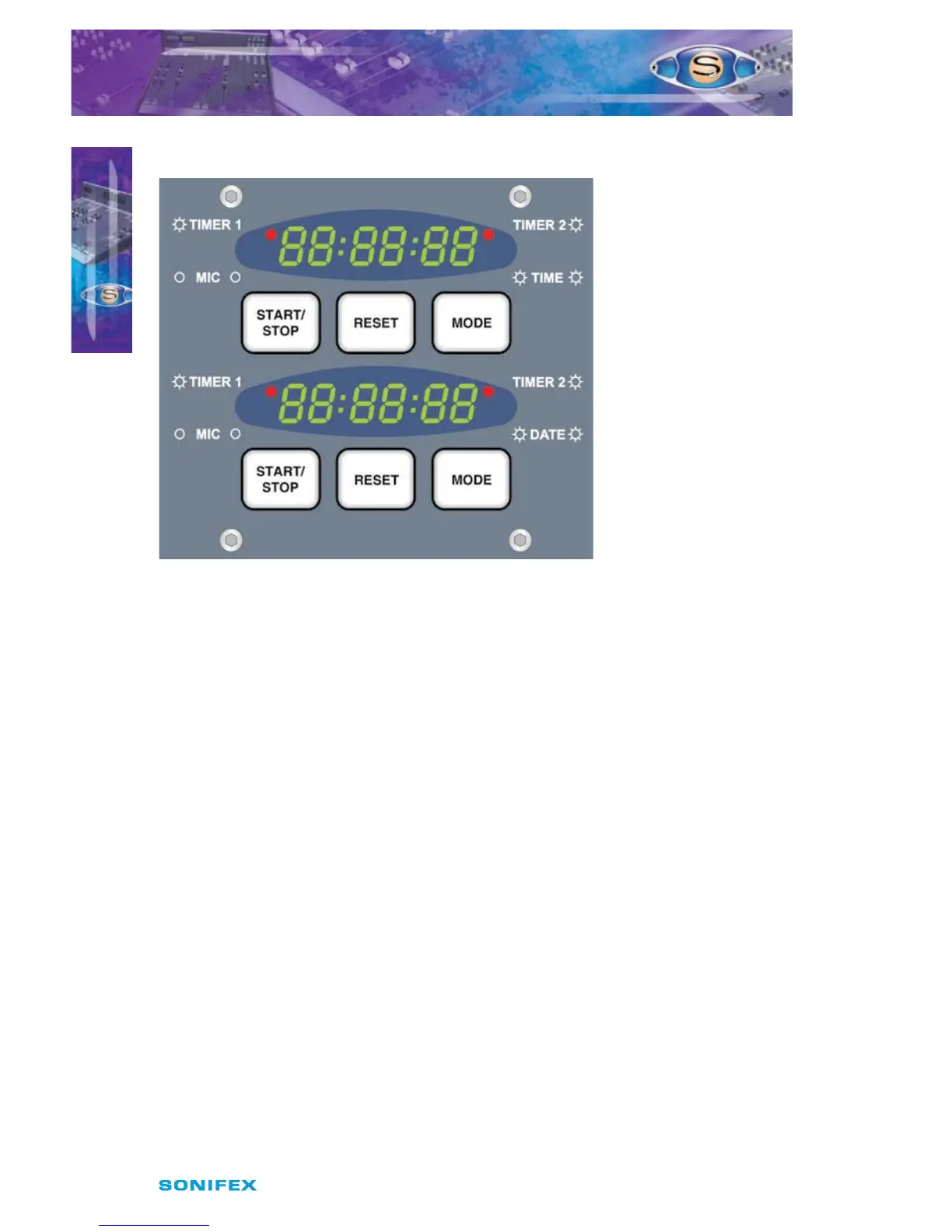
S2-MT Meterbridge Timer Panel
Fig 20-13 : Meterbridge Timer Panel.
Overview
Each of the dual timers can be used for timing events triggered by Timer 1, Timer 2, or the
Mic fader open signal. In addition the upper timer is used for displaying the time of day and
the lower timer for displaying the date. The illumination pattern of the red LEDs indicates
the timer display mode.
The date and time can be synchronised to a very accurate internal clock or optionally from
an external source, MSF, DCF, SMPTE, or RS232 time code string.
Panel Controls
START / STOP
When the display is in Timer 1, Timer 2 or MIC timer (manual) mode, this button causes
the timer to start, if currently stopped, or stop, if currently running. This button has other
functions when the display is in other modes, which are described below.
RESET
When the display is in Timer 1, Timer 2 or MIC timer (manual) mode, this button causes the
timer to be reset, but only if that timer is not currently running.
MODE
Changes the current display mode from TIMER 1, to TIMER 2, to MIC, to TIME (or DATE) back
to TIMER 1 again. This button also has other functions, which are described below.
Quick Date View
Hold down the upper timer “START/STOP” button while in Time mode.
The Date will be displayed until the button is released.



 To Next Page