28
S2 User Handbook
5 S2-CML Mic/Line Channel With EQ
Panel Controls
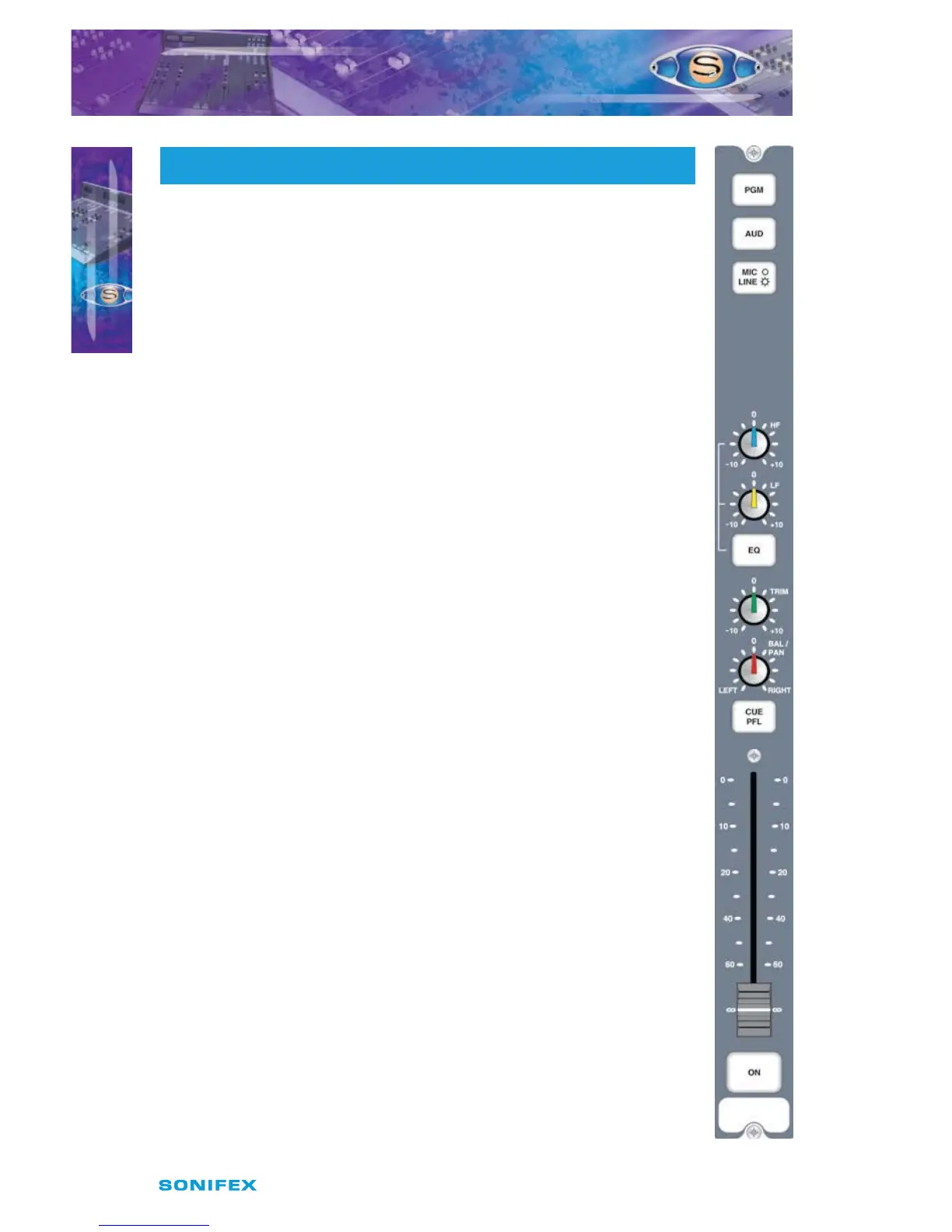
PGM and AUD Selection
Selecting the PGM, AUD buttons routes the channel audio output to the PGM
and/or AUD mix busses. The buttons are illuminated in green to indicate the
routing status. Changing the status of the PGM button is inhibited when the
channel is “live”.
MIC/LINE Selection
Selecting the MIC/LINE button changes the channel input connection
between Mic and Line. The button is illuminated in red to indicate when Line
is selected. The operation of the button is inhibited when the channel is “live”.
Equalisation Controls
The HF and LF controls are used to adjust the equalisation of the signal. The
HF control boosts and cuts the signal by ±7dB at 6.5kHz. The LF control boosts
and cuts the signal by ±7dB at 100Hz. The EQ button places the equalisation
in and out of the signal path. The button is illuminated in yellow when the EQ
is active.
TRIM Control
The Trim control provides an additional ±12dB of gain to ne tune the input
signal level.
BAL/PAN Control
The Bal control is used to pan the mono input signal in the stereo image.
Full anti-clockwise pans the signal to the left and increases the signal by 3dB
(right channel reduces by 70dB); full clockwise pans the signal to the right
and increases the signal by 3dB (left channel reduces by 70dB).
CUE/PFL Selection
Selecting the CUE/PFL button routes the pre-fader input signal to the
monitoring system where the signal can be heard via headphones and/or
loudspeakers. The level may be checked on meters and adjusted via the TRIM
control and panned via the BAL/PAN control. The button is illuminated in
green when CUE/PFL is active. There is a jumper option to cancel the CUE/PFL
selection when the fader is raised. This button works with both a momentary
and latched operation. If held down,
the selection is cancelled when released, otherwise the button is
alternate action.
Fader
The 100mm VCA fader provides unity gain when fully open. The channel input
signal is routed to the outputs whenever the fader is open, the ON button is
selected and either or both of the routing buttons are selected.
S2CML MIC/LINE CHANNEL WITH EQ
S2CML MIC/LINE CHANNEL WITH EQ
5
S2 -CML



 To Next Page