4
S2 User Handbook
2 Installation Notes
Atmosphere
The S2 mixer should be installed in an area which is not subject to excessive heat or cold.
Also, you should avoid installing it in atmospheric conditions which are dusty, smoky, or
dirty, or where there is moisture or vibration.
Do not use any liquids to clean the fascia of the mixer: a soft dry brush is ideal. Use a clean
cloth moistened with water or ethyl alcohol to clean the trim and scribble pads. Other
solvents may cause damage to paint or plastic parts.
Electromagnetic Radiation
Avoid using the S2 mixer close to strong sources of electromagnetic radiation such as, video
monitors or high power electric cabling. This may cause degradation of the audio quality
due to induced voltages in connecting leads and chassis. The S2 power supply should also
be sited at least 1 metre from the mixer.
In all cases the S2 mixer and power supply should be installed and serviced by qualied
personnel.
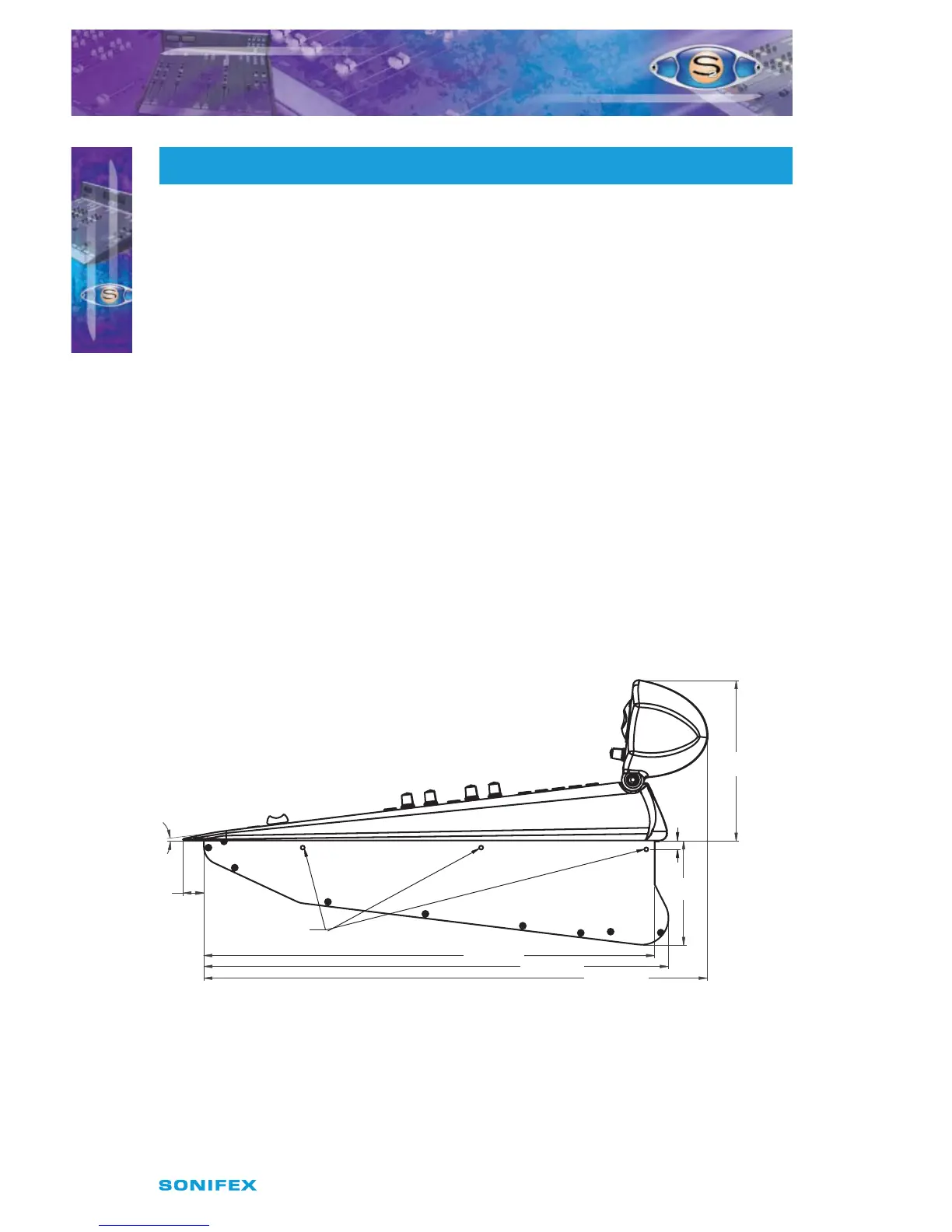
Dimensions and Cut-Out Sizes
The S2 mixer consists of a stainless steel chassis with plastic side and top mouldings and
aluminium front trim. The dimensions for the mixer below include the mouldings and trim.
The cut-out size is for reference only and should be checked with your mixer.
Fig 2-1 : Mixer Prole.
INSTALLATION NOTES
2
INSTALLATION NOTES
117mm
505mm
521mm
565mm
180mm
23mm
10mm
Mounting Holes 5mm Diameter
7°



 To Next Page