OTHER SETTINGS
190
No. Function
*
1
6HOHFWWRVHWWKHSHULRGLFUHVWQRWL¿FDWLRQRQRII
Select to reset all setup items.
*
1
: With navigation function
*
2
: Pandora is available in the United States, Australia, and New Zealand.
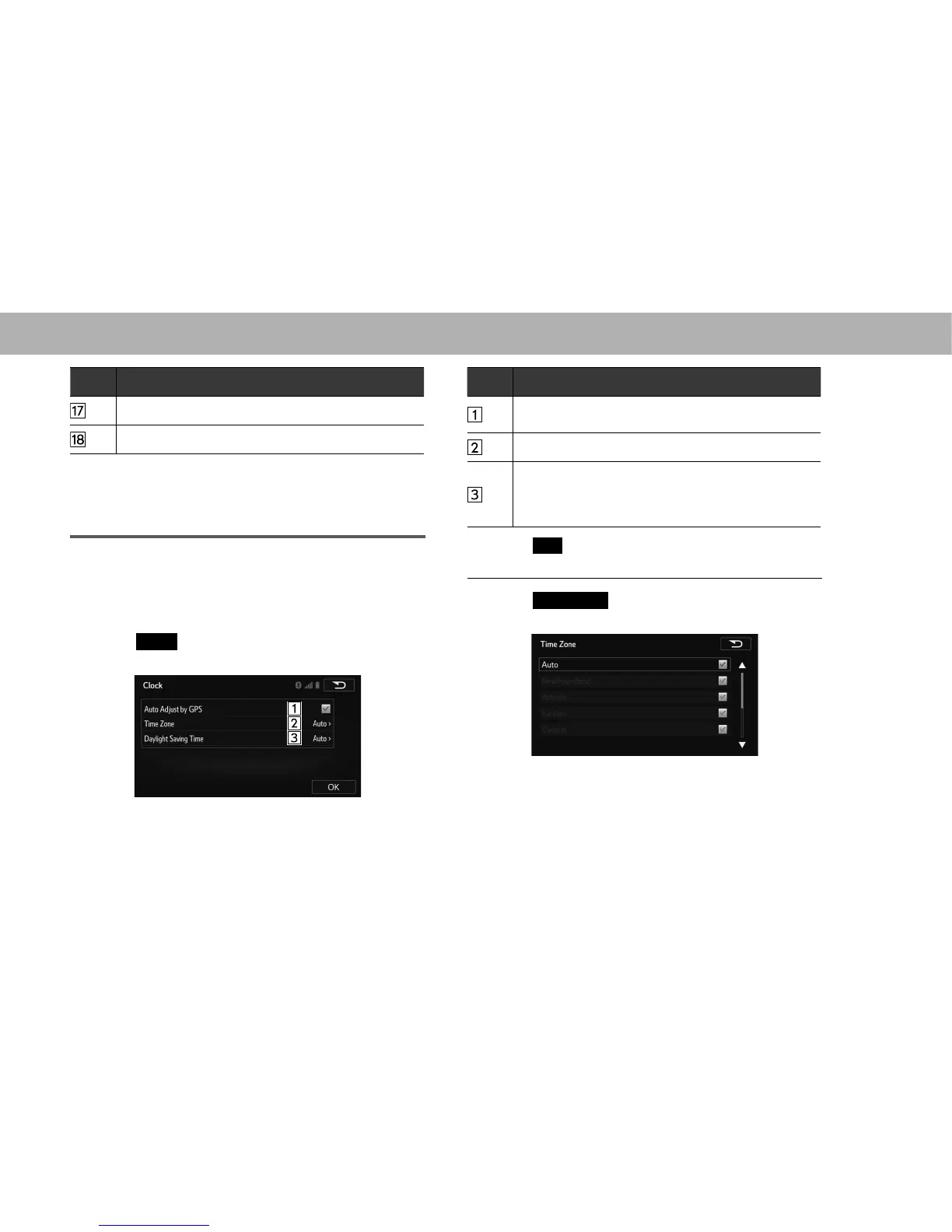
CLOCK SETTINGS (WITH NAVIGATION
FUNCTION)
Used to set the auto update setting for time zones, daylight
saving time and automatic time adjustment on/off.
1. Display the “General Settings (General Settings)”
VFUHHQĺ3
2. Select
Clock
(Clock).
3. Select the items to be set.
No. Function
Select to set automatic time adjustment using GPS
information on/off.
6HOHFWWRFKDQJHWKHWLPH]RQHĺ3
Select to set daylight saving time on/off or to auto.
When set to auto, the daylight saving time setting
automatically turns on or off based on the current
location information.
4. Select
OK
(OK).
Q SETTING THE TIME ZONE
1. Select
Time Zone
(Time Zone).
2. Select the desired time zone.















 To Next Page