OTHER SETTINGS
192
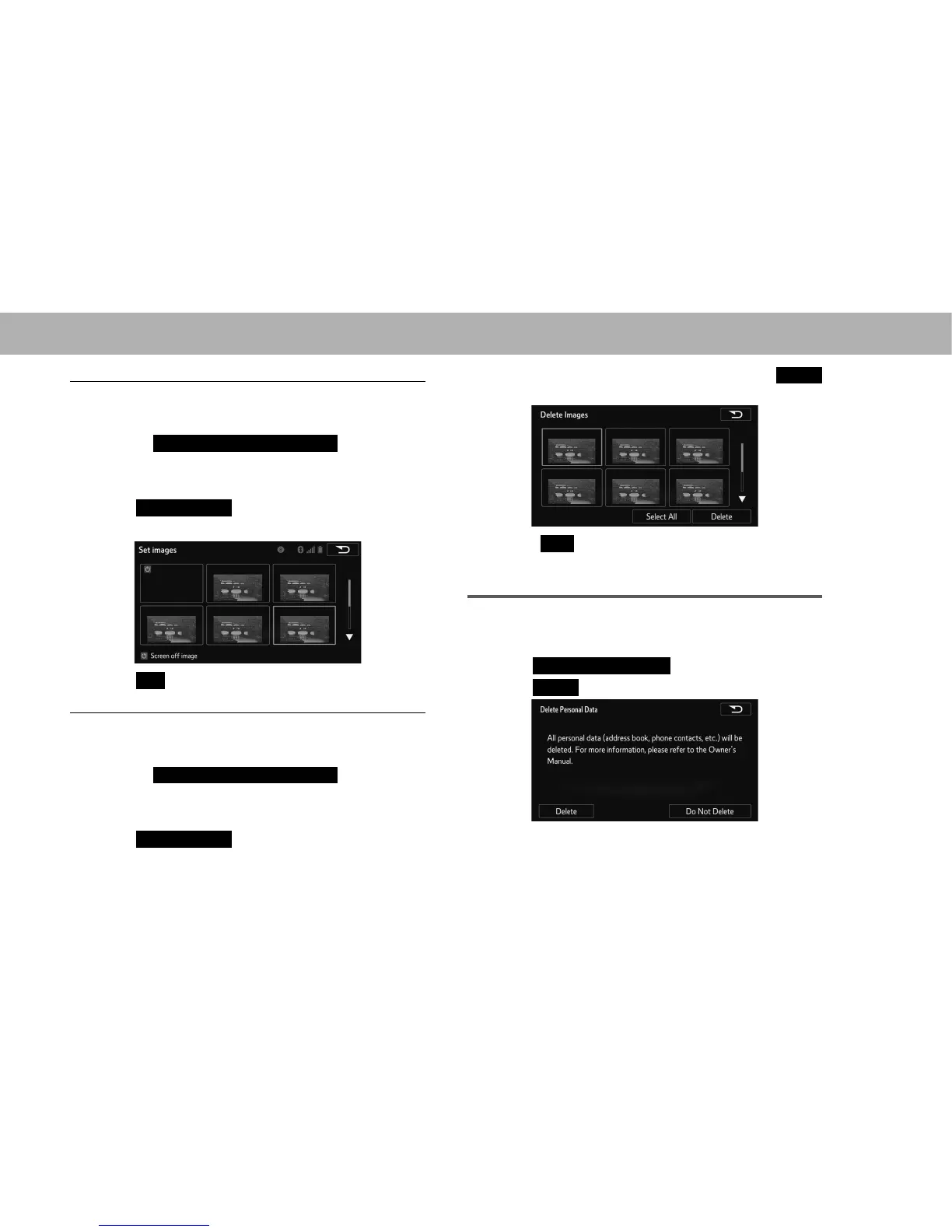
Q SETTINGS THE SCREEN OFF IMAGES
1. Display the “General Settings (General Settings)”
VFUHHQĺ3
2. Select
Customize Screen Off Image
(Customize
Screen Off Image).
3. Select the device that the image is stored on.
4. Select
Select Images
(Select Images).
5. Select the desired image.
6. Select
OK
(OK).
Q DELETING TRANSFERRED IMAGES
1. Display the “General Settings (General Settings)”
VFUHHQĺ3
2. Select
Customize Screen Off Image
(Customize
Screen Off Image).
3. Select the device that the image is stored on.
4. Select
Delete Images
(Delete Images).
5. Select the images to be deleted and then select
Delete
(Delete).
6. Select
Yes
<HV ZKHQ WKH FRQ¿UPDWLRQ VFUHHQ
appears.
DELETING PERSONAL DATA
1. Display the “General Settings (General Settings)”
VFUHHQĺ3
2. Select
Delete Personal Data
(Delete Personal Data).
3. Select
Delete
(Delete).















 To Next Page