ERROR MESSAGES
298
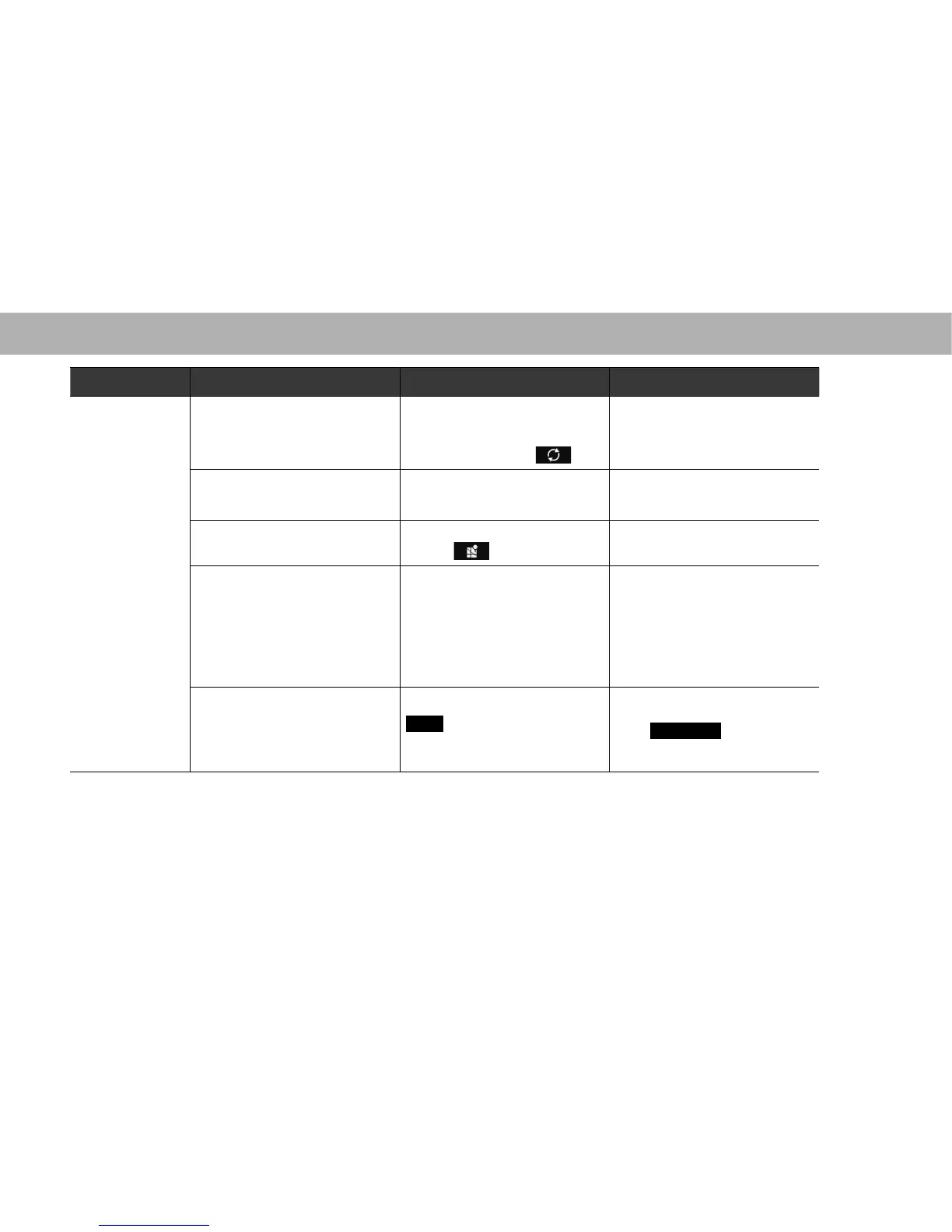
Mode Message Cause Action
aha
“The content cannot be acquired.
(The content cannot be acquired.)”
When not able to get the content
information.
When not able to switch to the Top
content when touching
.
Please try again (Refresh etc.) later
or reconnect it.
Select the desired station again
when the station list appears.
“Action not available. (Action not
available.)”
:KHQFRQWHQWVSHFL¿FRSHUDWLRQV
such as “fast forward” or “rewind” are
not available.
Please try again (Refresh etc.) later
or reconnect it.
“Failed. (Failed.)”
When data transmission failed when
touching
.
Please try again later.
“aha communication error - Please
check Owner's Manual. (aha
communication error - Please check
Owner's Manual.)”
When invalid data is received from
the aha application or there is no
response.
When the connection to the aha
application via Bluetooth is not
available.
When the data reception from this
unit is rejected.
Please try again (Refresh etc.)
later or reconnect it. If it is still not
improved, restart the aha application.
“Please select the type of connection
in “aha Settings”. (Please select the
type of connection in “aha Settings”.)”
When aha radio setting is set to
USB
(USB) when the Android
device is going to be paired via
Bluetooth.
When you want to connect to the aha
application with the Android device,
select
Bluetooth
(Bluetooth) in
the aha radio setting from the setting
screen.















 To Next Page