13
COMPONENTS
OPERATION METHOD OF CONTROL PANEL
Tap To select any relevant item. Continue to press Used for continuous moving.
(Moving of chinrest and
measuring head)
Touch the screen softly with a finger. Continue to touch the screen softly with a finger.
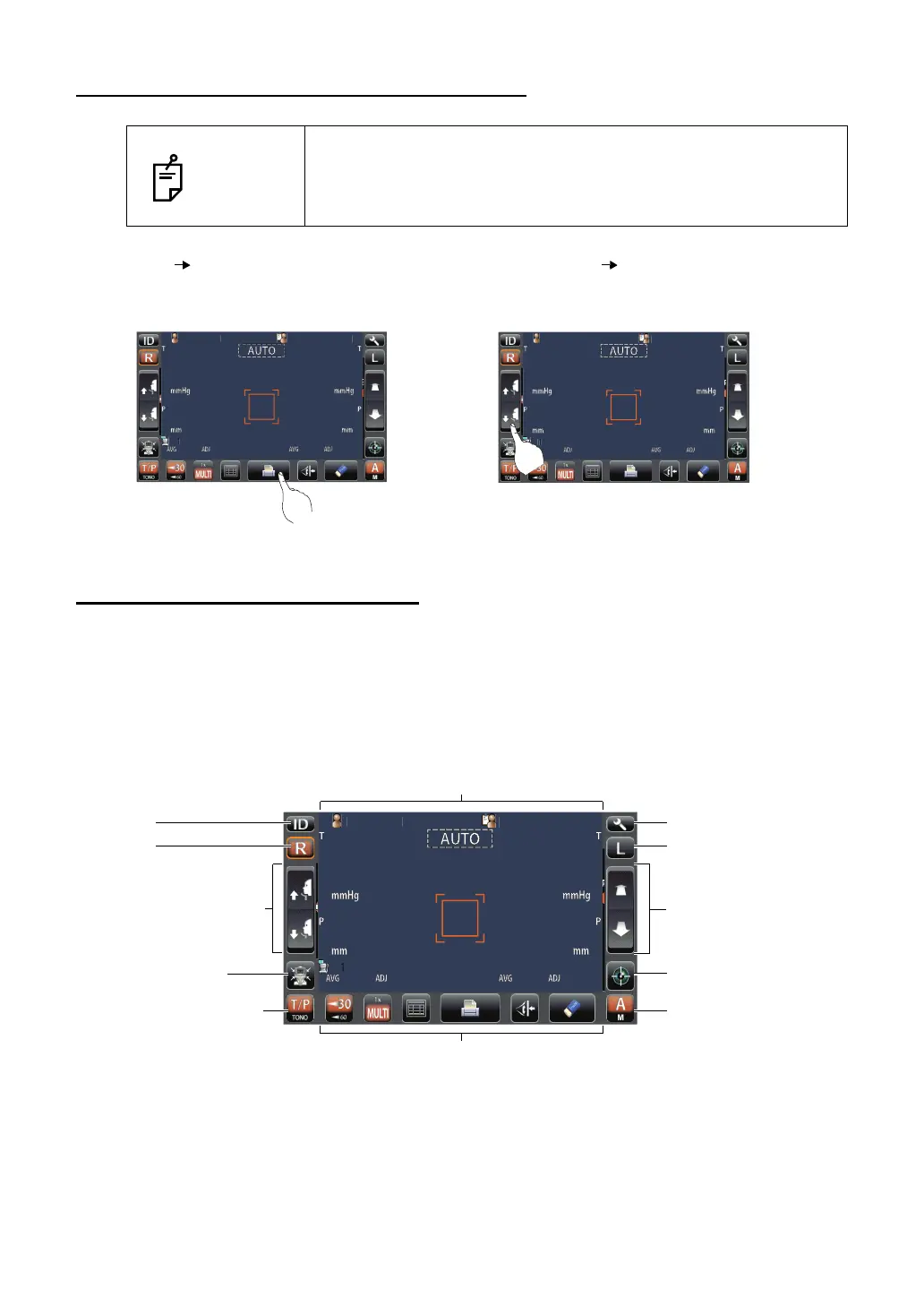
CONTROL PANEL COMPONENTS
The control panel is designed as a touch panel for performing various operations and settings.
It displays images and shows information, including set conditions and measurement results.
CT-1P
AUTO MODE
NOTES
• The control panel is a touch panel. Do not use any sharp tools;
e.g. ball point pen.
• Avoid tapping to deferent points simultaneously on the control
panel.
PatientID
PatientID
/3
/3
/3
/3
/3
/3
/3
/3
OPCON
ARO
PatientID
PatientID
/3
/3
/3
/3
/3
/3
/3
/3
1
OPCON
ARO
TOPCONTAROU
PatientID
PatientID
/3
/3
/3
/3
/3
/3
/3
/3
OPCON
ARO
Settings button
Display
L button
Measuring head forward/
backward button
Start button
Auto/Manual button
ID button
R button
Up/down button for chinrest
Measurement mode button
Function button
Air check/End button



 To Next Page