32
PREPARATIONS
RECOVERY FROM POWER SAVE STATUS
This instrument adopts the power save system for saving electric power. When the machine is
not operated for a set time, the control panel becomes a screensaver.
1 Tap the control panel.
In a few seconds, the measurement screen is displayed and measurement is enabled.
ADJUSTING THE CONTROL PANEL POSITION
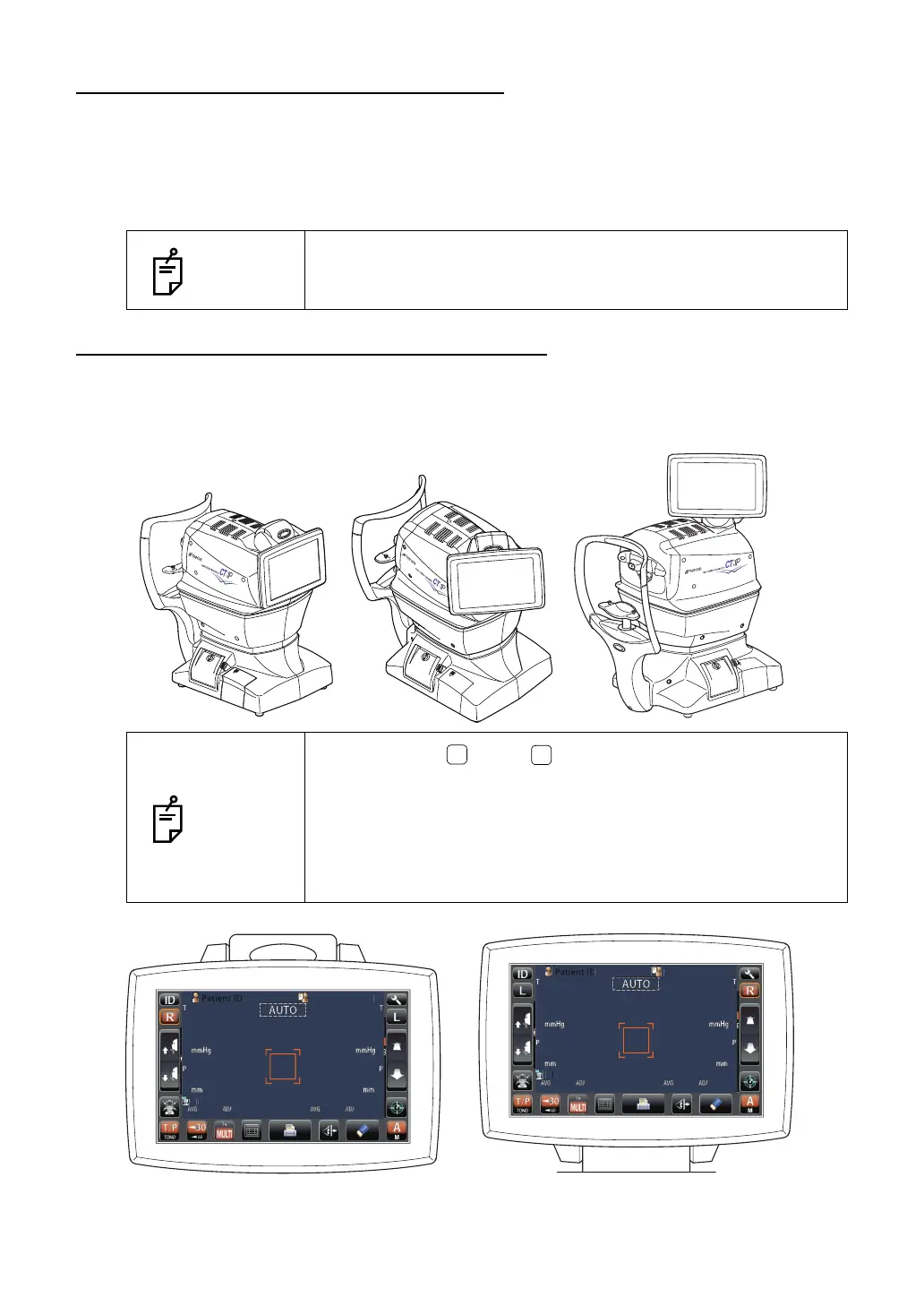
The control panel may be positioned by swinging and tilting the monitor to your desired
position. Touching the control panel controls operations including chinrest movements,
alignment and measurement.
NOTES
The time to start the power save status can be changed in the ini-
tial setting "SETTING THE AUTO POWER SAVE" (see page 75).
NOTES
• The layout of button/ button is reversed according to the
position of the control panel.
• The moving direction by tapping is changed according to the
position of the control panel.
• The moving direction when pushing continuously on control
panel changes according to the initial setting of "SETTING THE
XZ MOTOR DIRECTION". (Refer to P.85)
PatientID
/3
/3
/3
/3
/3
/3
/3
/3
TOPCONTARO
PatientID
/3
/3
/3
/3
/3
/3
/3
/3
1
TOPCON
ARO
TOPCONTAROU



 To Next Page