602
OPUS Projektor Manual
Simulations
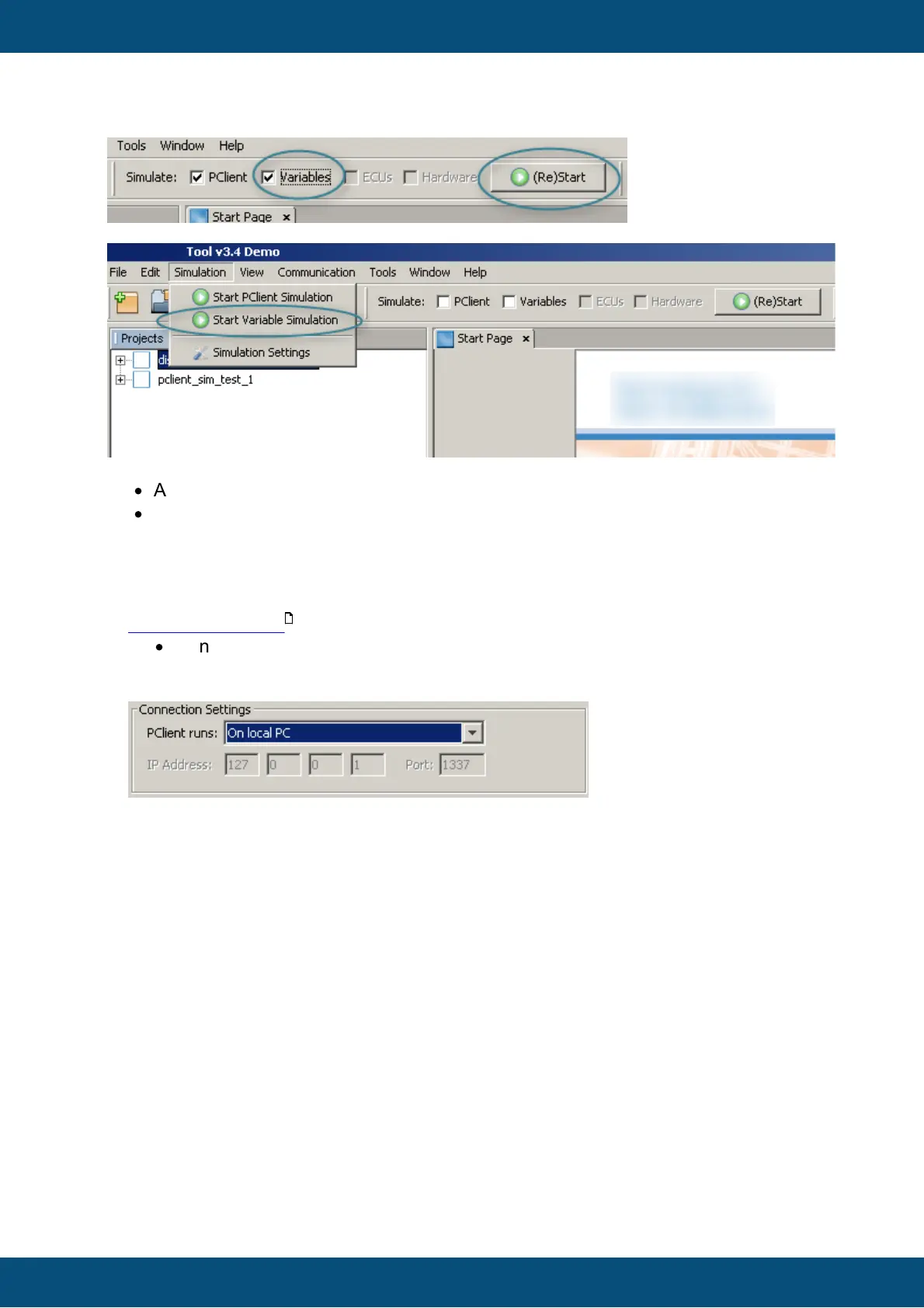
Or go to the simulation menu and then select "Start Variable Simulation".
Please Note:
·
A variable simulation without a running PClient simulation is useless.
·
A project needs to be open and active in the tool before the simulations can be
started.
Connecting to local PClient simulation
To connect to a local PClient simulation the following settings have to be made in the
Simulation Settings dialog (these are the default settings):
·
Connection Settings
o PClient runs: On local PC
o IP Address and Port: will be set automatically
Connecting to a PClient running on a device
To connect to a PClient running on a device, the settings in the Simulation Settings
dialog and some settings in PClient itself have to be adjusted.
Enable Ethernet and Simulation Mode in PClient
1. IP Address
The IP address that PClient uses is stored in the variable
@Ethernet0_IPAddress. This address can be changed to fit to the Network of
the connecting PC. Also check the other variables in the Ethernet variable group
if they need adjusting (like netmask @Ethernet0_Netmask). Contact the local
network admin if there is a doubt about the correct IP settings.
2. Port
The port that is used for simulation can be changed if it collides with other
applications in the network. Use the variable @PClientSimulationPort in the
Projekt variable group to change the port.
3. Enable Ethernet
596



 To Next Page