745
OPUS Projektor Manual
How To
·
Activate the Set as Input property of the list object
·
Set the Items Visible (Editing Mode) to e.g. 5
·
Put a JavaScript to the event OnEnterValue of the list object
·
In the script, read the variable menu_id to find out which option in the menu was selected
and perform the according action (e.g. jump to a certain page)
12.4
How to use the automatic backlight dimming
You want the device to change the backlight intensity automatically depending on the ambient
light.
·
Set the variable @DispBacklightIntensity to a value outside of its normal value region 0 to
100, e.g. -1 or 101
·
To disable the automatic backlight mode, set the variable @DispBacklightIntensity back to
a value between 0 and 100
·
The ambient brightness is readable in the variable @DispBacklightAmbient-LowPassed
·
The brightness at different ambient brightness levels can be set with the variables
@DispBacklightIntensity0 to @DispBacklightIntensity100. You set e.g.
@DispBacklightIntensity0 to 20, then the display brightness will be set to 20 when
@DispBacklightAmbient-LowPassed has a value of 0 (%). Set @DispBacklightIntensity10
to 30, then the display brightness will be set to 30 when @DispBacklightAmbient-
LowPassed has a value of 10 (%). Values in-between will be interpolated linearly
·
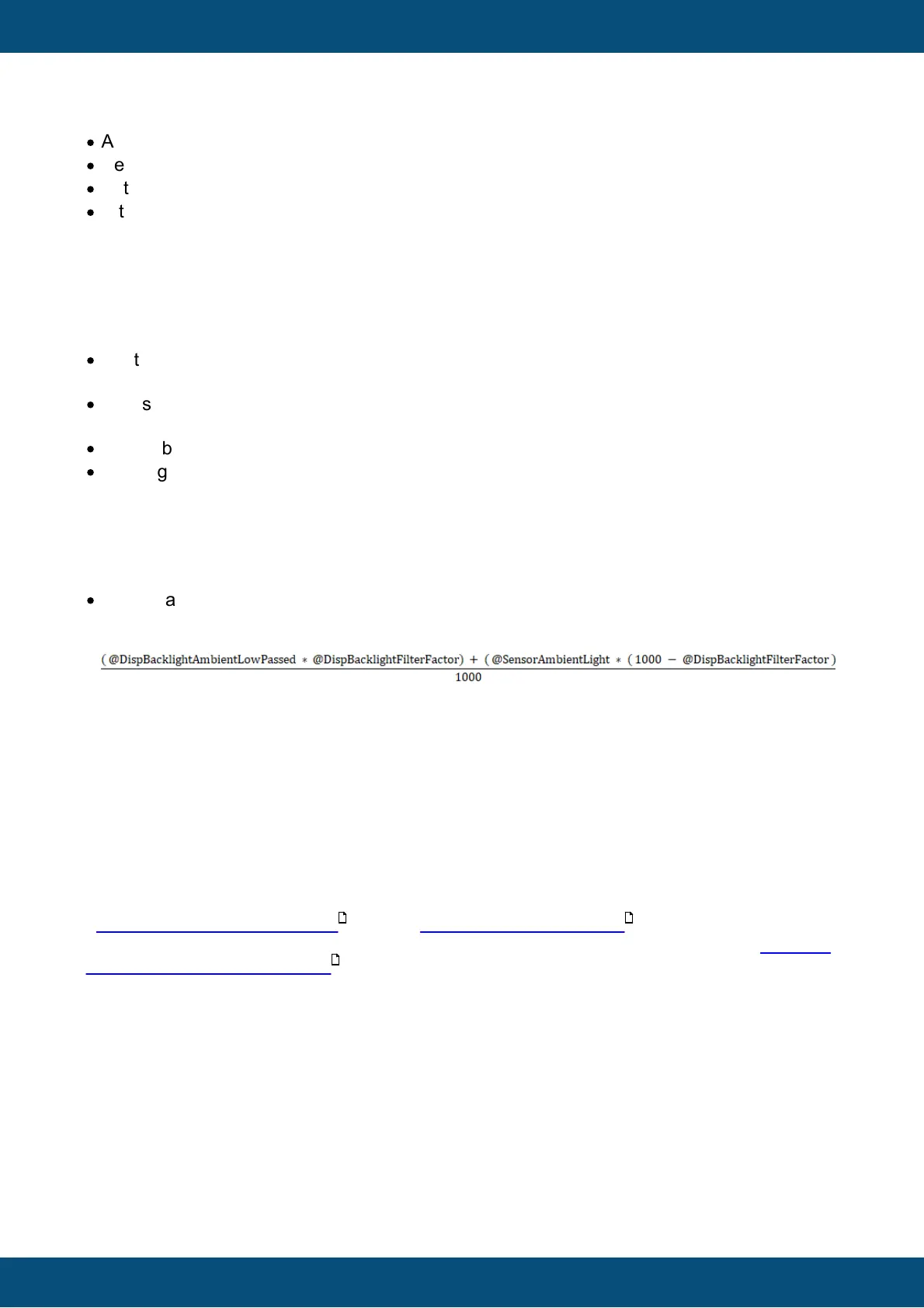
The variable @DispBacklightAmbient-LowPassed will be calculated from
@SensorAmbientLight using @DispBacklightFilterFactor. The formula is:
In words, the lower @DispBacklightFilterFactor is, the faster changing ambient brightness
values will influence the display brightness.
This formula will be calculated every @DispBacklightTimeConstant milliseconds.
12.5
How to set up SDO communication
You want to
a) request a value from an ECU / sensor
b) read a value with the ECU from the display device
c) write a value with the ECU to the display device
- include the CANopen protocol for the CAN port you want to use
- set up IDs for PClient SDO Server Channel and PClient SDO Client Channel in the Terminal
and Owner ECU Configuration dialog
- so make it clear:
COB-ID Client ->Server (rx) is the ID that the ECU uses to read / write a value from / to the
display device (used for b) and c))
COB-ID Server->Client (tx) is the ID that the display uses to respond a read / write request
from the ECU (used for b) and c))
COB-ID Client ->Server (tx) is the ID that the display device uses to read a value from the
ECU (used for a))
COB-ID Server->Client (rx) is the ID that the ECU uses to respond a read request from the
display device (used for a))
328
307
328



 To Next Page