515
OPUS Projektor Manual
JavaScript
·
Scripts are only visible in the debugger if they ran once.
·
A breakpoint can be set before a script was run (if you want a breakpoint in line 42 of
myScript.js simply type ".break myScript.js:42" into the console of the debugger).
·
The debugger can be triggered from within a script by using the statement debugger;.
Execution will stop at that line.
The only way to debug JavaScripts on the device is to check the outputs on the serial console.
Debug outputs can be added with the print function.
7.1
The JavaScript Editor
Tutorial video about the JavaScript editor
https://www.youtube.com/watch?v=5LTKEISIeBY
Since the version 1.12.X of the program, a new JavaScript editor is integrated and provides
many new features.
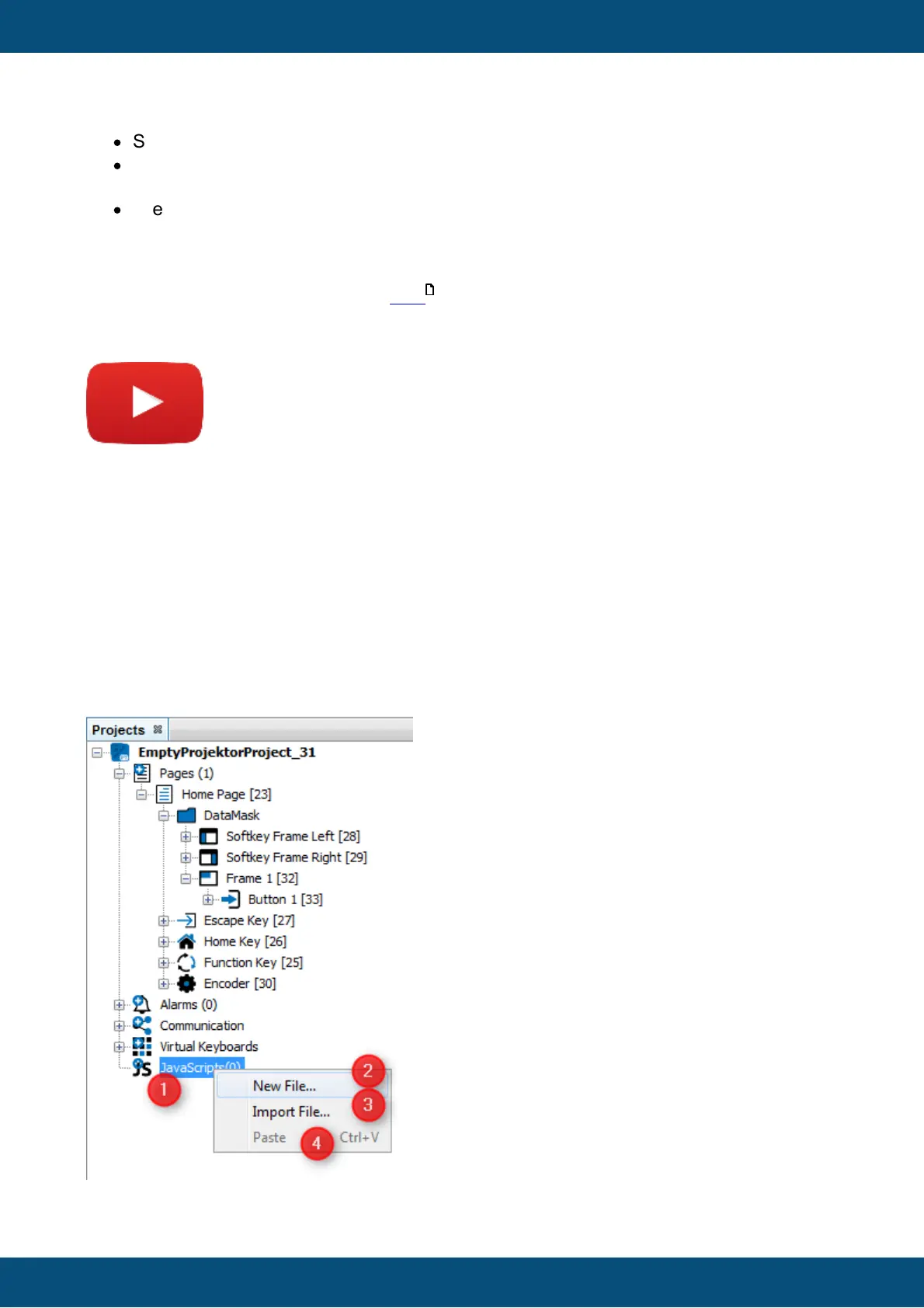
Create a new script file
JavaScript files can be created by right clicking on the JavaScripts node (1) insides the
project tree and clicking New File... (2). Already existing scripts can also be used with Import
File... (3). This functions copies the selected script file into the "terminal_files\scripts" folder of
the corresponding project. Scripts from other projects can copied to the target project by
using Paste (4)
529



 To Next Page