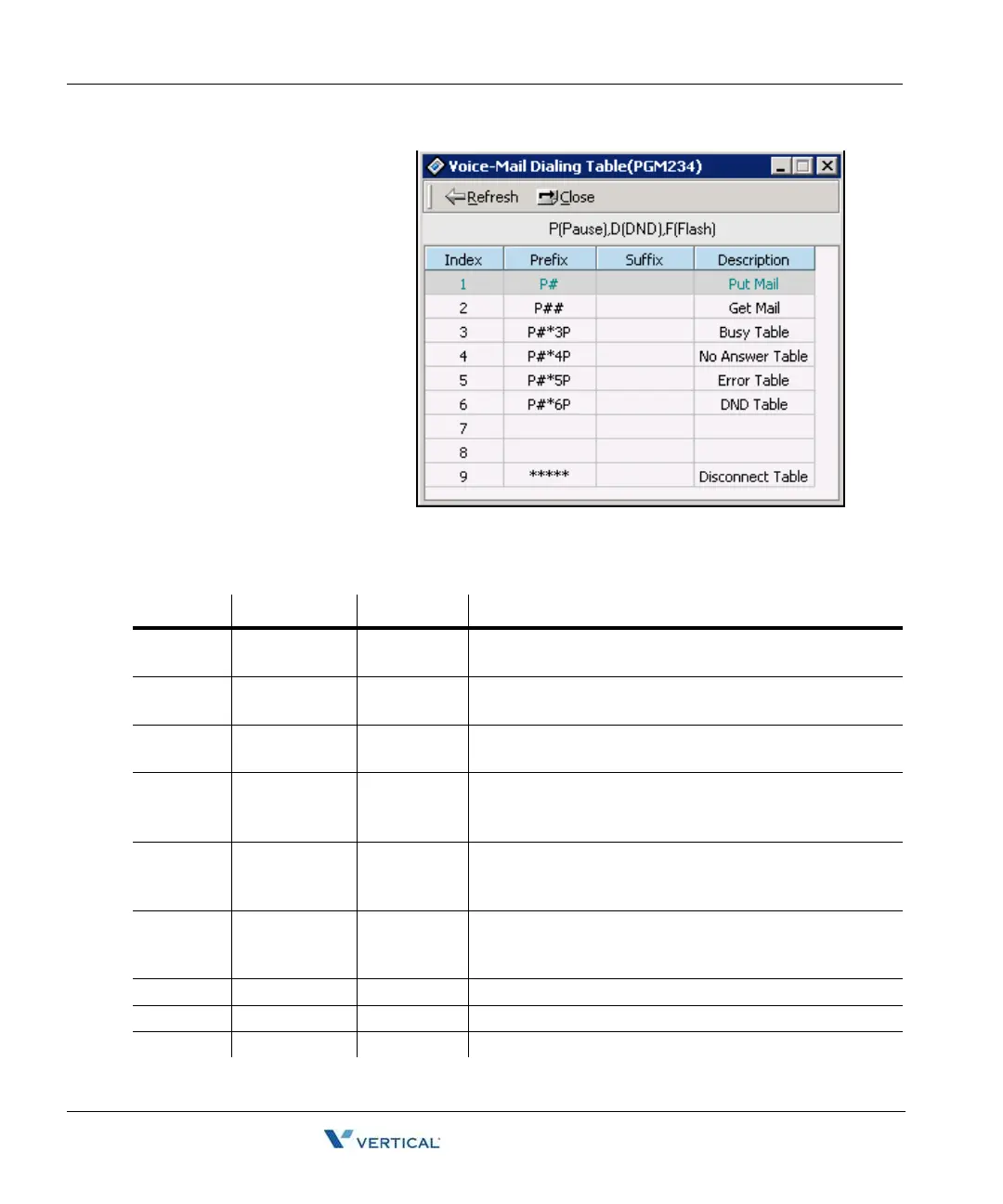
Voice-Mail Dialing Table (PGM 234) 1-134
Chapter 1: SBX IP Online PC Admin
SBX IP - PC Admin Guide
Voice-Mail Dialing Table
( PGM 234)
Apply this feature to use voice
mail, and signal assignment
between two systems.
It is recommended that you leave
the default values.
Operation
1. Click [Voice-Mail Dialing
Tab l e].
2. Select the [Update tool]
in the popup menu by
right-clicking the mouse.
3. After editing, press
[Update] button to save the change.
Voice Mail Table (PGM 234)
DIGIT ITEM DEFAULT REMARK
1 VM Table 1 Prefix: P#
Suffix: -
Put Mail
2 VM Table 2 Prefix: P##
Suffix: -
Get Mail
3 VM Table 3 Prefix: -
Suffix: -
4 VM Table 4 Prefix:
P#*0P
Suffix: -
5 VM Table 5 Prefix:
P#*4P
Suffix: -
No Answer Table
6 VM Table 6 Prefix:
P#*5P
Suffix: -
Error Table
7 VM Table 7 Busy Table
8 VM Table 8 DND Table
9 VM Table 9 ***** Disconnect Table



 To Next Page