BRAKES
M6060, M7060, WSM
4-S14
(6) Brake Pedal
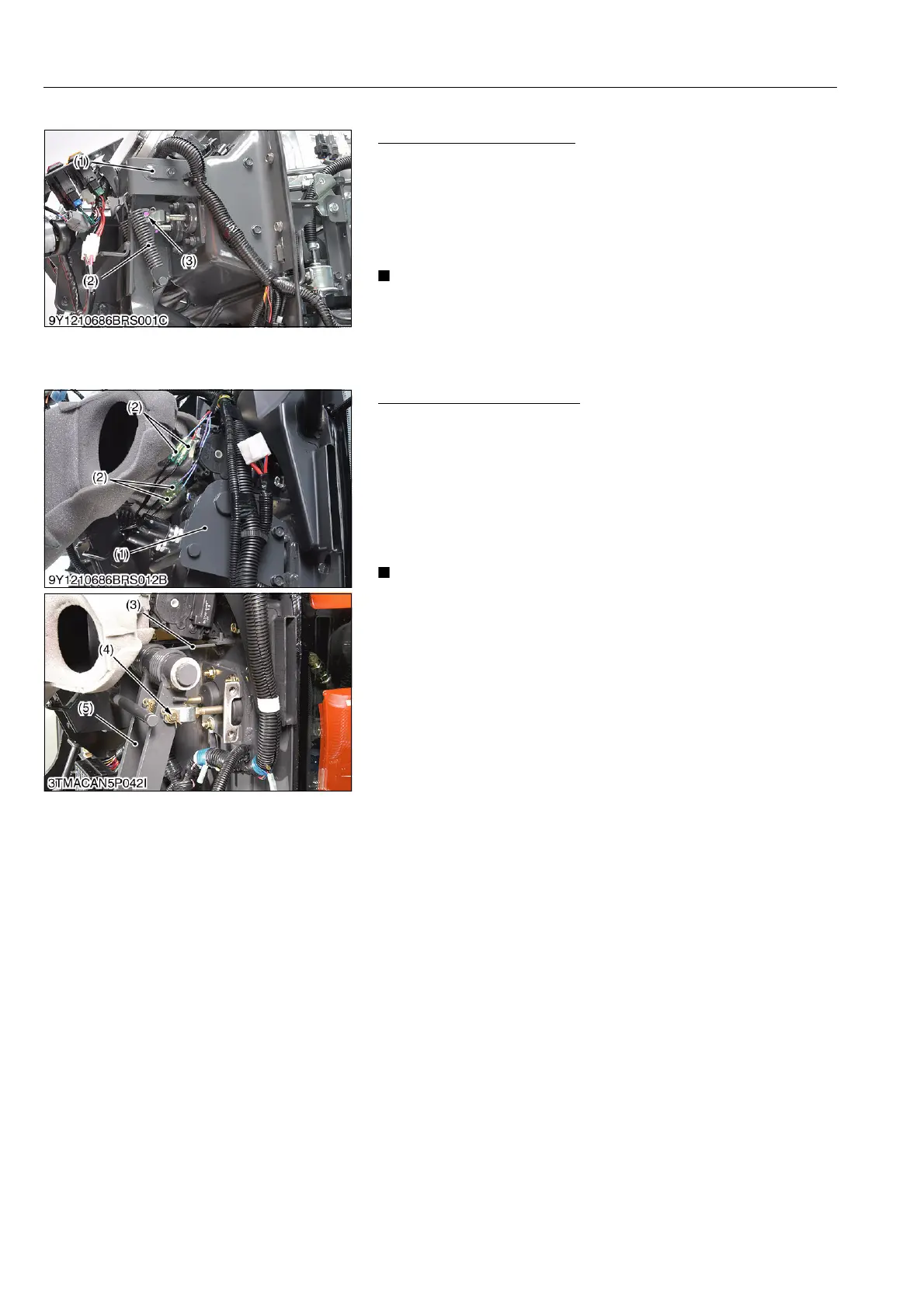
Brake Pedal (ROPS Model)
1. Remove the panel cover.
2. Remove the springs (2) and master cylinder snap pin (3).
3. Remove the pedal shaft (1) mounting screw.
4. Draw out the pedal shaft (1) and brake pedal.
(When reassembling)
• Apply grease to the pedal shaft.
• After reassembling the brake pedal, be sure to adjust the
brake pedal free travel.
9Y1210828BRS0021US0
Brake Pedal (CABIN Model)
1. Remove the pedal shaft support (1).
2. Disconnect the 1P connector (2).
3. Remove the master cylinder snap pins (4) from brake pedals
(5).
4. Unhook the springs (3).
5. Draw out the brake pedals (5).
(When reassembling)
• Apply grease to the pedal shaft.
• After reassembling the brake pedal, be sure to adjust the
brake pedal free travel.
9Y1210828BRS0022US0
(1) Pedal Shaft
(2) Spring
(3) Snap Pin
(1) Pedal Shaft Support
(2) 1P Connector (Brake Pedal)
(3) Spring
(4) Snap Pin
(5) Brake Pedal



 To Next Page