ELECTRICAL SYSTEM
M6060, M7060, WSM
8-S23
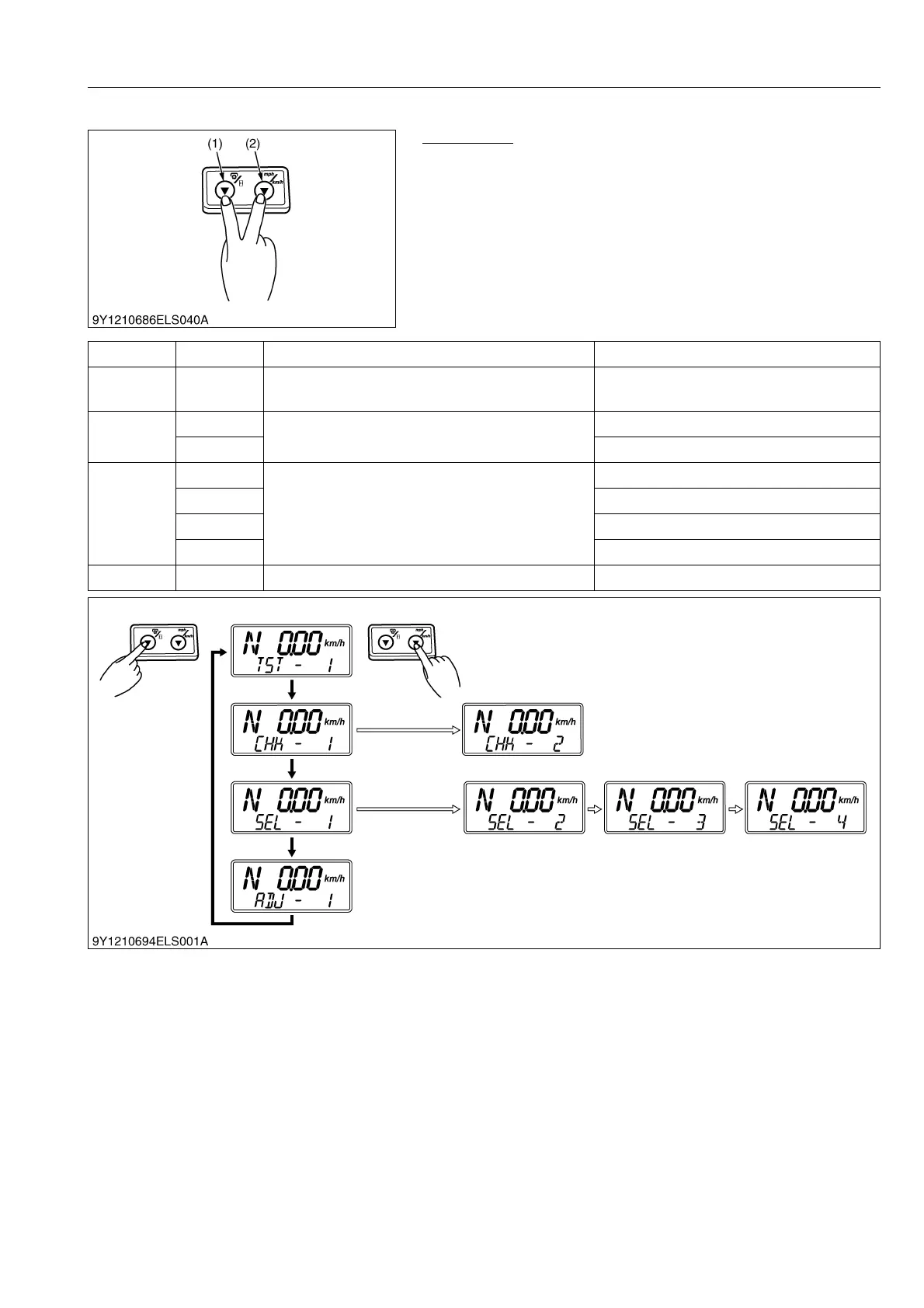
(2) Adjusting Meter Panel
Mode Select
1. While pressing both the PTO/Hour meter select switch (1) and
traveling speed select switch (2), turn the key switch to ON
position.
2. Release temporally both switches.
3. Press both the PTO/Hour meter selects switch (1) and traveling
speed select switch (2).
4. Select the mode in below table.
9Y1210828ELS0039US0
(1) PTO/Hour Meter Select Switch (2) Traveling Speed Select Switch
Mode Item No. Mode Name Item Name
TST 1 Testing sensor
Check the each sensor value
Check the switch sound
CHK
1
Check the error code
Checking the error code history
2 Erasing error code history
SEL
1
Selecting the tractor specification
Tractor specification
2 PTO gear ratio
3 Tire dimension
4 Block heater
ADJ 1 Adjusting throttle sensor Adjusting throttle sensor



 To Next Page