ELECTRICAL SYSTEM
M6060, M7060, WSM
8-S51
(6) Front/Rear Work Light (CABIN Model)
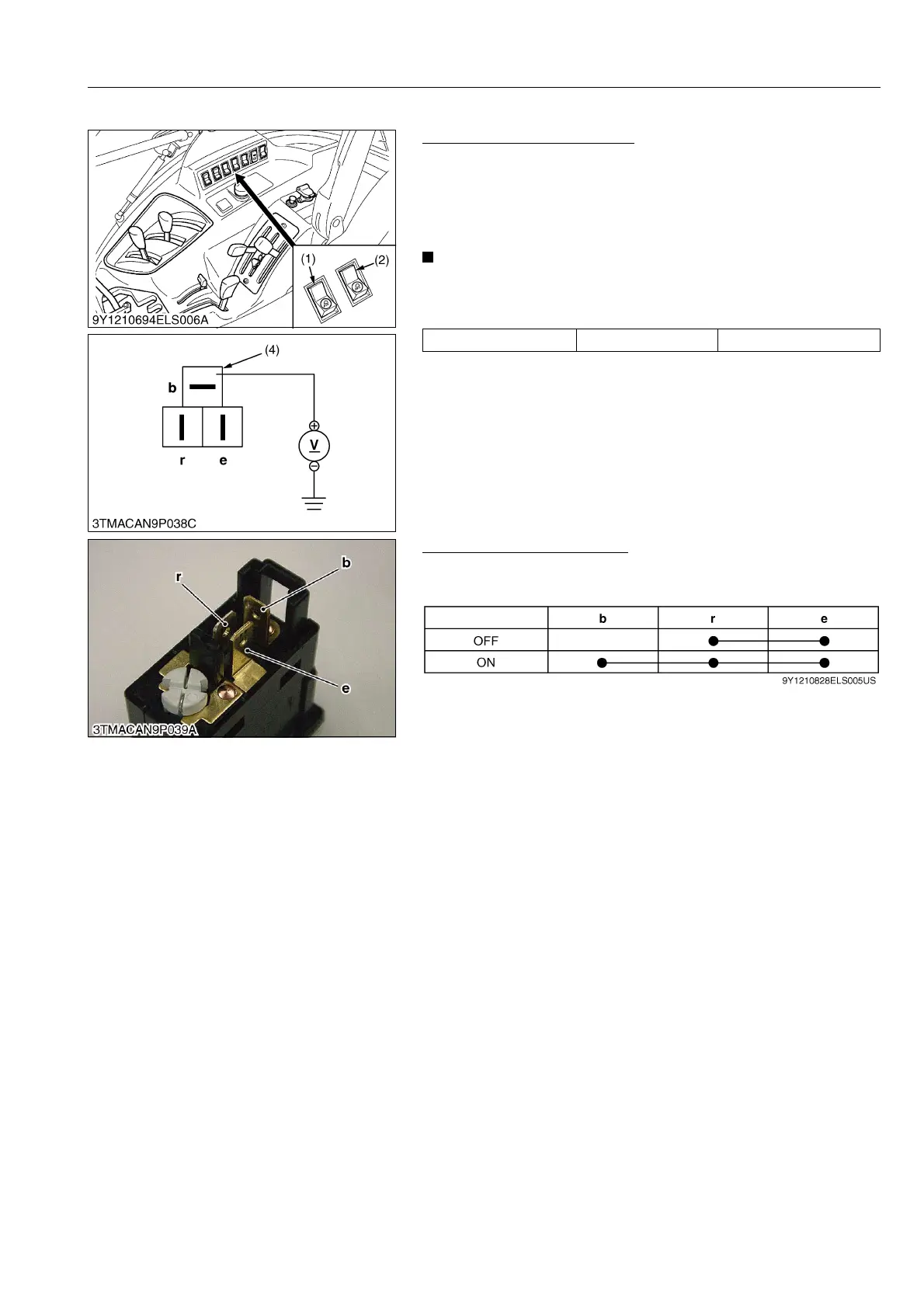
Checking Connector Voltage
1. Turn the main switch to ON position.
2. Measure the voltage with a voltmeter across the terminal b and
chassis.
3. If the voltage differ from the battery voltage, the wiring harness
or fuse is faulty.
• The terminal b of 3P connector for front work light switch is
white/black color wire, for rear light switch is white/blue
color wire.
9Y1210828ELS0094US0
Checking Switch Continuity
1. Test the continuity through the switch with an ohmmeter.
2. If continuity specified below is not indicated, the switch is faulty.
9Y1210828ELS0095US0
Voltage Terminal b – Chassis Approx. battery voltage
(1) Work Light Switch (Front)
(2) Work Light Switch (Rear)
(3) 3P Connector (Wire Harness Side)
(1) Work Light Switch



 To Next Page