7-52
E
–+
ELEC
REMOTE CONTROL SYSTEM
REMOTE CONTROL SYSTEM
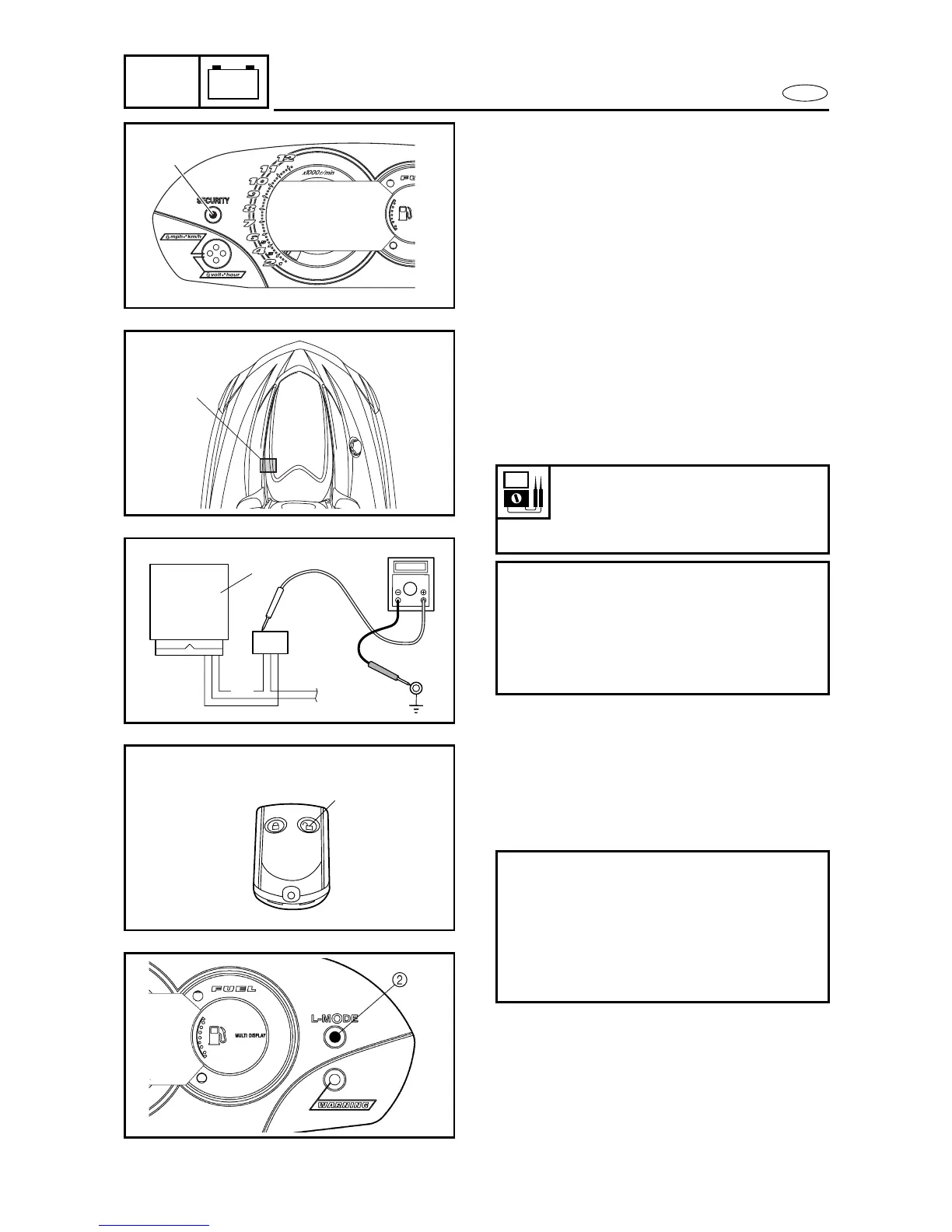
Yamaha Security System indicator
1. Check:
• Yamaha Security System indicator
Check that the “SECURITY” indicator
light
1
comes on when the Yamaha
Security System is deactivated (i.e., the
engine can be started).
Does not come on
→
Measure the
remote control unit output voltage.
2. Measure:
• Remote control unit output voltage
Within specification
→
Replace the mul-
tifunction meter.
Out of specification
→
Replace the
remote control unit.
Remote control unit output
voltage:
Blue/yellow (L/Y) – ground
11–13 V
Measurement steps:
• Disconnect the remote control unit
1
coupler from the multifunction meter.
• Measure the remote control unit output
voltage while pushing the unlock button
of the remote control transmitter.
1
1
L/Y
1
Low-rpm mode indicator
1. Check:
• Low-rpm mode indicator
Does not come on
→
Replace the multi-
function meter.
Checking steps:
• Press the unlock button
1
of remote con-
trol transmitter for more than four sec-
onds to select the low-rpm mode.
• Check that the beeper sounds three
times and the “L-MODE” indicator light
2
comes on.
1










 To Next Page