AutoTest Sytem Operation
Subject to Export Control, see Cover Page for details.
5-4
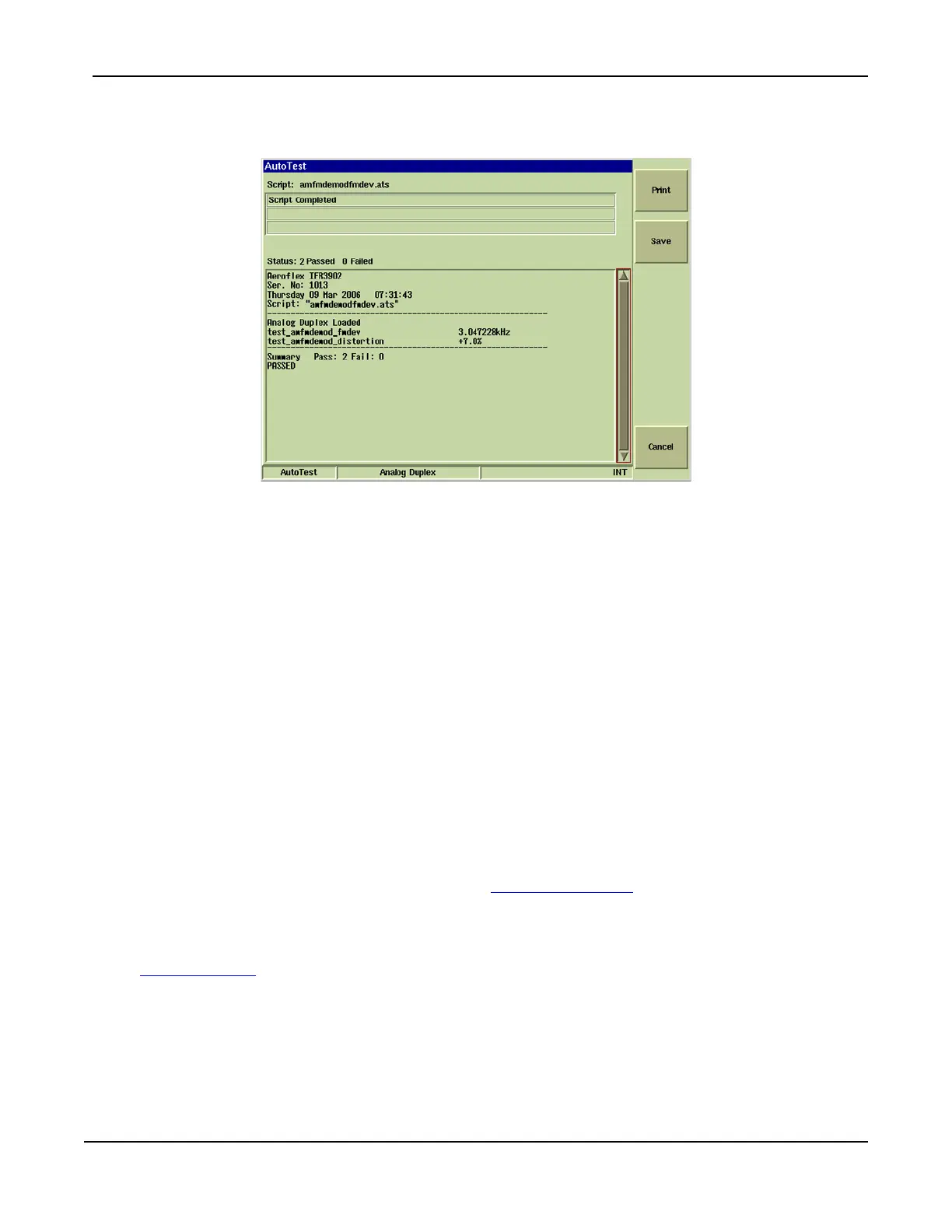
5. When a test is completed, soft keys appear that offer the user the ability to Print, Save or
Cancel the test file.
Fig. 5-4 AutoTest - Complete
Soft Keys Definitions
[Abort] Soft Key
Pressing [Abort] stops the test and deletes all test data. Aborted test data can not be retrieved.
[Pause] Soft Key
Pressing [Pause] opens a soft key sub-menu that provides the user with the option to Abort,
Continue, Step or Repeat the Test.
[Continue] Soft Key
Resumes test at last completed command.
[Step] Soft Key
When [Step] is selected, AutoTest runs one procedure at a time (single step), not as a
continuous, automated procedure.
[Repeat] Soft Key
Repeats the last selected function. For example, if the test is being run in Step sequence,
pressing [Repeat] runs the last step again.
[Print] Soft Key
Pressing this soft key sends test results to a printer. Test Set must be configured with printer
setup to use this feature. Refer to Chapter 3, Test Set Operation
for information on printer
configuration.
[Save] Soft Key
Pressing this soft key allows user to save completed test results. Refer to the section titled
Storing Results
on use of this feature.
[Cancel] Soft Key
Pressing this soft key deletes completed test results.













 To Next Page