AutoTest II Sytem Operation
Subject to Export Control, see Cover Page for details.
6-6
Editor Mode
AutoTest II contains an editing mode that allows the user to review and make minor changes to an
imported Test Script. Editor Mode has been developed primarily as a viewing application within
AutoTest II Systems, however, the tool does function as a basic editing tool.
Edited script files can be saved over existing files or renamed with a new file name. Edited files can
be exported using the File Management feature. Refer to Chapter 3, section titled File Management
Tile for information on using this feature.
● Editor Mode requires use of an external keyboard;
● Editor Mode does not support advanced keyboard functionality (i.e., using the
Ctrl+Alt+c key combination to copy text);
● Use of a USB mouse is recommended when using Editor Mode.
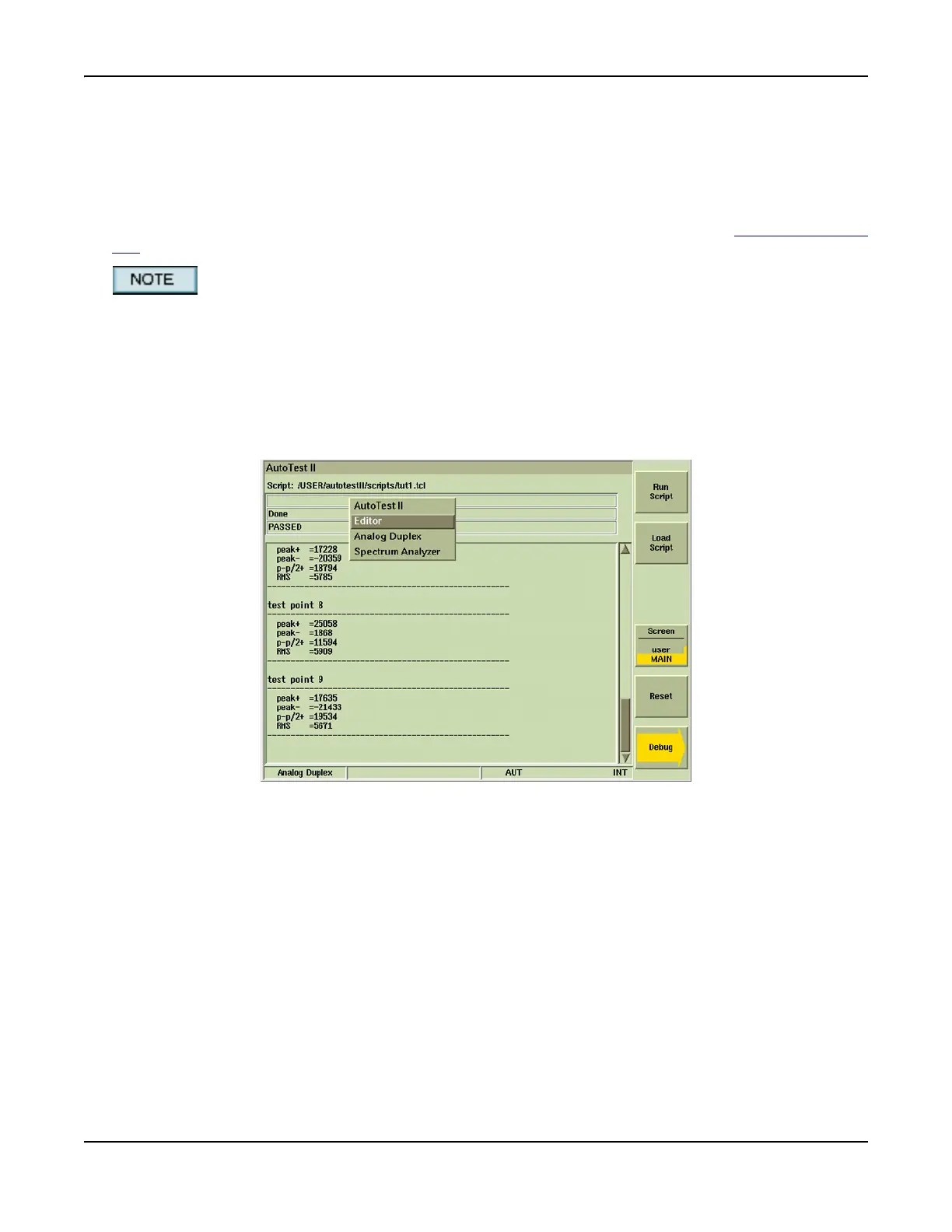
To access Editor Mode:
1. Press Alt+T on external keyboard or press TEST key on Test Set.
2. Select Editor from floating menu.
Fig. 6-6 Accessing AutoTest II Editor Tool
3. The last viewed file is displayed when Editor Mode is selected. Press [File Open] Soft Key.
4. When File Open dialog box opens, open the results/ or scripts/ directory and select desired
file.
5. Verify the selected file name appears in the File field and press the [OK] Soft Key.













 To Next Page