Test Set Operation
Subject to Export Control, see Cover Page for details.
3-23
TEST, CONFIG and UTILS Functions
The 3900 has three primary functional modes of operation: Test, Configuration and Utilities. These
functions are selected by pressing the desired function key on the front panel.
When the Test Set is in TEST Mode, the selected System is available for use and is controlled through
the user interface.
When the Test Set is in CONFIG Mode, the Configuration menu and functions of the selected System are
accessed through the user interface. The first level of the Configuration menu has a Systems option
that allows users to select any of the systems installed on the Test Set.
When the Test Set is in the UTILS Mode, the Utilities functions are accessible through the user
interface. The Utilities functions are not system defined.
TEST
The Test Set must be in TEST Mode to access TEST Tiles via the user interface. The operation of
the Test function is explained in chapters specific to each System.
CONFIG (Configuration)
System Selection
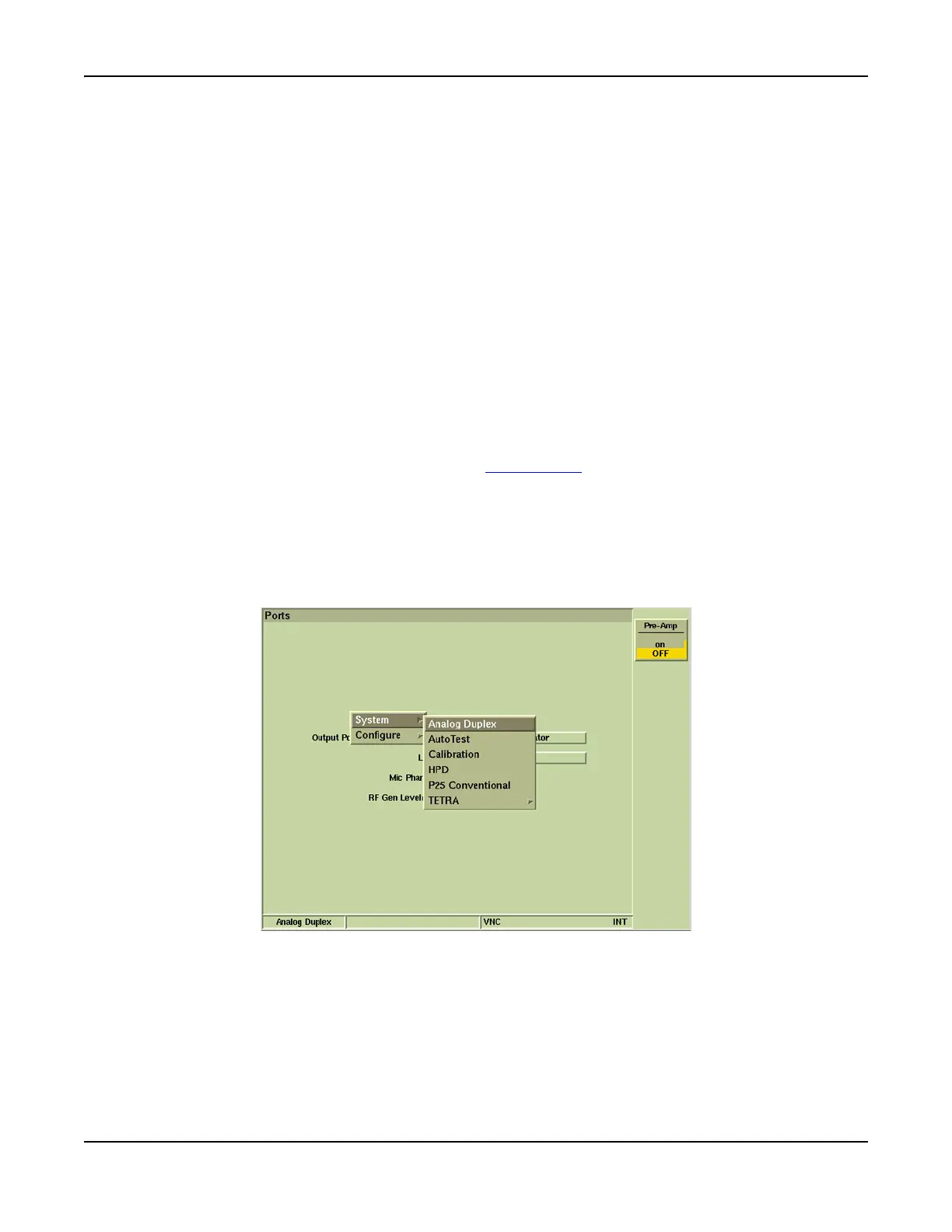
The Systems menu is opened by pressing the CONFIG Key. A menu similar to that shown below
is displayed. The desired system is selected from the Systems menu.
As an example, to open Analog Duplex:
1. Select Systems from the CONFIG menu.
2. Select Analog Duplex from the Systems menu.
3. The Analog Duplex system loads and the Test Set is now ready for Analog Duplex mode of
operation.
Fig. 3-16 Analog Duplex Configuration Floating Menu













 To Next Page