Decorative Stitches
103
7.4 Tapering
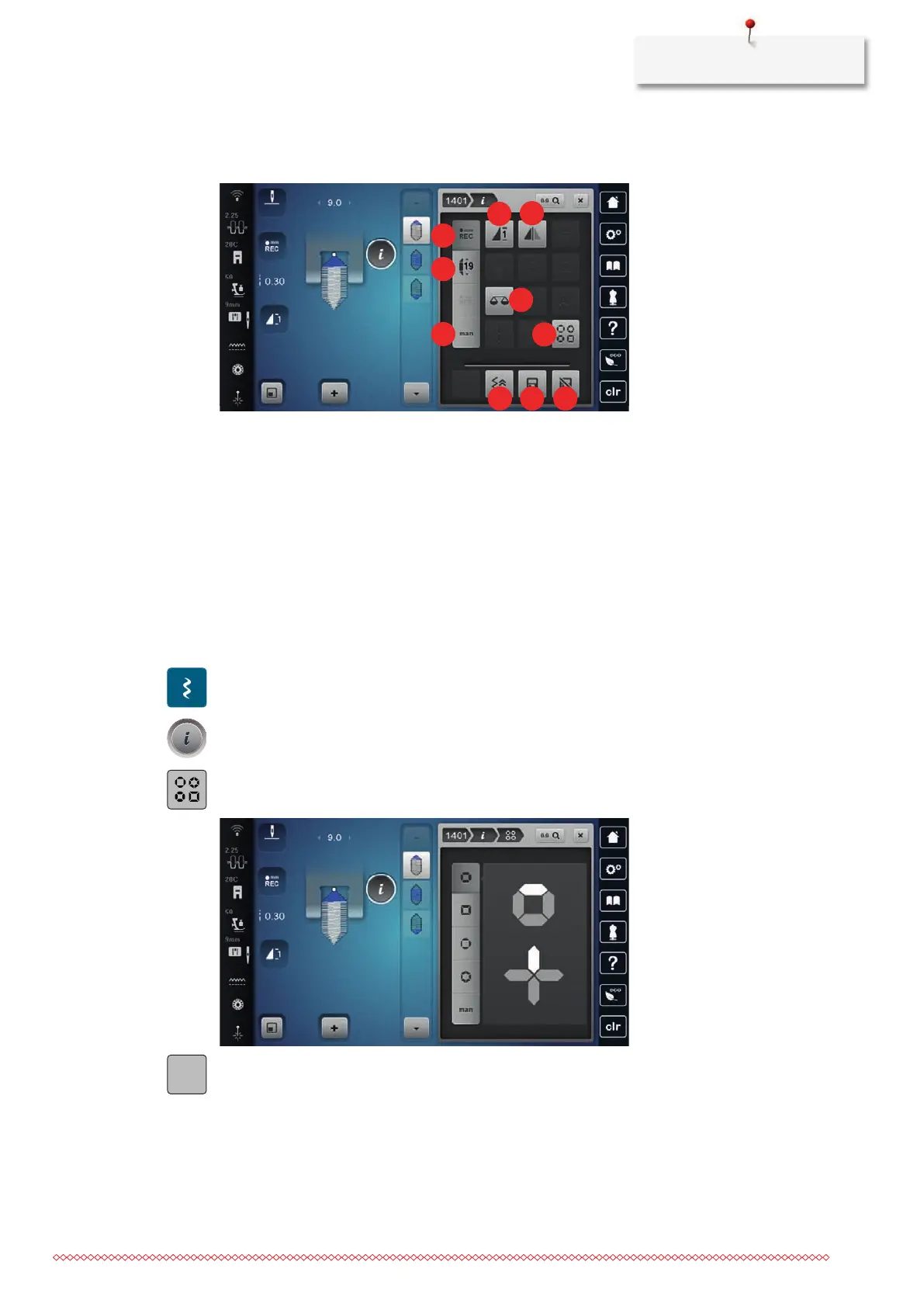
Overview Tapering
1 «Programming the Length of Section 2» 6 «Manual Tapering»
2 «Pattern Repeat» 7 «Tapering Configuration»
3 «Adjusting Lengths» 8 «Back Stepping»
4 «Mirror Image Left/Right» 9 «Save Stitch Pattern Settings»
5 «Balance» 10 «Reset Stitch Pattern»
Altering Points of a Stitch Pattern
Tapering is a technique in which the stitch patterns come to a point at the beginning and at the end. A
choice of 4 preset stitch pattern tips is available. In addition, the tips of the stitch pattern can also be
determined individually.
> Tap «Decorative Stitches».
> Select a stitch pattern of the Category1400.
> Tap «i-Dialog».
> Tap «Tapering Configuration».
> Select the desired point of the stitch pattern in the right portion of the display.
> To individualize the tips of the stitch pattern, tap «Setting the Stitch Pattern Tips».
> To alter the tips of the stitch pattern, tap «Minus» in the upper right area of the display or «Plus».



 To Next Page