Creative Embroidering
155
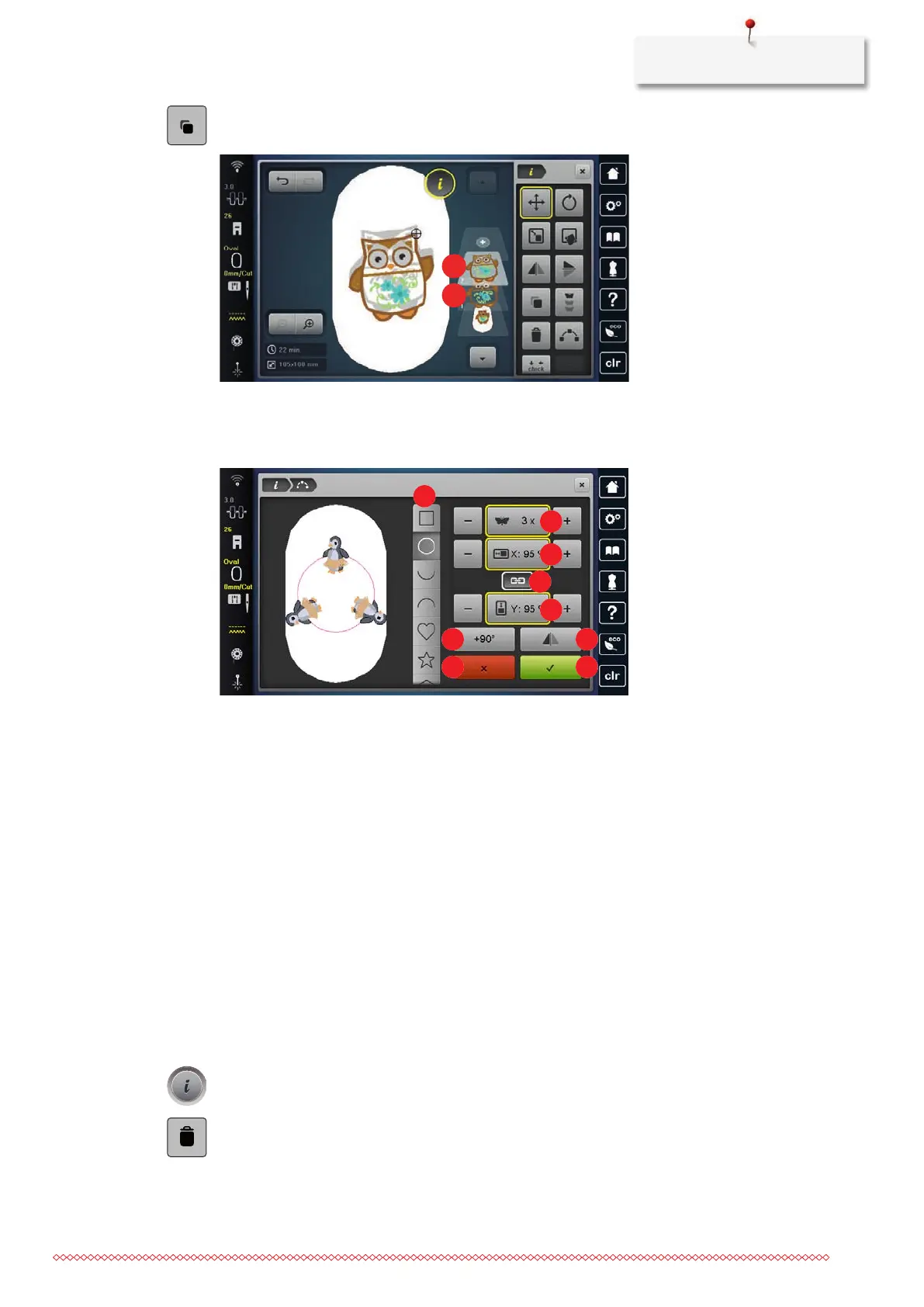
> Tap «Duplicate».
– The embroidery design (1) is duplicated (2).
Arranging Embroidery Designs
Embroidery designs can be arranged in various predefined arrangements.
1 «Styles of Arrangements» 6 «Rotating Embroidery Designs»
2 «Number of Designs» 7 «Mirroring Embroidery Designs»
3 «Shape Width» 8 «Cancel»
4 «Retain proportions» 9 «Confirm»
5 «Shape Height»
> Select an embroidery design or a combination.
> Select the style how to arrange the embroidery designs.
> Set the number of embroidery designs.
> Set the height and the width of the arrangement.
> Rotate or mirror the embroidery design. When rotating, the embroidery design is rotated clockwise in 90°
steps. When mirroring, every second embroidery design is mirrored horizontally
Deleting an Embroidery Design
The active embroidery design is deleted.
> Select the embroidery design.
> Tap «i-Dialog».
> Tap «Deleting».



 To Next Page