Creative Embroidering
153
Endless Embroidery
When embroidering a border or a trim, it is of advantage to use the Mega Embroidery Hoop or the Maxi
Embroidery Hoop. This means that the embroidery project does not have to be rehooped so often. It is
recommended to draw guide lines on the fabric and to use the template when hooping and rehooping the
material. In doing so, the guide lines must run parallel to the template. In the following example, the
supplied Oval Hoop is used.
> Select the embroidery design.
> Tap «i-Dialog».
> Tap «Endless Embroidery».
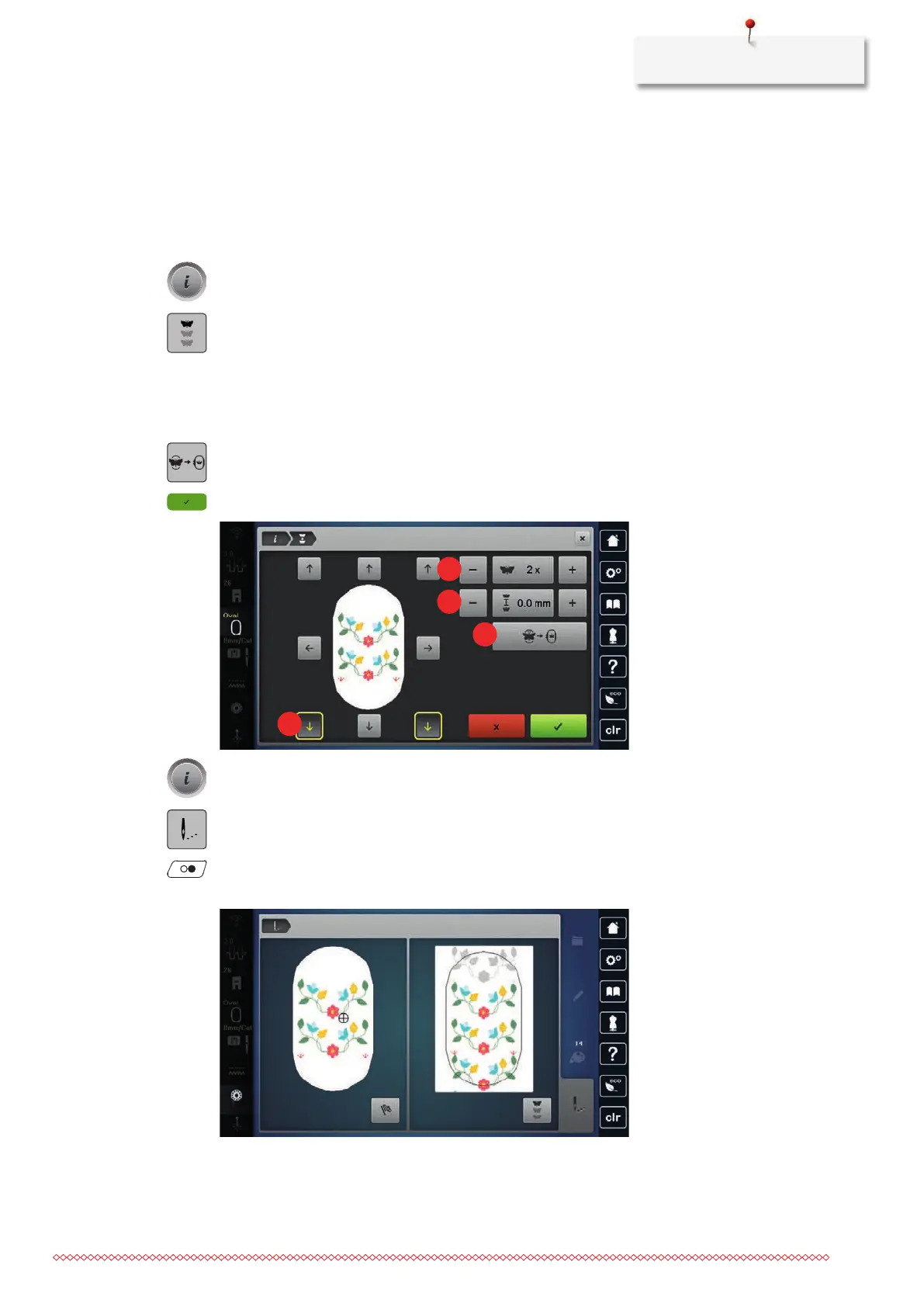
– The embroidery design is multiplied in the optimum number corresponding to the embroidery hoop.
– The reference points, which are required when rehooping the fabric, are inserted.
> If required, use the arrow icons (1) to insert additional reference points.
> To set the number of embroidery designs, tap «Minus»/«Plus»(2).
> To specify the distance between the embroidery designs, tap «Minus»/«Plus»(3).
> To automatically fit all embroidery designs into the hoop, tap «Modify to Fit Hoop»(4).
> Tap «Confirm».
> Tap «i-Dialog».
> Tap «Embroidery».
> Press the button «Start/Stop» and embroider the border.
– The embroidery design must be completely embroidered.



 To Next Page