MAX Operation & Service Manual 133MAX Operation & Service Manual Section 6: Maintenance & Service 133
Adjusting the Buffer Belt Tension
Tools needed: adjustable wrench, 1/2” wrench.
Parts needed (if replacing): Buffer Drive Belt, part number 11-655022-000.
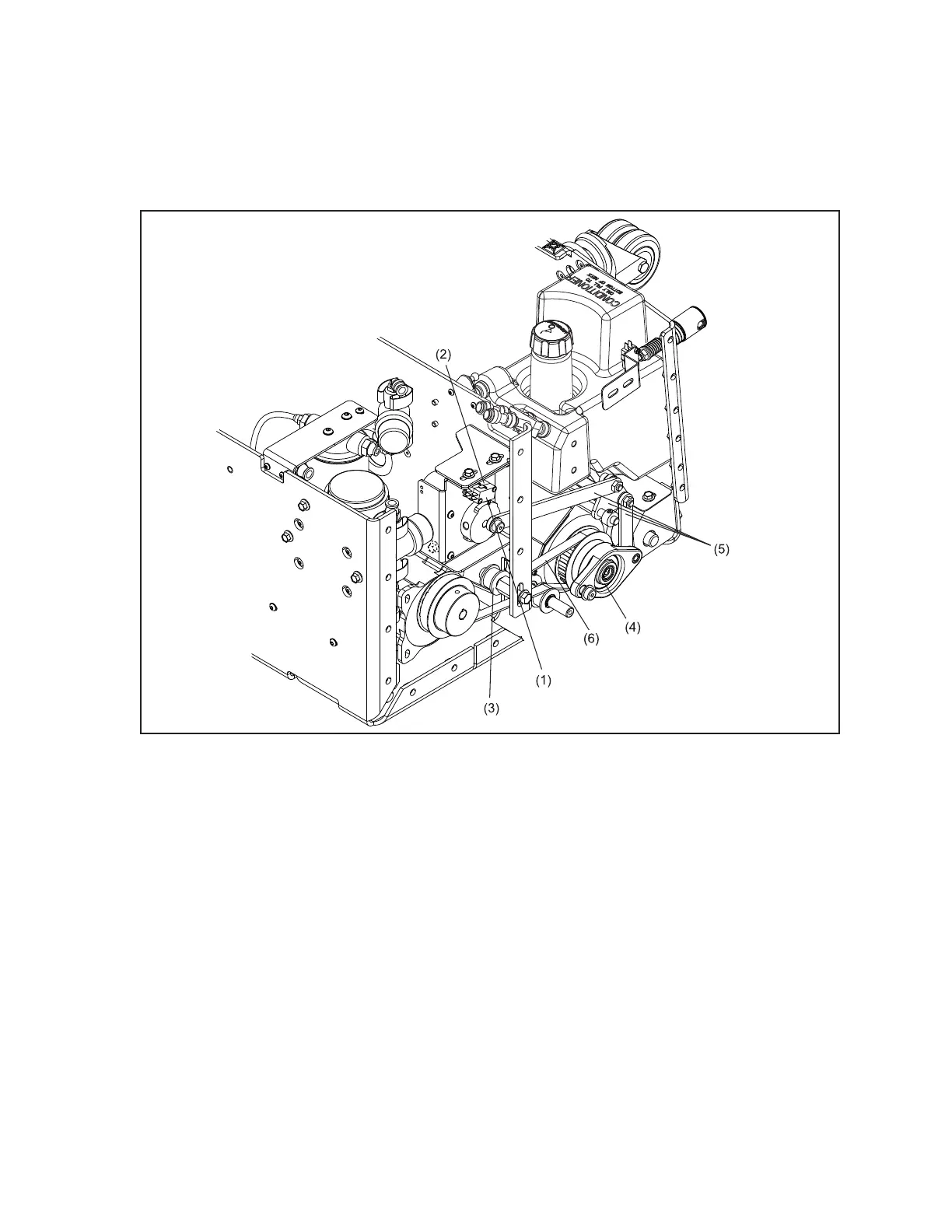
Refer to Figure 6-22.
Figure6-22.AdjustingBufferBeltTension,ReplacingBufferUp/DownSwitches,LubricationBufferBrush
BearingsandLubricatingBrushLiftingAssembly
(1) BUFFER UP SWITCH
(2) BUFFER DOWN SWITCH
(3) BUFFER BELT IDLER ASSEMBLY
(4) BUFFER BRUSH BEARING
(5) BUFFER BRUSH LIFTING LINKAGES
(6) BUFFER DRIVE BELT
1. Place machine in transport position with the power supply disconnected.
2. Remove the side cover from the 7-pin side of the machine.
3. Place machine in operating position.
4. Supply power to machine.
5. Lower buffer brush by selecting “toggle buffer up/down” on the “Conditioner diagnostics”
screen in the “Maintenance” menu.
6. Disconnect power from machine.
7. Place adjustable wrench on the hex-mount inside the machine and place the 1/2” wrench on the
bolt on the outside of the machine.



 To Next Page