MAX Operation & Service Manual 35MAX Operation & Service Manual Section4:UnderstandingTheTabletInterface35
THE PATTERN MENU
The pattern screen lets you schedule, select, create, edit, or save conditioning patterns. The MAX
comes with UNLIMITED patterns. You may use these pattern as your own or use them as a template to
create more customized patterns. You may also save machine data locally or to a USB drive.
Pattern Scheduler
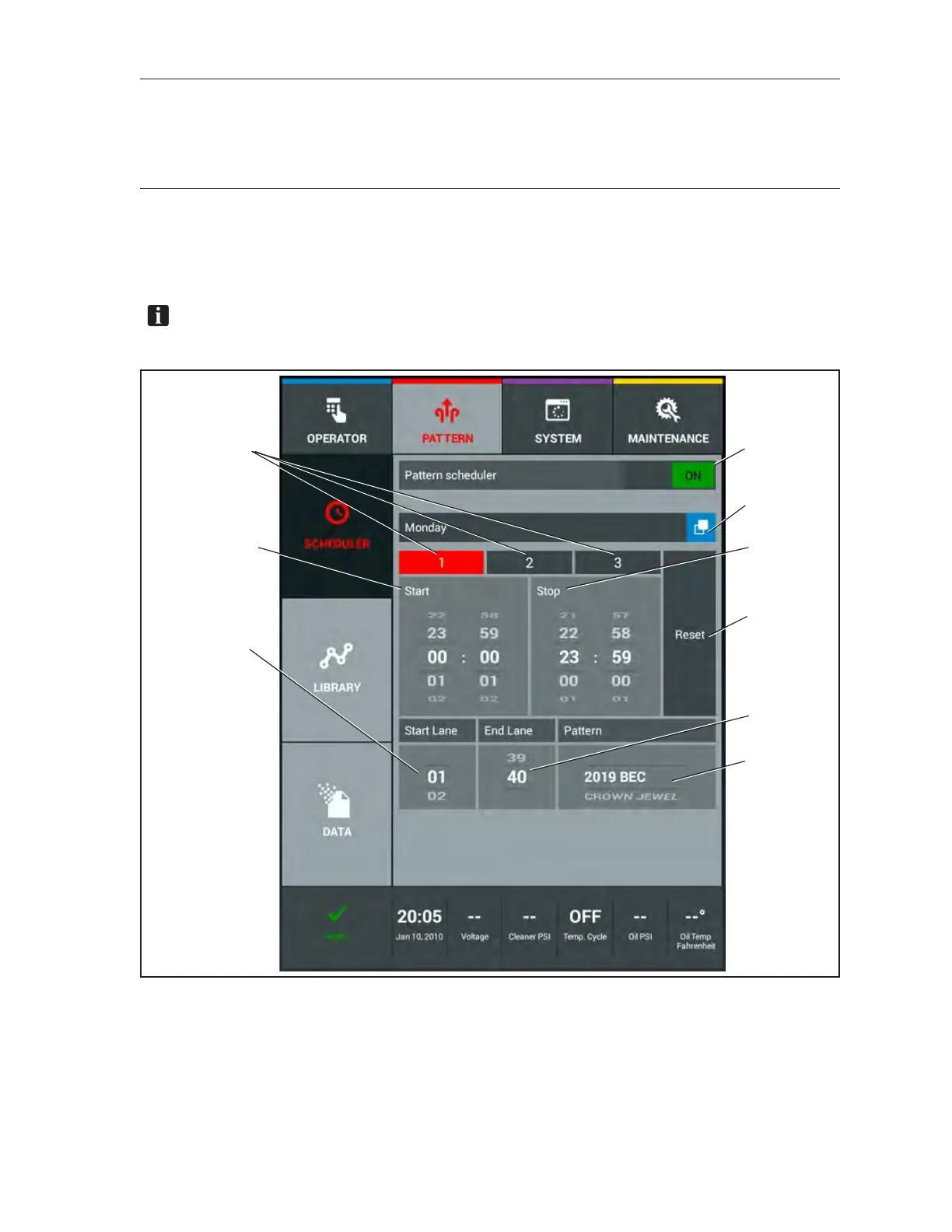
Lets you schedule different conditioning patterns for up to 3 time periods per day, 7 days per week, and
for up to 2 different ranges of lanes to accommodate different types of bowlers and leagues. Refer to
Figure4-8.
NOTE:MakesurethatacertiedBrunswickInstallerhassetupthenumberoflanesinyour
centerfromthesystemmenubeforeyoustartsettingupyourPatternScheduler.
(1)
(4)
(5)
(6)
(7)
(8)
(9)
(2)
(3)
Figure4-8.PatternScheduler
(1) PATTERN SCHEDULER ON/OFF SWITCH
(2) DAY OF THE WEEK
(3) TIME PERIODS
(4) START TIME
(5) STOP TIME
(6) RESET SCHEDULE
(7) START LANE
(8) END LANE
(9) PATTERN SELECTION



 To Next Page