MAX Operation & Service Manual 41MAX Operation & Service Manual Section4:UnderstandingTheTabletInterface41
Zone Conguration
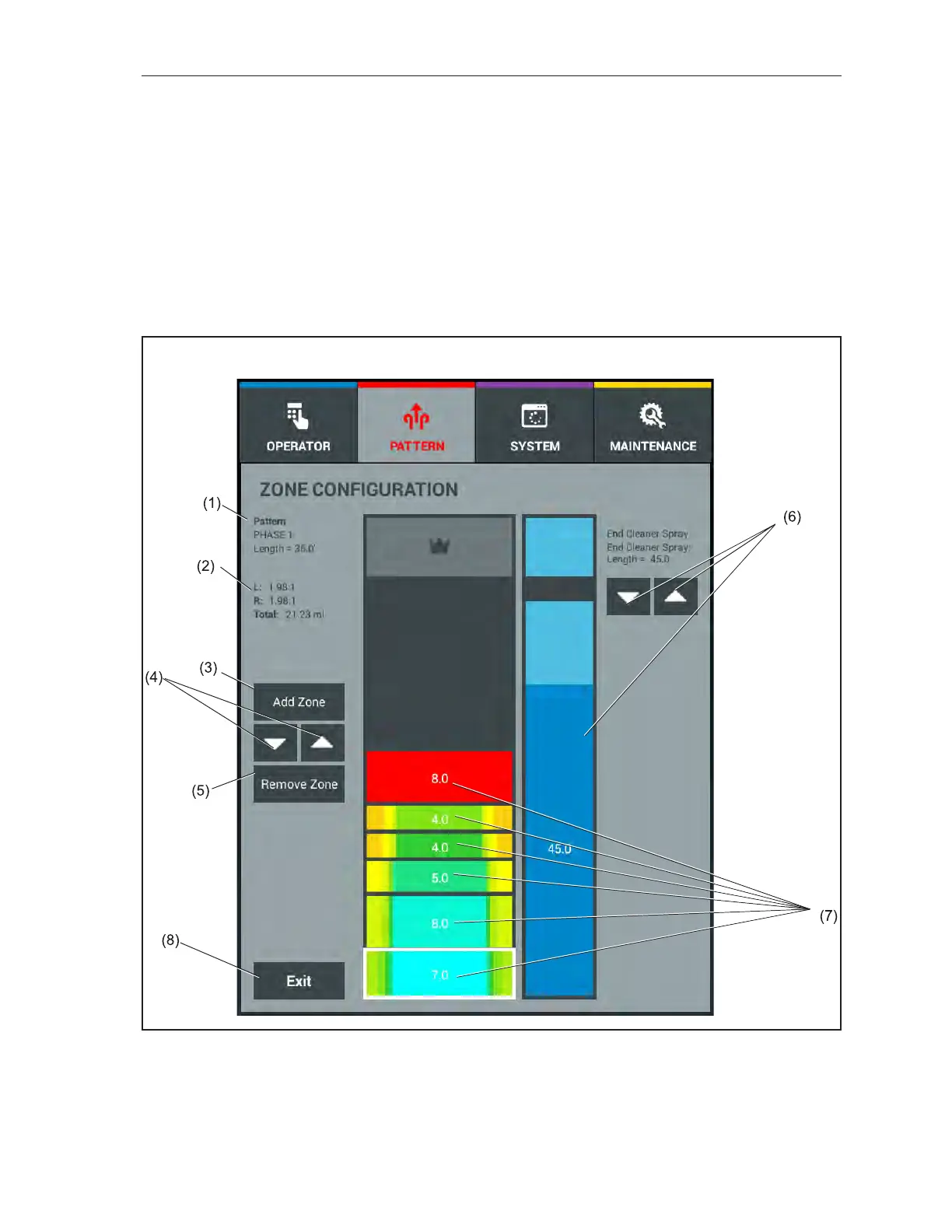
Touching the Zone Conguration button will open an additional screen that will display an overhead
view of your oil pattern. It also allows you to modify zone lengths, add or remove zones, and set the
End Cleaner Spray distance. These can be used to help ne tune your conditioner pattern. If you double
tap an oil zone, you will gain access to the Oil Levels screen to modify the prole of the conditioner
pattern.
You can create anywhere from 1-8 zones in a pattern. A zone can be between 3 and 57 feet long and
can be adjusted in 0.5 foot increments. The Zone Conguration screen also displays the length of the
zones, total pattern distance, pattern volume, and crosswise ratios that dictate the difculty level. Up
and down arrows allow you to easily set the length you intend to use. You may also use your nger to
adjust the End Cleaner Spray. Refer to
Figure4-11.
Figure4-11.ZoneConguration
(1) PATTERN NAME/DISTANCE
(2) PATTERN RATIOS/VOLUME
(3) ADD ZONE BUTTON
(4) ZONE LENGTH UP/DOWN
(5) REMOVE ZONE BUTTON
(6) END CLEANER SPRAY CONTROLS
(7) PATTERN ZONES
(8) EXIT BUTTON



 To Next Page