MAX Operation & Service Manual 161MAX Operation & Service Manual Section7:Troubleshooting161
TROUBLESHOOTING USING THE TABLET
NOTE:Itispossibleforatemporarypowerlosstocausetheelectronicenclosure(rmware)to
getoutofsyncwiththeTablet.Ifthesystemappearslockedorrepeatsthesameerrormessage,
itisrecommendedthatyoushutoffthepowertothelanemachine,thenrestorepowersothe
rmwareandTabletcanreboottogether.
The Tablet is a very helpful tool to use for troubleshooting machine issues that may occur from time to
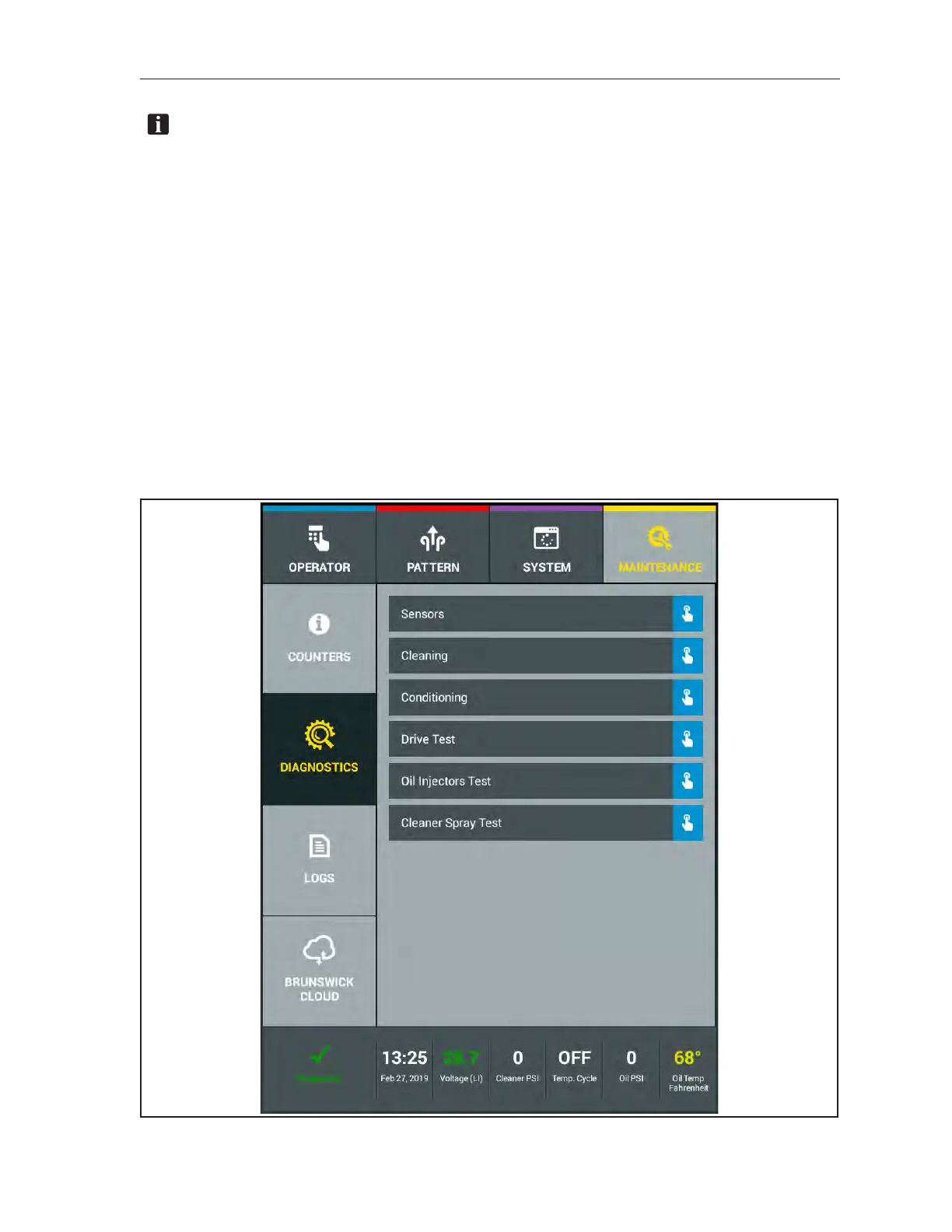
time. In the “Maintenance” menu you can enter the “Diagnostics” sub menu, of the lane machine, and
have a choice of selections for “Sensors”, “Cleaning”, “Conditioning”, “Drive”, “Oil Injector Test” and
“Cleaner Spray Test”. Within each of the choices, you have sensory components and motor functions
that can be tested to check the status and functionality.
1. Place the machine in the operator position and supply power.
2. Go to the “Maintenance” menu.
3. Go to the Diagnostics sub menu.
The screen will now display your “Diagnostics” options that are broken into each system of the lane
machine. Refer toFigure7-8.
Figure7-8.Diagnostics



 To Next Page