MAX Operation & Service Manual 59MAX Operation & Service Manual Section4:UnderstandingTheTabletInterface59
System Global Settings
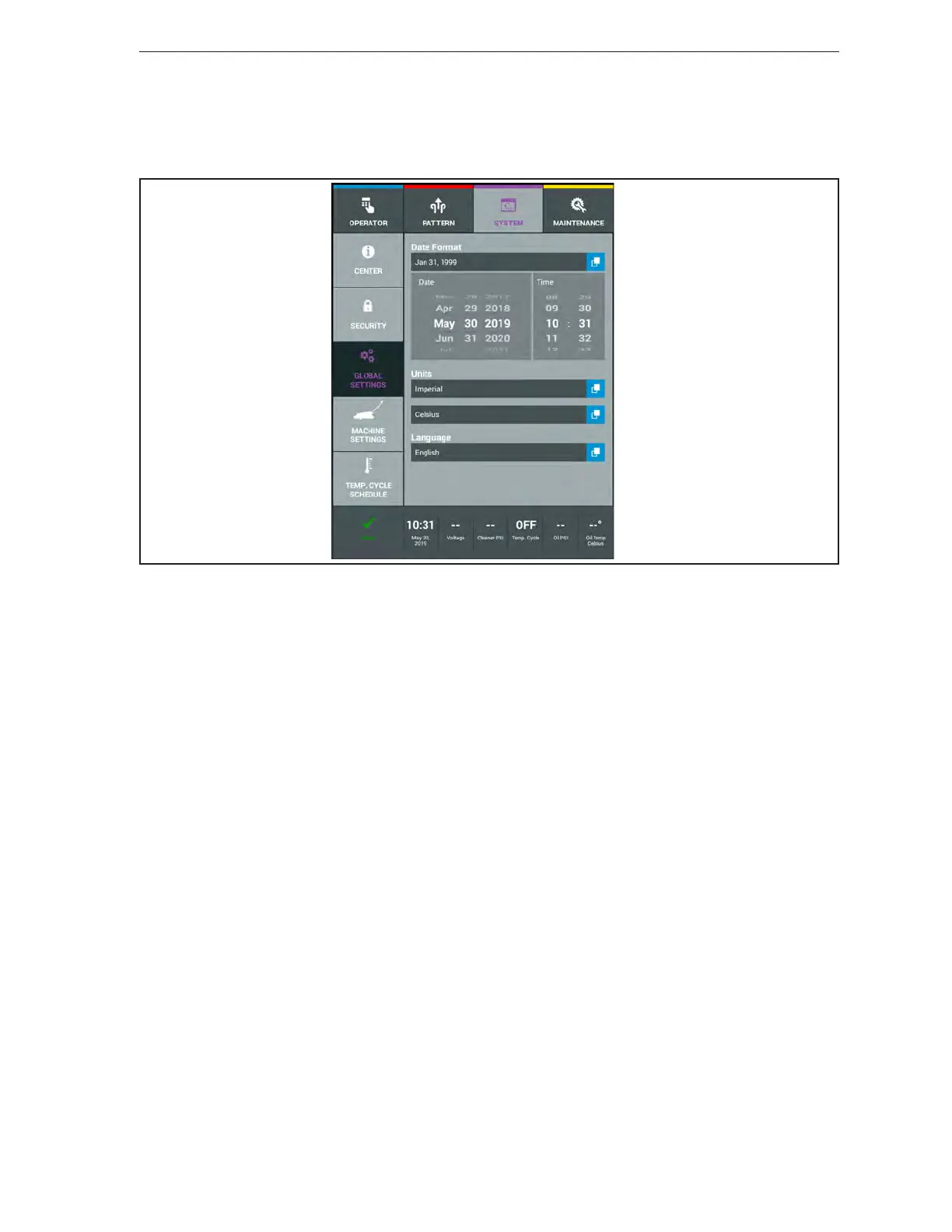
The system settings are used to set clock functions like the date, time, and date format (MM/DD/YY
or DD/MM/YY). The operator can select their preferred language and whether to see units of measure
expressed in Imperial (US) or Metric (International) as well as setting the temperature format between
Fahrenheit or Celsius. Refer to Figure4-29.
Figure4-29.SystemGlobalSettings
Changing the Date Format
1. Go to the System menu and select Global Settings.
2. Select the Date Format button to bring up the list of formats available.
3. Exit to another menu to save your selection.
Changing the Date and Time
1. Go to the System menu and select Global Settings.
2. Use the scroll wheel to select the Month, Day, Year, and time of day.
3. Exit to another menu to save your selection.
Changing the Units of Measure
1. Go to the System menu and select Global Settings.
a. To change how distance is displayed select the box and choose between Imperial (USA) or
Metric (International).
b. To change how temperature is displayed select the box and choose between Fahrenheit or
Celsius.
2. Exit to another menu to save your selection.
Changing the Language
1. Go to the System menu and select Global Settings.
2. Select the Language button and a list of available languages will appear.
a. Select the appropriate language.
3. Exit to another menu to save your selection.



 To Next Page