MAX Operation & Service Manual 163MAX Operation & Service Manual Section7:Troubleshooting163
Cleaning
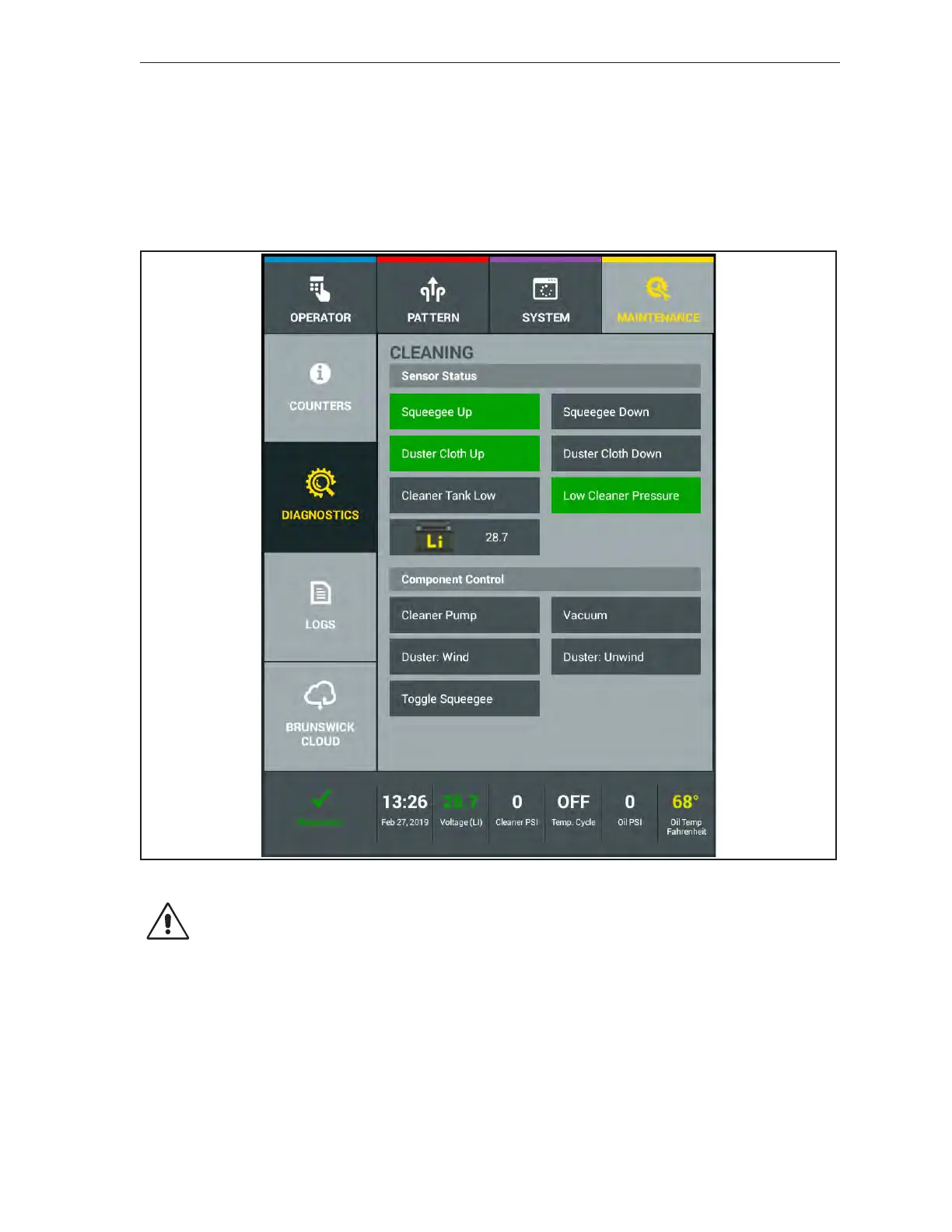
The “Cleaning” diagnostics screen is split into 2 sections. The top section displays the sensors and
current status used in conjunction with the cleaning system (sensors include squeegee and duster
position, cleaner uid level sensor). The bottom section displays the motor functions (vacuum, cleaner
pump, duster motor) that can be selected and tested for either a period of up to 20 seconds or may be
toggled between positions (Toggle Squeegee). Any timed function can be turned off in less than the
remaining 20 seconds by pressing the button again. Multiple functions may be turned on at the same
time (cleaner pump. Refer to Figure7-10.
Figure7-10.Diagnostics-Cleaning
CAUTION! Do not operate cleaner pump with the machine on the approach.
1. Select the “Cleaning” button to enter that screen.
2. Identify and select the motor function that is suspect to failure.
3. Press the button for that component and the component will run for 20 seconds and shut off,
except for the “Toggle Squeegee” and the “Duster: Wind” and “Duster: Unwind” button which
moves between the up and down switches. Any timed function can be turned off in less than the
remaining 20 seconds by pressing that button again.
Sensors will highlight when a motor function related to the sensor is activated.



 To Next Page