MAX Operation & Service Manual 37MAX Operation & Service Manual Section4:UnderstandingTheTabletInterface37
Pattern Library
This menu allows you to program custom information for each conditioning pattern, including pattern
Shape and volume.
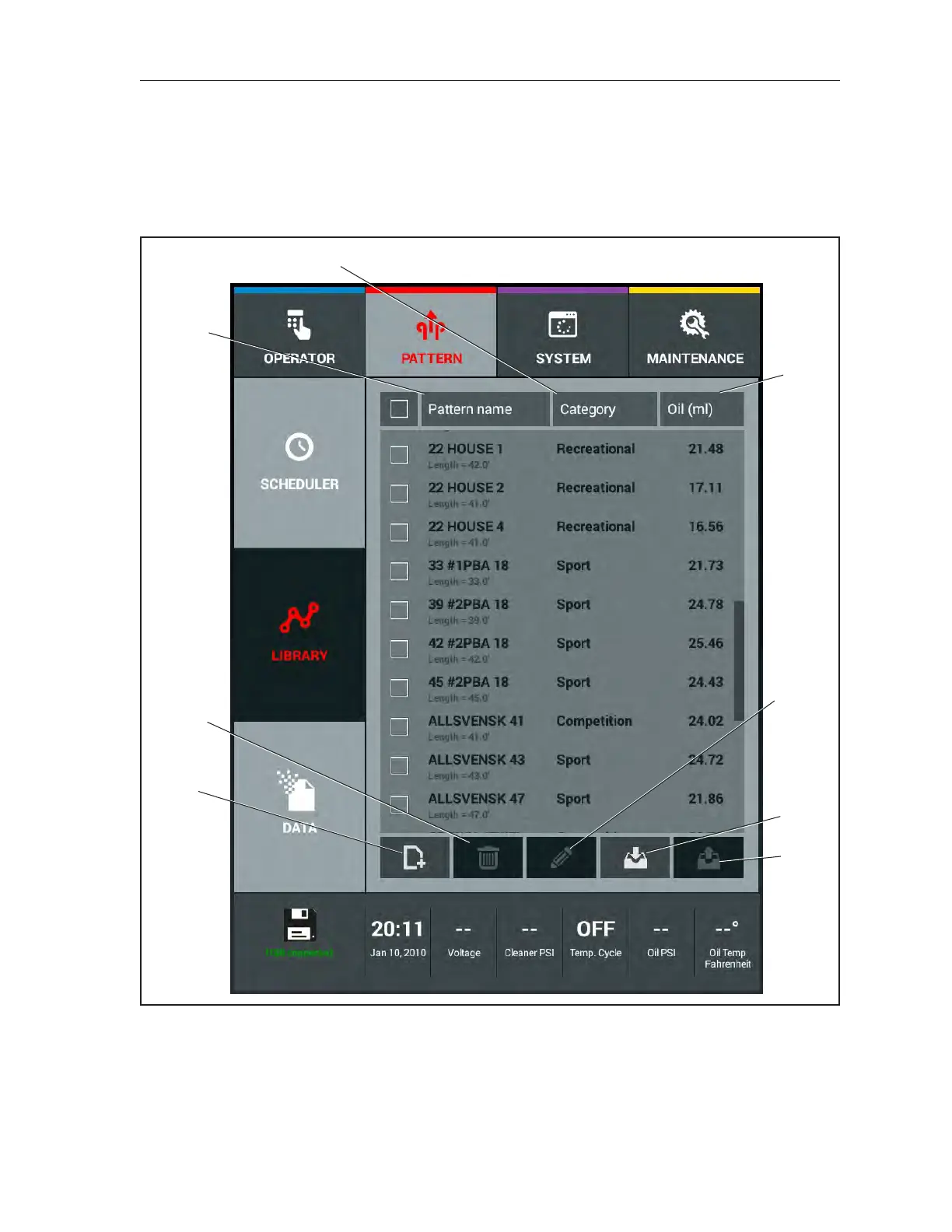
The rst screen in your Pattern Library is the Pattern list screen. This screen allows you to select a
specic pattern that you wish to view Refer to Figure4-9.
(1)
(4)
(6)
(8)
(3)
(5)
(7)
Figure4-9.PatternLibrary
(1) PATTERN NAME AND LENGTH
(2) CATEGORY (DIFFICULTY LEVEL)
(3) PATTERN OIL VOLUME (MILLILITERS)
(4) CREATE PATTERN
(5) DELETE PATTERN
(6) EDIT PATTERN
(7) IMPORT PATTERNS
(8) EXPORT PATTERNS



 To Next Page