38 MAX Operation & Service Manual38 Section4:UnderstandingTheTabletInterface MAX Operation & Service Manual
Selecting A Pattern
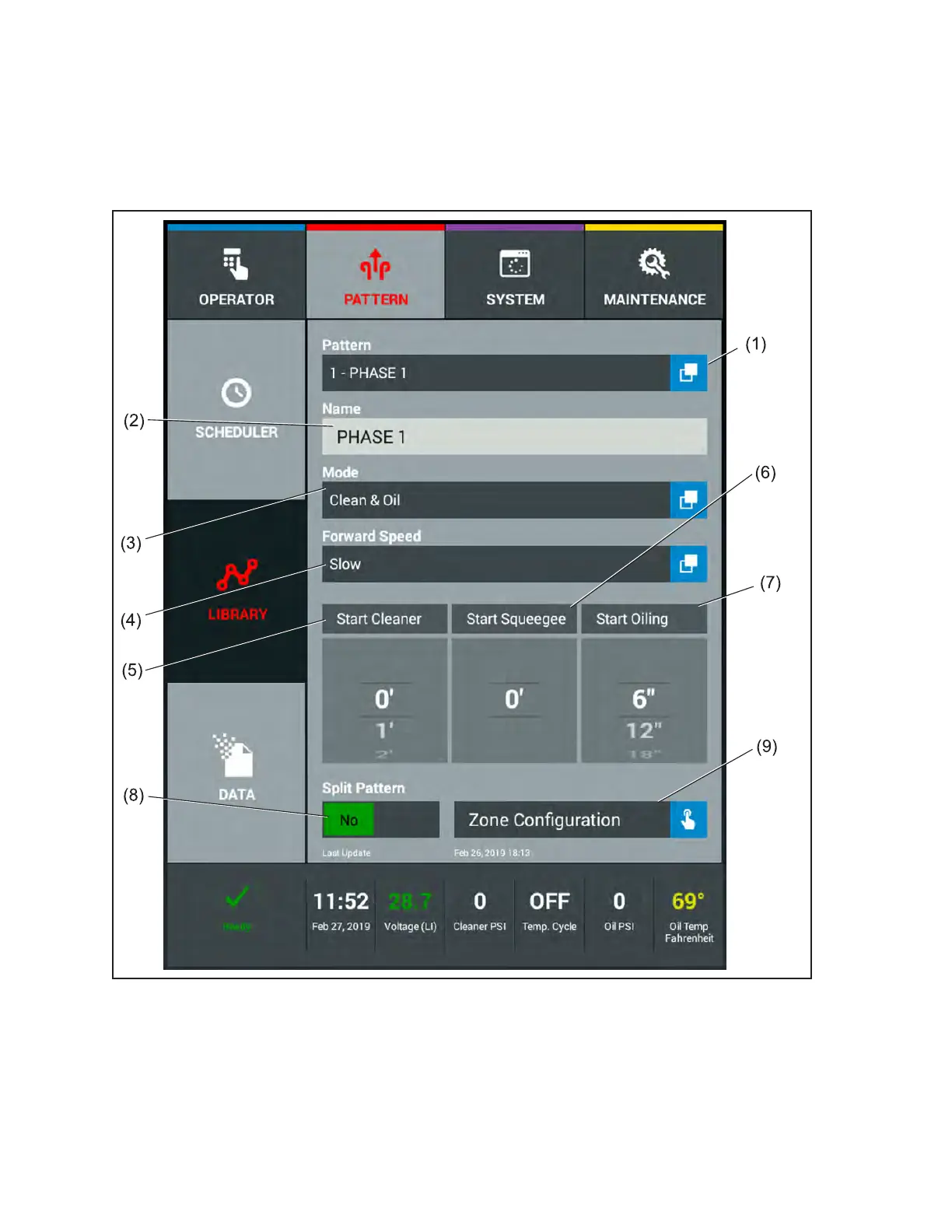
You can select any pattern in you library to view by touching the Pattern Name. The rst screen will be
the Pattern Parameter screen that allows you to customize specic settings for the pattern such as the
Mode and Forward Travel Speed. You may also change the start of the oil, cleaner spray and squeegee.
Refer to Figure4-10.
Figure4-10.PatternParameterScreen
(1) PATTERN LIST
(2) PATTERN NAME
(3) MODE OF OPERATION
(4) FORWARD TRAVEL SPEED
(5) START CLEANER SPRAY
(6) START SQUEEGEE
(7) START OILING FROM FOUL LINE
(8) SPLIT PATTERN FUNCTION
(9) ENTER ZONE CONFIGURATION
(10) LAST PATTERN UPDATE



 To Next Page