SECTION 4 - ELECTRICAL SYSTEM SERVICE
page 4-11
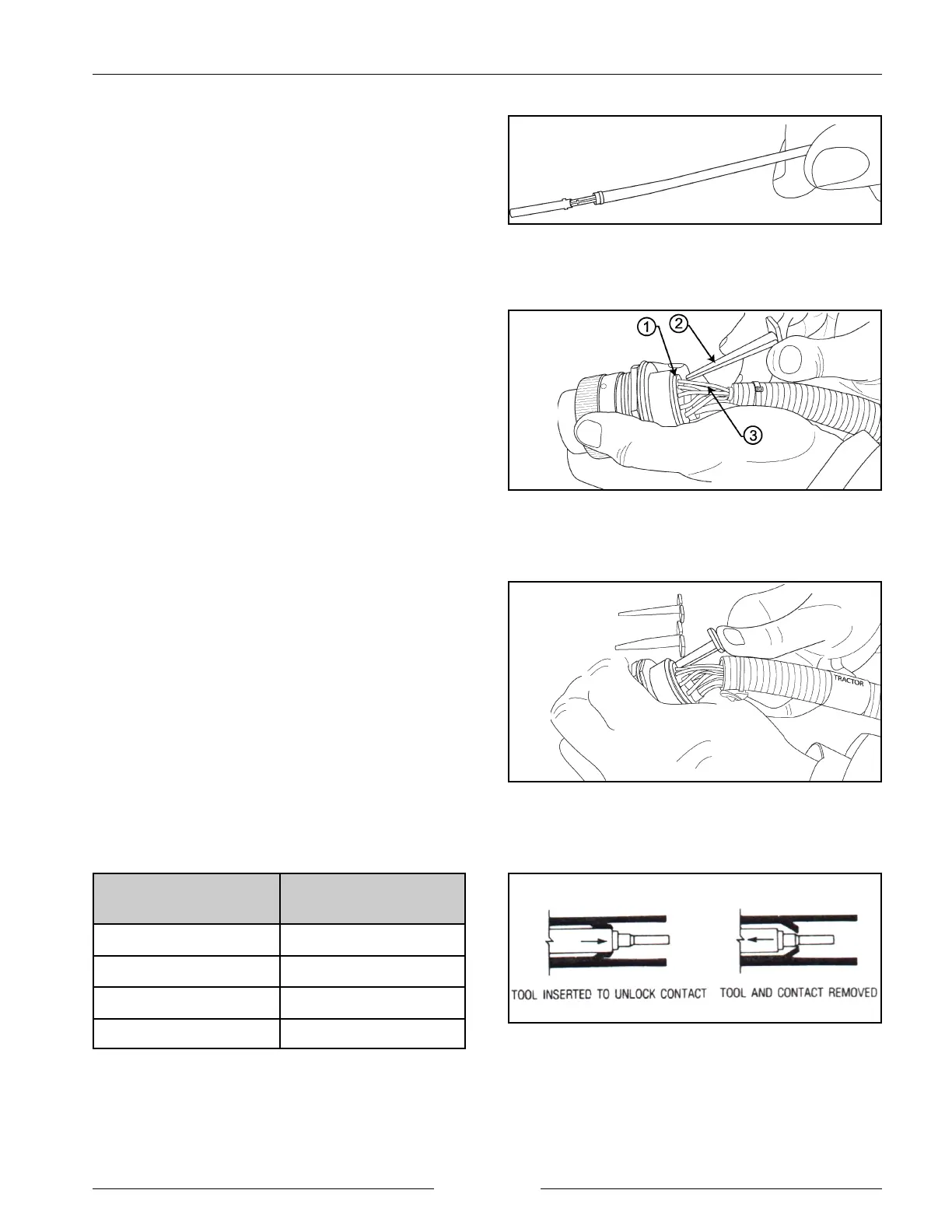
Perfect Termination
902001S
Remove Grommet Contact
902007M1
Push Extractor Tool in the Grommet
902009S
Using the Tool to Remove the Contact
902001S
7. The result will be a perfect termination.
NOTE: Ensure that there are no unterminated wire
strands and that some strand ends can be seen
at the forward edge of the crimp. Also note
that the insulator is gripped by the smaller
secondary crimp. Distortion should be
minimal.
CONTACT REMOVAL (GROMMET)
1. With rear insert (1) toward you, slip appropriate size
extractor tool (2) over the wire (3) of contact to be
removed.
2. Slide tool along into the insert cavity until it engages
contact and resistance is felt.
NOTE: Do not twist or insert tool at an angle.
Extraction Tool Part
Number
Size of Extraction tool
and Color
12119 Blue (16)
425278A1 Green (8)
461829C1 Yellow (12)
83870C1 Red (20)


 To Next Page