SECTION 4 - ELECTRICAL SYSTEM SERVICE
page 4-21
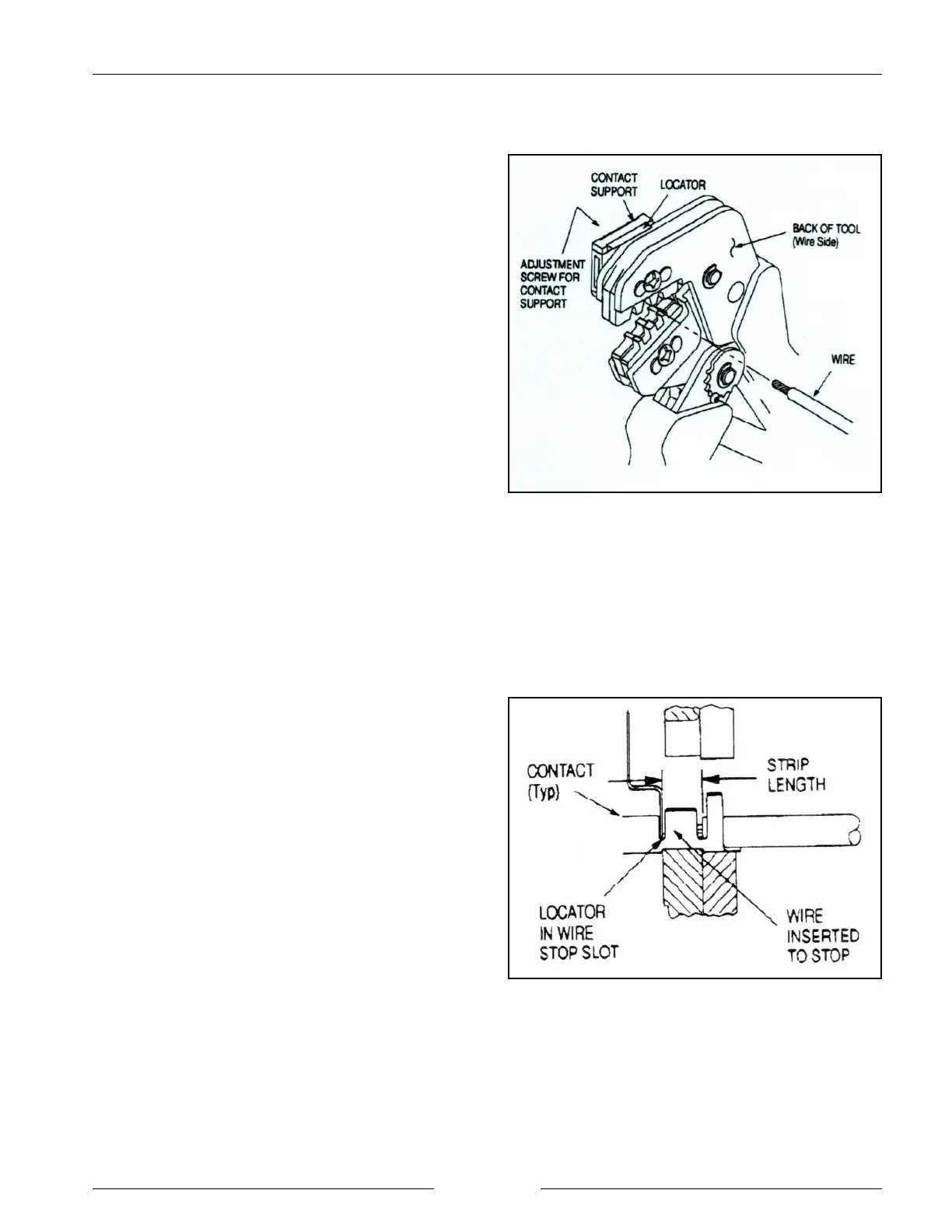
Crimping Tool
902022S
Wire Location in the Crimper
902023S
AMP CRIMPING PROCEDURE
Strip wire to 6 mm (1/4"), taking care not to nick or cut
wire strands. Select the required contact and identify the
appropriate crimp section of the tool according to the wire
size markings. Refer to the figure and proceed as follows.
1. Hold the tool so that the back (wire side) is facing you.
Squeeze tool handles together and allow them to open
fully.
2. Holding the contact by the mating end, insert the
contact - insulation barrel first - through the front of
the tool and into the appropriate crimp section.
3. Position the contact so that the matching end of the
contact is on the locator side of the tool, and so that the
open ‘u’ of the wire and insulation barrels face the top
of the tool. Place the contact up into the nest so that
the movable locator drops into the slot in the contact.
(Refer to the figure.) Butt the front end of the wire
barrel against the movable locator.
IMPORTANT: Ensure that both sides of the
insulation barrel are started evenly
into the crimping section. DO NOT
attempt to crimp an improperly
positioned contact.
4. Hold the contact in position and squeeze the tool
handles together until ratchet engages sufficiently to
hold the contact in position. Do not deform the
insulation barrel or wire barrel.
5. Insert the stripped wire into the contact insulation and
wire barrels until it is butted against the wire stop, as
shown in the figure to the right.
6. Holding the wire in place, squeeze tool handles
together until the ratchet releases. Allow tool handles
to open and remove crimped contact.
NOTE: The crimped contact may stick in the crimping
area, but the contact can be easily removed by
pushing downward on top of the locator.


 To Next Page