SECTION 4 - ELECTRICAL SYSTEM SERVICE
page 4-10
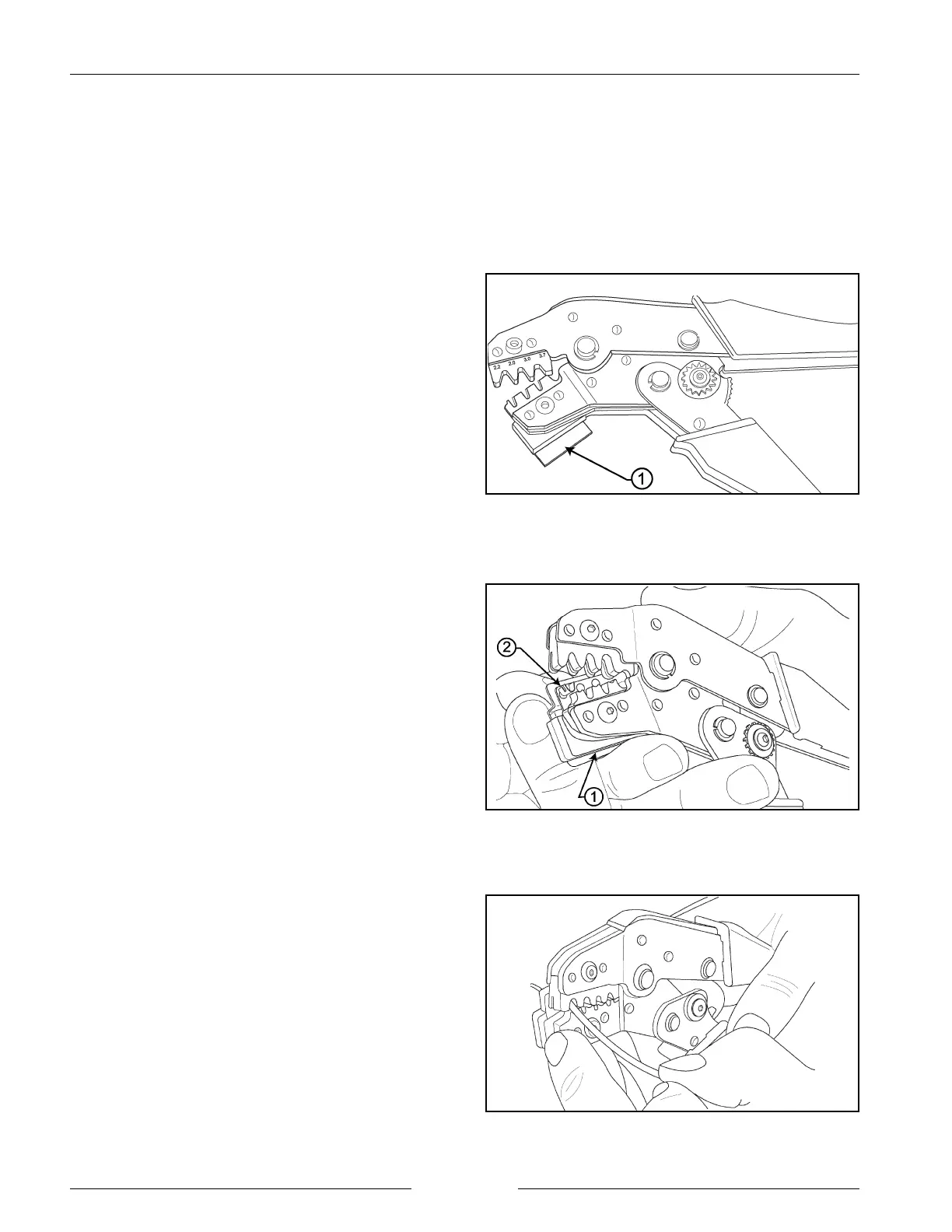
Cycling the Hand Tool
902004M1
Aligning the Contact in the Hand Tool
902003M1
Inserting the Wire into the Contact
902002M1
CONNECTOR SERVICE KIT
Connector service kits are available from the manufacturer for maintenance and repair of electrical connectors on tillage
equipment and air seeders. For a drill connected to a ADX3360, order part number 14531; for a drill connected to an
ADX2180 or a ADX2230, order part number 13345V2.
CONTACT REPLACEMENT (GROMMET)
1. Cycle the hand tool to the open position. Note the
locator spring location (1).
2. While pressing upward on the locator spring (1), insert
the contact (2) with the tails upward completely into
the locator.
3. When correctly positioned, the contact should be
located beyond flush with the edge of the hand tool
and positioned on the concave polished split level
crimp areas.
4. Partially (usually the first click) cycle the hand tool
assuring that the upward thrusting tails of the contact
has started engaging with the top jaw of the tool.
NOTE: There is a slight tendency for the contact to roll
out of vertical alignment.
5. Insert the pre-stripped wire into the crimp area of the
contact and completely cycle the tool.
Recommended strip length: 4.4 mm ± 0.5 mm
( 0.175" ± 0.02").
6. While pressing upward on the locator spring withdraw
the crimped termination.


 To Next Page