SECTION 4 - ELECTRICAL SYSTEM SERVICE
page 4-15
Release Locking Seal
902011M1
Insert Tool to Release Connector
902012M1
Remove Connector
902013M1
CONTACT REMOVAL (PACKARD WEATHER PACK)
Terminal Removal
This tool is designed to remove Weather Pack and Compac
1 terminals from the connector.
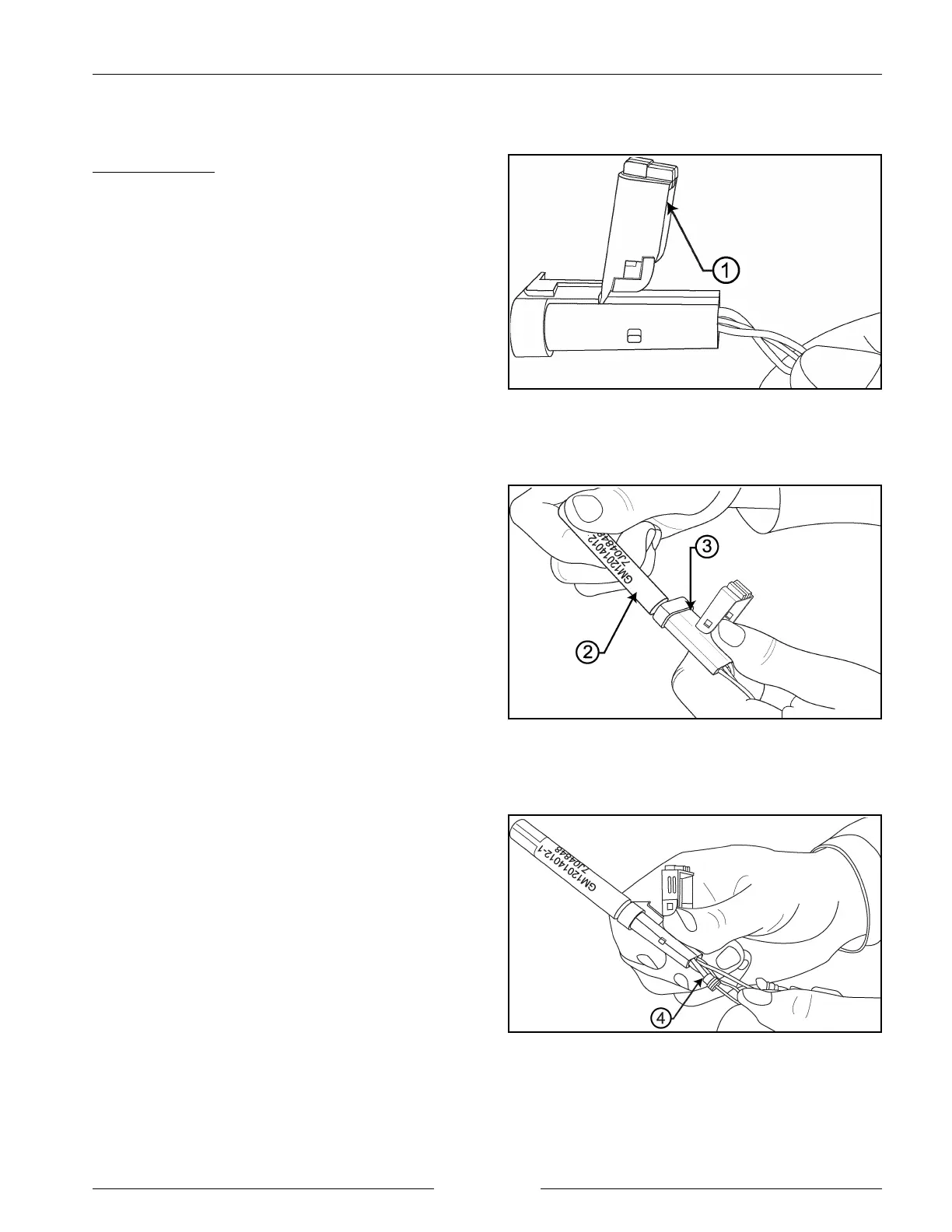
1. Open connector secondary lock (1).
2. Grasp the lead and push the terminal to the forward
most position.
3. Insert tool (2) straight into front of connector cavity (3)
until it rests on cavity shoulder.
4. While securely holding the connectors, grasp the lead
(4) and pull it out of the connector cavity.
5. Terminal tangs will depress to unseat terminal. Gently
pull the terminal out of the back of the connector.
6. Never use excessive force to pull terminal out of the
connector. Use of force will result in lock tang
damage.


 To Next Page