SECTION 4 - ELECTRICAL SYSTEM SERVICE
page 4-5
Remote Switch Electrical Cable Installation
REMOTE WORK SWITCH - Used with SDX30 and SDX40 with ADX Air Systems
NOTE: Before attaching the switch assembly to the implement, connect the appropriate length of electrical cable to the
switch.
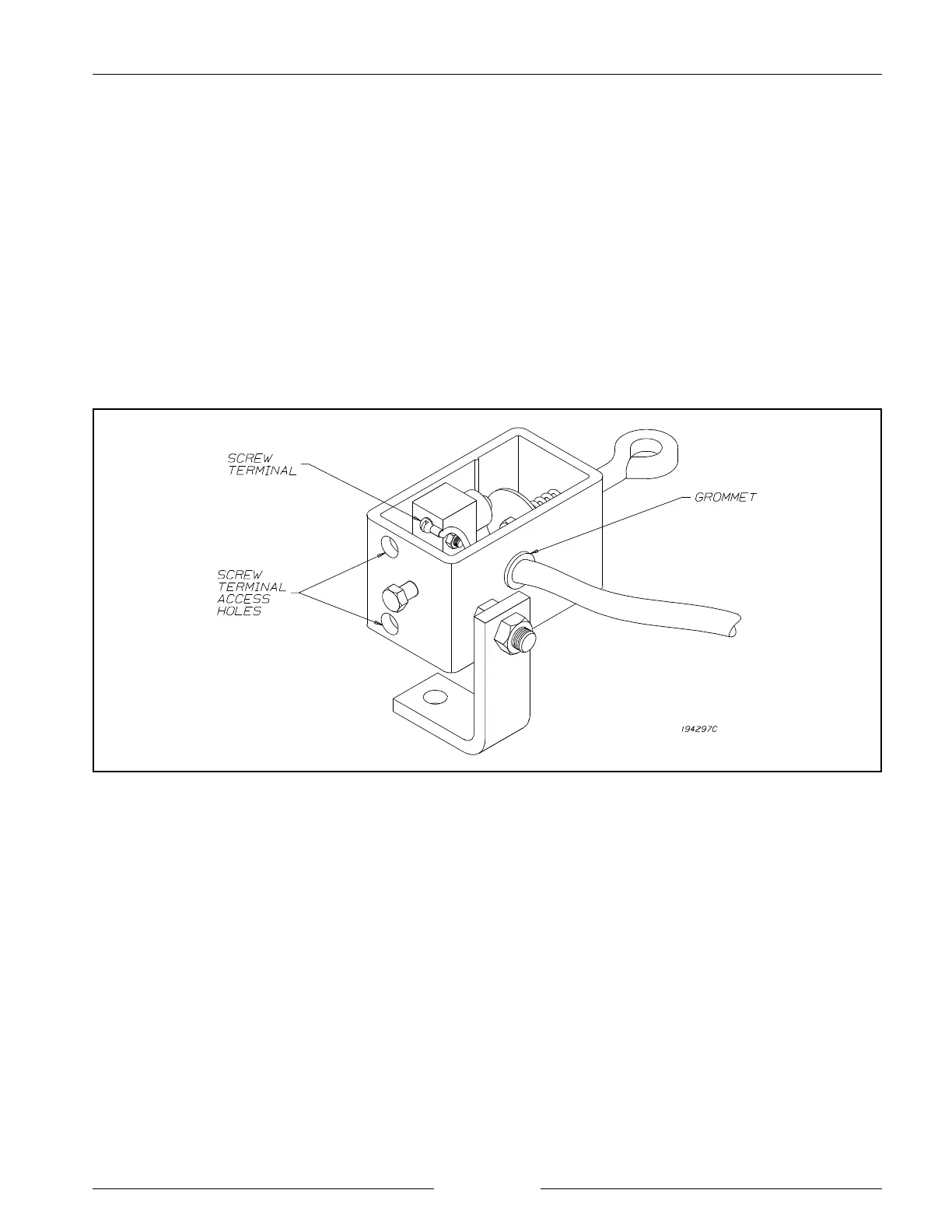
1. Insert the electrical cable ends through the rubber
grommet.
2. Tie a knot with the wires on the inner side of the
switch housing to prevent the cable from pulling out.
3. Connect the wire ends to the switch screw terminals
using the access holes on the switch housing (see
figure below).
MOUNT THE SWITCH
1. The switch assembly must be mounted in a position so
that it is actuated as the unit is raised or lowered
relative to the ground. Select a location that gives the
required movement.
2. Be sure the switch wires will not be stretched or
tangled and the switch will not be damaged as the
machine is raised and lowered.
3. Use the brackets supplied to mount the work switch
onto a frame member that will move when the
implement is raised or lowered.
4. Mount the chain brackets to a part of the frame that
will be fixed during normal field operation.
NOTE: Refer to table and figure, ‘Remote Switch
Assembly’ on the following page for work
switch assembly parts.


 To Next Page